web
You’re offline. This is a read only version of the page.
close
Skip to main content

Notifications

Announcements

No record found.

Community site session details

Community site session details

Session Id :
Microsoft Dynamics CRM (Archived)

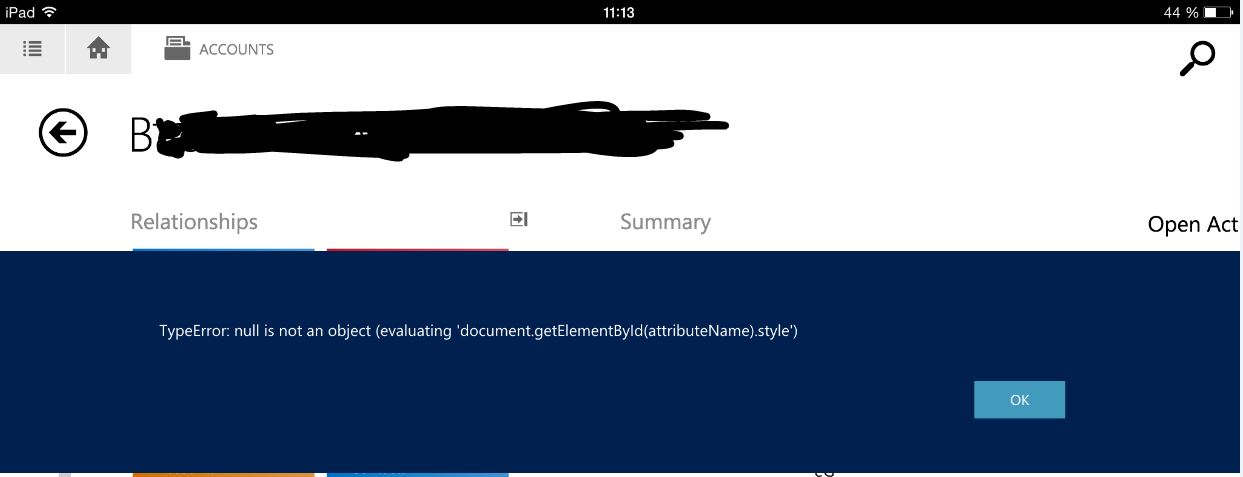
iPad opening account TypeError: null is not an object

(0) ShareShare
ReportReport
Posted on by 120

417641.Capture.JPG

When we open any account on an iPad, we now get this error message:

TypeError: null is not an object (evaluating 'document.getElementById(attributeName).style')


What does it mean?
How to fix it?


Thanks in advance for your help. 

*This post is locked for comments

I have the same question (0)
  • Verified answer
    Hugo Silva Profile Picture
    1,374 on at

    Hi Julie,

    Did you try in other other browser beside the Safari?

    What you could do to test this to put the code so it executes after the elements are defined, either with a DOM ready callback or place the source under the elements in the HTML.

    document.getElementById() returns null if the element couldn't be found. Property assignment can only occur on objects. null is not an object (contrary to what typeof says).

    On the Javascript validate if the attribute name exist first.

  • Julie Massin Profile Picture
    120 on at

    Thanks Hugo.

    It works fine under Safari.

    The error happens in CRM app only.

    In order to try your suggestions, what's the process to follow in order to edit the code?

    We have not edited codes ourselves yet.

  • Verified answer
    Hugo Silva Profile Picture
    1,374 on at

    Hi Julie,

    You need to go to the form and click on the 3 dots and "Edit form", then go to "Form Properties" (the button on the top) -> verify if you have any javascript on the form on load and on save, double click on the file and verify is the there`s any "document.getElementById()" on the code, you should be using something more like (var recordId = Xrm.Page.data.entity.getId(); )

    To read the attribute you should user the XRM, this code "document.getElement" is not support by Microsoft.

  • Julie Massin Profile Picture
    120 on at

    Wonderful, we'll get on it asap.

Under review

Thank you for your reply! To ensure a great experience for everyone, your content is awaiting approval by our Community Managers. Please check back later.

Helpful resources

Quick Links

Responsible AI policies

As AI tools become more common, we’re introducing a Responsible AI Use…

Neeraj Kumar – Community Spotlight

We are honored to recognize Neeraj Kumar as our Community Spotlight honoree for…

Leaderboard > 🔒一 Microsoft Dynamics CRM (Archived)

#1
SA-08121319-0 Profile Picture

SA-08121319-0 4

#1
Calum MacFarlane Profile Picture

Calum MacFarlane 4

#3
Alex Fun Wei Jie Profile Picture

Alex Fun Wei Jie 2

Last 30 days Overall leaderboard

Featured topics

Product updates

Dynamics 365 release plans



