web
You’re offline. This is a read only version of the page.
close
Skip to main content

Notifications

Announcements

No record found.

Community site session details

Community site session details

Session Id :
Microsoft Dynamics CRM (Archived)

Get Activity type optionset values by using c#

(0) ShareShare
ReportReport
Posted on by 425

Hi guys,
I am tried to get access of all activities by using c#. 
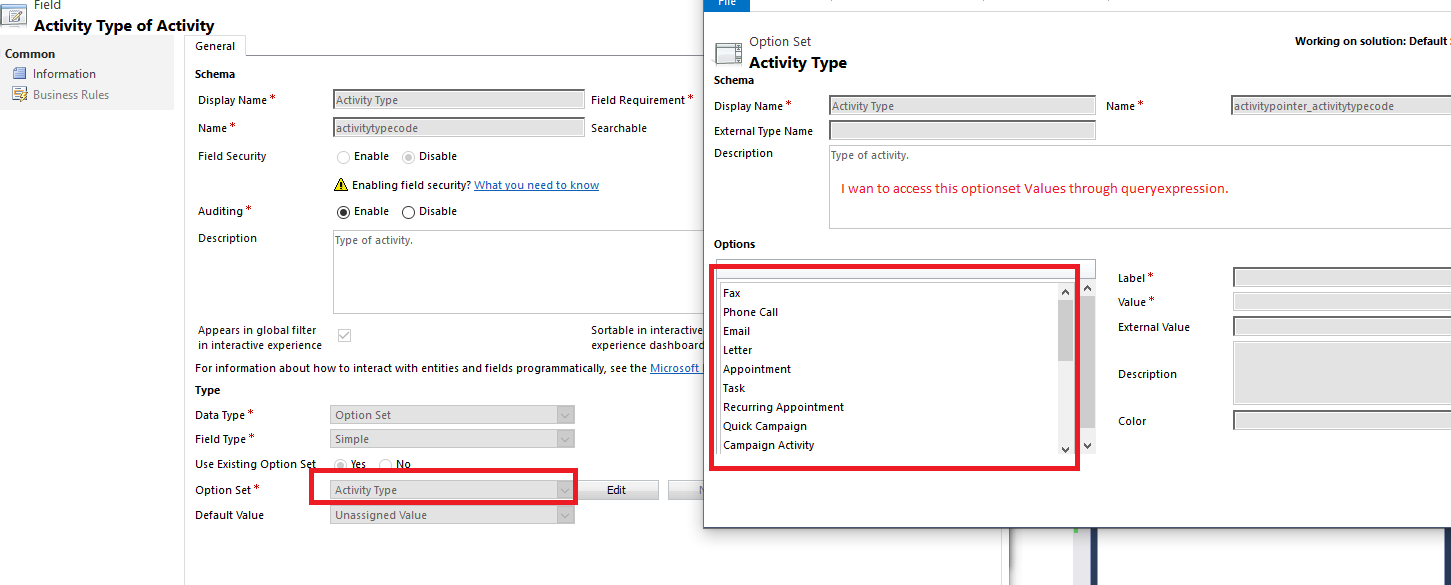
I need suggestion to get values of activity type. See below screenshot.
5635.Untitled1.png

The optionset was used like "existingOptionset".
I am trying to get the data by queryexpression for online d365 version.

Suggest me to solve this issue.

Thanks in advance.

*This post is locked for comments

I have the same question (0)
  • Suggested answer
    Kokulan Profile Picture
    18,054 on at

    Hi

    You will have to query the activitypointer entity to get all the activities.

    The following query will return all the activities in the system.

    var QEactivitypointer = new QueryExpression("activitypointer");

    QEactivitypointer.ColumnSet.AddColumns("activitytypecode", "subject", "statecode", "prioritycode", "modifiedon", "activityid", "instancetypecode", "community");

    QEactivitypointer.AddOrder("modifiedon", OrderType.Ascending);

    var results = crmservice.RetrieveMultiple(QEactivitypointer);

    Note: If you have more than 5K activities in your CRM, you will have to use paging cookie to get all the records.

  • Dynamics365 Rocker Profile Picture
    7,755 on at

    You will get Activity type code there in C#.

    Use Metadata service. Check below post:

    mscrmtechie.blogspot.com/.../activity-pointer-and-activity-type-code.html

  • naresh babu Profile Picture
    425 on at

    Thanks for your reply

    I already tried this query. I got all data fields output except activitytypecode because this optionset was existing optionset. So through this expression the output for activitytypecode is not working.

    Error:

    An unexpected error occurred from ISV code. (ErrorType = ClientError) Unexpected exception from plug-in (Execute):

    Workflowname            : System.InvalidCastException: Unable to cast object of type 'System.String' to type 'Microsoft.Xrm.Sdk.OptionSetValue'.

  • Suggested answer
    Kalpavruksh D365 CoE Profile Picture
    2,545 on at

    Hi,

    For Activitytypecode is optionset so you will have to fetch activitytypecode value using below query:

    --

    var QEactivitypointer = new QueryExpression("activitypointer");

    QEactivitypointer.ColumnSet.AddColumns("activitytypecode", "subject", "statecode", "prioritycode", "modifiedon", "activityid", "instancetypecode", "community");

    QEactivitypointer.AddOrder("modifiedon", OrderType.Ascending);

    var results = crmservice.RetrieveMultiple(QEactivitypointer);

    foreach (var a in result.Entities)

    {

        if(a.Contains("activitytypecode") && a["activitytypecode"] != null)

        {

           int activitytypecode = ((OptionSetValue)a["activitytypecode"]).Value;

        }

    }

    Once you will get the value, you can refer to below blog to find the corresponding label:

    community.dynamics.com/.../mscrm-retrieve-optionset-label-retrieveattributerequest-optionsetmetada-c

    If found useful, please mark this answer as verified.

  • naresh babu Profile Picture
    425 on at

    Thanks for your reply Kalpavruksh

    error occured

    System.InvalidCastException:  Unable to cast object of type 'System.String' to type 'Microsoft.Xrm.Sdk.OptionSetValue'. 

    I have tried with this link 
    https://docs.microsoft.com/en-us/previous-versions/dynamicscrm-2016/developers-guide/gg328546(v=crm.8)

    I want to access this optionset fields "activitypointer_activitytypecode" which is not created in activity pointer. 
    This optionset was global option set metadata.

  • Suggested answer
    Kokulan Profile Picture
    18,054 on at

    Hi

    activitytypecode is a string field, and thats why you are getting the above cast error.

    Please try the following code to get the activitytypecode

    var QEactivitypointer = new QueryExpression("activitypointer");

    QEactivitypointer.ColumnSet.AddColumns("activitytypecode", "subject", "statecode", "prioritycode", "modifiedon", "activityid", "instancetypecode", "community");

    QEactivitypointer.AddOrder("modifiedon", OrderType.Ascending);

    var results = crmservice.RetrieveMultiple(QEactivitypointer);

    foreach (var a in result.Entities)

    {

       if(a.Contains("activitytypecode") && a["activitytypecode"] != null)

       {

          string activitytypecode = a["activitytypecode"];  // This will set values like phonecall/email...

       }

    }

  • Suggested answer
    naresh babu Profile Picture
    425 on at

    Thanks for all your replies.

    Below syntax solved my issue.

    string priority = entity.FormattedValues["prioritycode"];

Under review

Thank you for your reply! To ensure a great experience for everyone, your content is awaiting approval by our Community Managers. Please check back later.

Helpful resources

Quick Links

Responsible AI policies

As AI tools become more common, we’re introducing a Responsible AI Use…

Neeraj Kumar – Community Spotlight

We are honored to recognize Neeraj Kumar as our Community Spotlight honoree for…

Leaderboard > 🔒一 Microsoft Dynamics CRM (Archived)

#1
SA-08121319-0 Profile Picture

SA-08121319-0 4

#1
Calum MacFarlane Profile Picture

Calum MacFarlane 4

#3
Alex Fun Wei Jie Profile Picture

Alex Fun Wei Jie 2

Last 30 days Overall leaderboard

Featured topics

Product updates

Dynamics 365 release plans
