web
You’re offline. This is a read only version of the page.
close
Skip to main content

Notifications

Announcements

No record found.

Community site session details

Community site session details

Session Id :
Microsoft Dynamics AX (Archived)

Purchase Order Workflow Auto Reject if no PR

(0) ShareShare
ReportReport
Posted on by

Hi guys,

I've been trying to modify our PO workflow to automatically reject the PO without "Purchase order lines.Purchase Requisition"
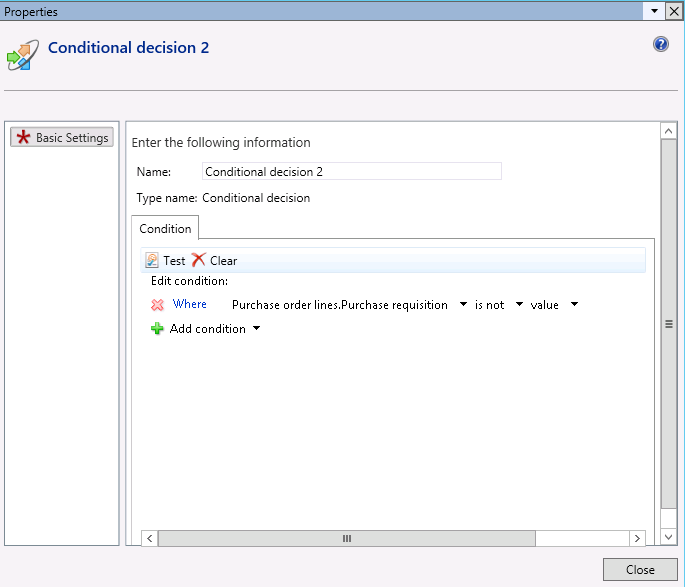
Condition.png

But the work flow item that i've added to reject the PO without purchase requisition. Doesn't work.
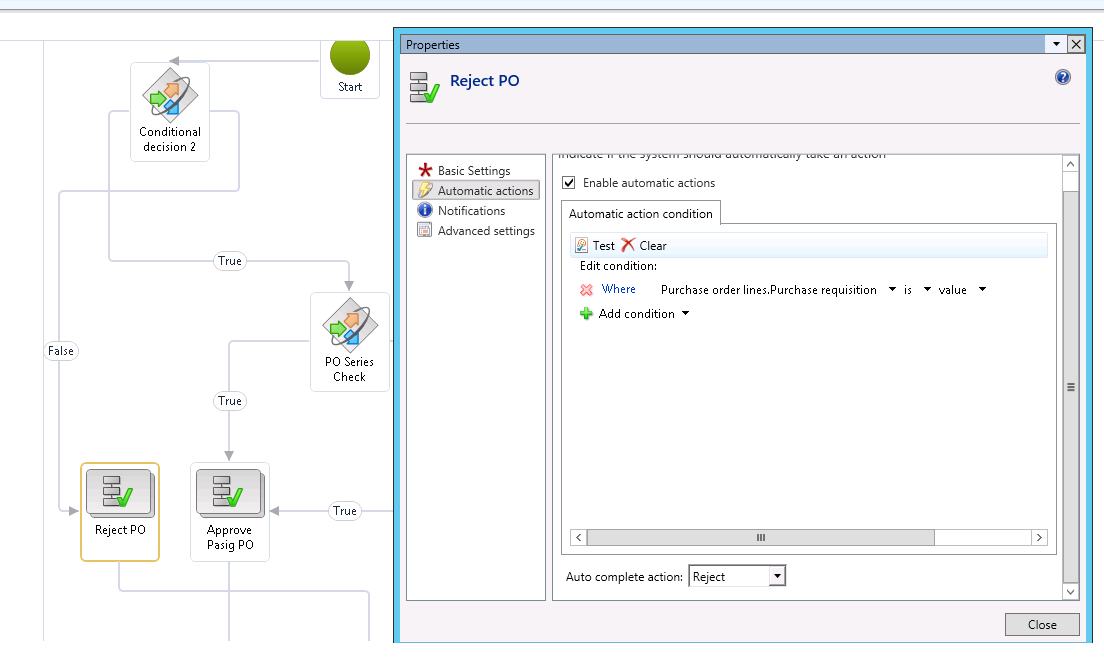
Reject-PO.png

Is there anything that I need to add? :)

*This post is locked for comments

I have the same question (0)
  • Suggested answer
    Community Member Profile Picture
    on at

    Hi ,

    Could you check and confirm all the lines of PO doesn't have value on purchase requisition field.

    If PO have multiple line, system will check only first PO line Purchase order lines.Purchase Requisition value.

    Also share history of workflow.

  • Community Member Profile Picture
    on at

    Workflow-Activated.png

    There is only one line of item on my PO and it has no PR.

    One thing that i've observe is that my tracking details is stucked with workflow activated.

    I was wondering what may be the reason why it didn't flow on the next step. which is a conditional as seen on the images above.

  • Suggested answer
    Community Member Profile Picture
    on at

    Seems like my workflow hangs and I have no idea why it takes too long to proceed on the next work flow item after activated.

    Anyways running this form under AOT solves it.

    Open the AOT, go to forms -> tutorial_workflowprocessor. Click "begin"

    found it from this thread community.dynamics.com/.../152025 :)

  • Prashant Singh Profile Picture
    8,802 on at

    Dear Spamm,

    It will be very difficult to determine based on PR lines. I will suggest with small customization it will solve all the issue. Add a field in the PO header called purchase requisition number. Whenever you create a purchase order from purchase requisition system will bring the requisition number in that field. And add condition in PO workflow if the field is empty reject the workflow.  

    If your batch job is creating any problem you can delete the existing workflow batch job and create new. It will solve that issue.

    Regards,

    Prashant Kumar

  • Suggested answer
    Community Member Profile Picture
    on at

    Hi Spamm,

    You workflow configuration condition is fine only. It will work.

    We can check the same without any customization, but [Purchase order lines].[Purchase Requisition] always return first PO line.

    Workflow batch job is not running on your machine, As Prashant mentioned configured Workflow batch or run forms -> tutorial_workflowprocessor. Open form and click start button, it will start run and you could check Workflow history

    If we want to check whether our configuration condition is correct Open the Workflow configuration

    Go to the corresponding Element or node

    Click Test. It will open Purchase order list, the below form

    Save_5F00_3.JPG

    Select record and click test, it will check and give result.

    Save_5F00_3.JPG

Under review

Thank you for your reply! To ensure a great experience for everyone, your content is awaiting approval by our Community Managers. Please check back later.

Helpful resources

Quick Links

Responsible AI policies

As AI tools become more common, we’re introducing a Responsible AI Use…

Neeraj Kumar – Community Spotlight

We are honored to recognize Neeraj Kumar as our Community Spotlight honoree for…

Leaderboard > 🔒一 Microsoft Dynamics AX (Archived)

#1
Martin Dráb Profile Picture

Martin Dráb 4 Most Valuable Professional

#1
Priya_K Profile Picture

Priya_K 4

#3
MyDynamicsNAV Profile Picture

MyDynamicsNAV 2

Last 30 days Overall leaderboard

Featured topics

Product updates

Dynamics 365 release plans
