web
You’re offline. This is a read only version of the page.
close
Skip to main content

Notifications

Announcements

No record found.

Community site session details

Community site session details

Session Id :
Microsoft Dynamics AX (Archived)

error: You cannot partially invoice delivery note

(0) ShareShare
ReportReport
Posted on by 390

Hi,

I have a sales order that was processed and completed thru warehouse management. The work order was closed and is looking ok, but when it comes to invoicing the sales order, we got the error saying: You cannot partially invoice delivery note.
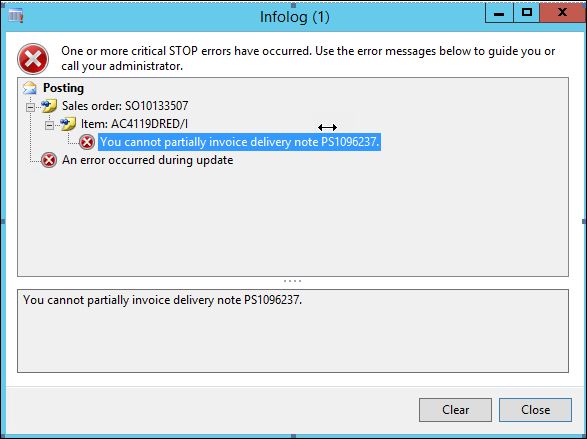
so10133507.JPG

I cannot cancel the delivery note to re-do this order. Can you advise please?

*This post is locked for comments

I have the same question (0)
  • Burogster Profile Picture
    390 on at

    Hi Crispin,

    Thank you for your reply. I did try to cancel the delivery note,but i got below error.

    delivery-note.JPG

    The work order and the delivery note shows the correct quantity which is 10.

    delivery-note.JPG

  • Guy Terry Profile Picture
    28,924 Moderator on at

    Hi

    It's standard validation that I've never seen before; it's perfectly possible to build scenarios where you invoice a lower quantity than you deliver. The validation seems to be linked to the fact that the Items are serial tracked. Are they?

    When posting the invoice, can you check the 'Lines' tab, to ensure that the quantities shown match the delivery note quantities?

  • Burogster Profile Picture
    390 on at

    Hi Guy,

    Yes you are right, it is a serialized item. And 10 serial numbers were registered for each items, so I am not sure if that is causing the error.

    Hi Crispin,

    There was no packing slip printed, only a delivery note. 

    so-and-wo.JPG

  • Guy Terry Profile Picture
    28,924 Moderator on at

    Hi Crispin,

    Yes, there are differences between posting a packing slip from the sales order vs the warehouse module. I wrote some of the problems with using the Sales periodic job in WHS scenarios here:

    ideas.dynamics.com/.../ID0002277

    Behind the scenes, AX is also using different logic to calculate the quantities to packing slip update. It does not use 'Picked' inventory transactions like one might normally rely on in the Sales module. I believe, in some circumstances at least, it is using the quantity on Work lines.

    But I don't think this is the reason for the error. The message comes from Tables\InventTrackingRegisterTrans\Methods\associateFinancialJournalTrackingTrans. And you can probably decipher that better than me!

  • Guy Terry Profile Picture
    28,924 Moderator on at

    Hi C Wee,

    It might be that, in your 'Serial-enabled' scenario, you must always post the full delivery note quantity on the sales invoice. Have you tried part-invoicing your serial items before?

  • Burogster Profile Picture
    390 on at

    Hi Guy,

    I haven't tried part-invoicing serialized item before. This is what I have in the lines tab when I tried to invoice it:

    I got 10 serial numbers for each of the items. 

    invoice-line.JPG

  • Guy Terry Profile Picture
    28,924 Moderator on at

    Right. You're using 'Serial in sales process'. It's mentioned here that there are some controls around partial invoicing. However, you don't appear to be part invoicing!

    https://technet.microsoft.com/en-us/library/dn497833.aspx

    Perhaps, if you don't mind the items appearing on separate invoices, you could try to invoice one line at a time.... might narrow down which is the problematic line. Check that one serial number is not showing twice? Other than vague suggestions, I never came across this problem; sorry. If it we me, I'd be getting it debugged; see if I can identify a scenario that I can reproduce in standard and get logged with Microsoft. But I realise not everyone has easy access to developers.

Under review

Thank you for your reply! To ensure a great experience for everyone, your content is awaiting approval by our Community Managers. Please check back later.

Helpful resources

Quick Links

Responsible AI policies

As AI tools become more common, we’re introducing a Responsible AI Use…

Neeraj Kumar – Community Spotlight

We are honored to recognize Neeraj Kumar as our Community Spotlight honoree for…

Leaderboard > 🔒一 Microsoft Dynamics AX (Archived)

#1
Martin Dráb Profile Picture

Martin Dráb 4 Most Valuable Professional

#1
Priya_K Profile Picture

Priya_K 4

#3
MyDynamicsNAV Profile Picture

MyDynamicsNAV 2

Last 30 days Overall leaderboard

Featured topics

Product updates

Dynamics 365 release plans
