web
You’re offline. This is a read only version of the page.
close
Skip to main content

Announcements

News and Announcements icon
Community site session details

Community site session details

Session Id :
Small and medium business | Business Central, N...
Suggested Answer

How to send .Key certificate with Web Service using AL

(0) ShareShare
ReportReport
Posted on by 5

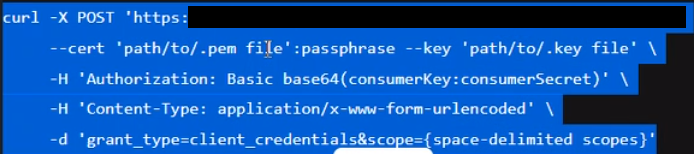
A large US bank requires a Pem certificate and a Key certificate to be sent when calling their web service. Basically this is what the cURL looks like if it helps:
pastedimage1656547443504v4.png

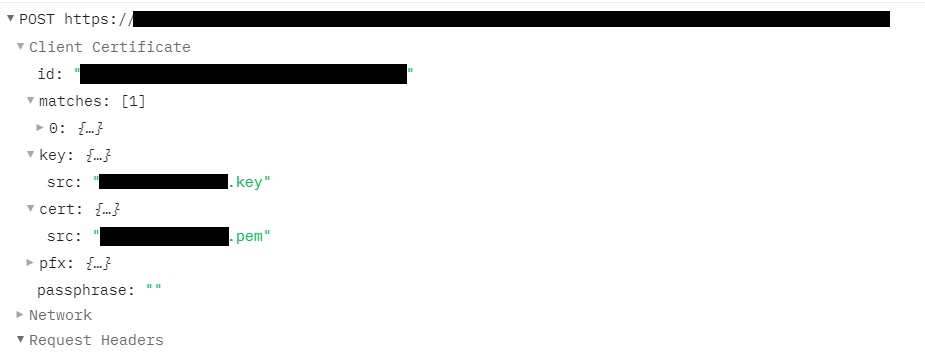
I am able to successfully call the WS using Postman and as you can see Postman caters for a Key and a Cert (here I use the Pem certificate) certificate. 
pastedimage1656547110936v2.png

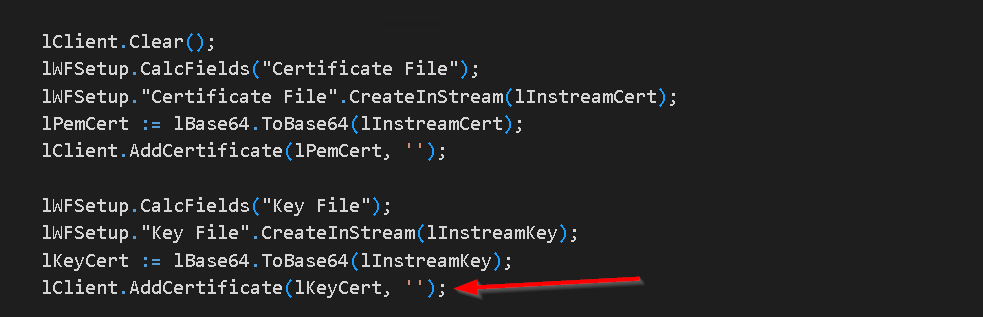
In AL I am using the following code to to add the certificates in the hope that I can add the two certificates, however when I get to loading the Key Certificate, it throws out a message "Cannot find the requested object" when hitting the code lClient.AddCertificate(lKeyCert,'')
pastedimage1656547625069v6.png

It appears either AL does not recognize a .Key file as a certificate or there is no function to cater for Key certificates.

I am trying to avoid using DotNet as this customer will be transitioning to the cloud.

Has anyone come across this issue before and got around it?

AL Language v9.3.646020

BC On Prem Version: NA Business Central 17.2 (Platform 17.0.19353.19730 + Application 17.2.19367.19735)

I have the same question (0)
  • Suggested answer
    Marco Mels Profile Picture
    Microsoft Employee on at

    Hello,

    We currently do not have dedicated Dev support via the Dynamics 365 Business Central forums, but I wanted to provide you some additional resources to assist.  If you need assistance with debugging or coding I would recommend discussing this on one of our communities.

    www.yammer.com/dynamicsnavdev

    www.dynamicsuser.net/.../14

    I will open this up to the community in case they have something to add.

    Thanks.

  • Rebe.Gwaindepy Profile Picture
    216 on at
    Hi everyone, 

    Did anyone manage to get a solution on how to use the Cert PEM and Key PEM directly in AL?
     
    Thanks,
     

Under review

Thank you for your reply! To ensure a great experience for everyone, your content is awaiting approval by our Community Managers. Please check back later.

Helpful resources

Quick Links

Season of Sharing Community Challenge Winners!

Congratulations to our community stars!

Women in Power Builds Momentum

Expanding mentorship, skilling, and AI innovation

Congratulations to the July Top 10 Community Leaders

These are the community rock stars!

Leaderboard > Small and medium business | Business Central, NAV, RMS

#1
OussamaSabbouh Profile Picture

OussamaSabbouh 551 Super User 2026 Season 2

#2
YUN ZHU Profile Picture

YUN ZHU 372 Super User 2026 Season 2

#3
Grigorios Mavrogeorgis Profile Picture

Grigorios Mavrogeorgis 339 Super User 2026 Season 2

Last 30 days Overall leaderboard

Featured topics

Microsoft Training Manuals

Product updates

Dynamics 365 release plans
