web
You’re offline. This is a read only version of the page.
close
Skip to main content

Announcements

No record found.

News and Announcements icon
Community site session details

Community site session details

Session Id :
Microsoft Dynamics NAV (Archived)

Revaluation Error

(0) ShareShare
ReportReport
Posted on by

Dear Experts,

I want to revaluate one ITem for date 30-03-2015. while selecting an item I am not able select location code the field is disable. Following error occurred. Please advise,
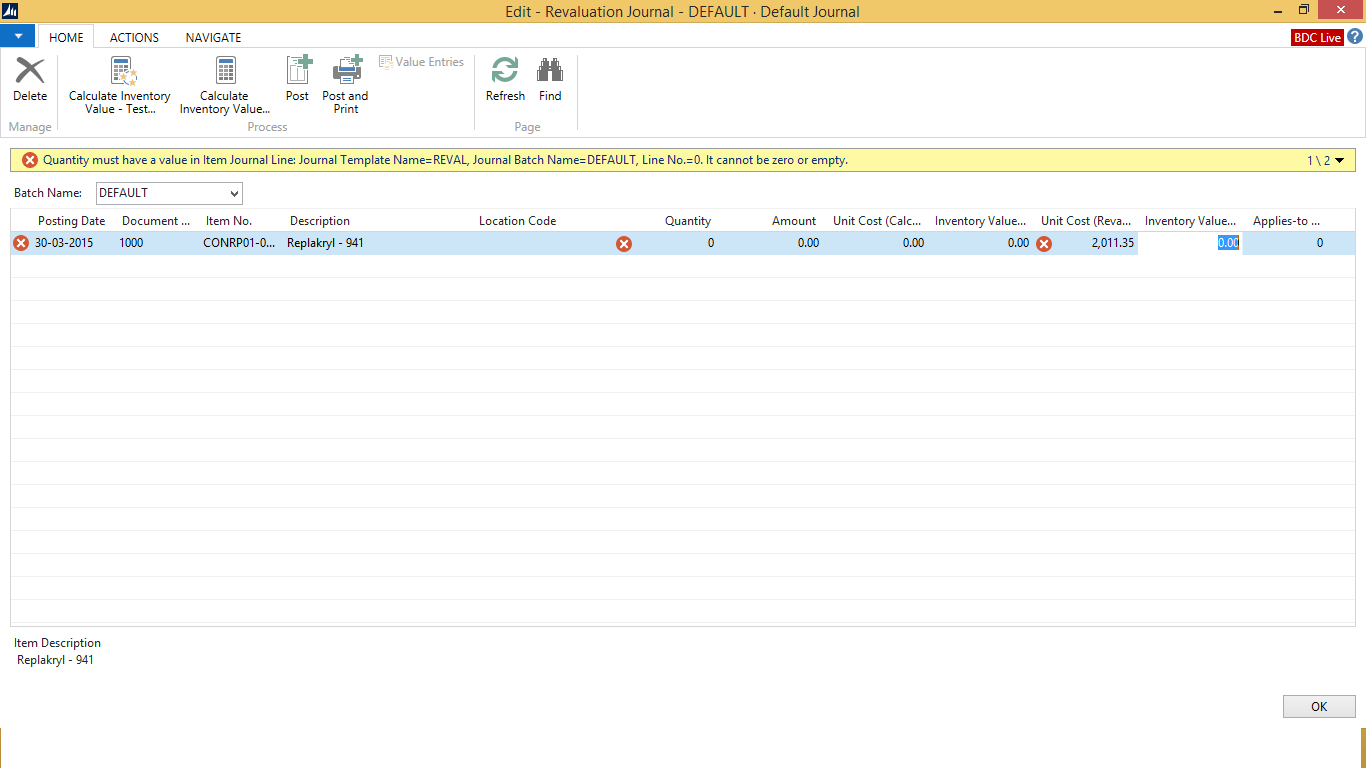
revaluation-error.png

Thanks

With Regards

Mandeep Kaur

*This post is locked for comments

I have the same question (0)
  • Indikauk Profile Picture
    1,759 on at

    Hi Mandeep

    its looks to me that you have selected or entered the Line Manually in the revaluation Journal. you should not do that because there is function to bring the lines to Revaluation Journal follow the below steps.

    1. in the revaluation Journal from the ribbon go to action tab and select "Calculate inventory Value" it will prompt you to do the Adjust cost Item Batch job so before do the revaluation journal keep the habit of run the Adjust Cost Item Batch job 1st.

    2. and you prompt a screen to select filters depending on the Costing method of the item the available option is vary but i'm giving you the scenario for "Average Costing Method"

    from the selection you need to fill Posting Date, Document No., & Calculate Per "Item" must select for Average costing & Item filter for you item.

    for your clear understanding i have attached the Screen Shot below.

    revaluation.png

    Hope this will help to solve your problem it so please make Verified answer it help to other users like you to find the solution.

    Thanks

    Indika

  • Community Member Profile Picture
    on at

    Hi Indika,

    Thanks for your prompt reply, We are trying to Calculate inventory Value getting the following error. Kindly advise.

    inven_2E00_.jpg

    Thanks

    With Regards

    Mandeep Kaur

  • Suggested answer
    Indikauk Profile Picture
    1,759 on at

    Hi Mandeep

    Error is not familiar to me i haven't face any error like this before but i think you have done some shipment and invoice is not posted. just check the two Item Ledger entries which are shown  in the Screen you will be able to find the problem.

    Do you have average Costing method of any other option?

    thanks

    indika.

  • Community Member Profile Picture
    on at

    Hi,

    We have generated the invoices as well. Kindly advise

    Thanks

    With Regards

    Mandeep Kaur

  • Indikauk Profile Picture
    1,759 on at

    Hi Mandeep

    Now What is the Error if the Error is Same just go and check those two Item Ledger Entry numbers related to what?

    also you haven't mention what is the Costing method that you are using.

    Thanks 

    Indika

  • Community Member Profile Picture
    on at

    Hi Indika,

    Thanks, Actually I have resolved the error, which was coming while calculating the inventory. But now once the revaluation is done, there are no changes in the balance sheet.

    Actually, we are in process of closing the balance sheet (2014-15)

    We have close the income statement, but there is diff. of 4 lac. To adjust this amount we are doing revaluation. Kindly advise.

    Thanks

    With Regards

    Mandeep Kaur

  • Community Member Profile Picture
    on at

    Hi Indika,

    We are using FIFO method.

  • Community Member Profile Picture
    on at

    Hi Indika,

    Can you please advise me.

  • Community Member Profile Picture
    on at

    Hi,

    Please advise how to check the impact of revaluation entries.

    when we do the revaluation which tables get effected. As per my knowledge Item ledger entry get effected. please advise.

    Thanks

    With Regards

    Mandeep Kaur

  • Suggested answer
    Amol Salvi Profile Picture
    18,698 on at

    Check Value Entry table .Its impacted there

Under review

Thank you for your reply! To ensure a great experience for everyone, your content is awaiting approval by our Community Managers. Please check back later.

Helpful resources

Quick Links

Introducing the 2026 Season 1 community Super Users

Congratulations to our 2026 Super Stars!

Meet the Microsoft Dynamics 365 Contact Center Champions

We are thrilled to have these Champions in our Community!

Congratulations to the April Top 10 Community Leaders

These are the community rock stars!

Leaderboard > 🔒一 Microsoft Dynamics NAV (Archived)

#1
TAHER_El_Mehdi Profile Picture

TAHER_El_Mehdi 2

#1
sliderxb Profile Picture

sliderxb 2

#1
broberts Profile Picture

broberts 2

Last 30 days Overall leaderboard

Featured topics

Product updates

Dynamics 365 release plans
