web
You’re offline. This is a read only version of the page.
close
Skip to main content

Announcements

No record found.

News and Announcements icon
Community site session details

Community site session details

Session Id :
Finance | Project Operations, Human Resources, ...
Answered

Cannot Migrate 25 length characaters product number Id into AX using DIXF

(0) ShareShare
ReportReport
Posted on by 46

Hello everyone,

I am just trying to migrate almost all items(products) from Axapta 3.0 to Ax2012R3 using DIXF.

For many of the items everything goes perfect. but when I am trying to migrate the 100% of the items an error msg prompt with : "

DMF – Error occured while doing bulkcopy from temp table to entity table

"

then inside I notice that index ID are duplicated and it cannot be imported, also I notice that the DIXF is truncating the item number to 20 chars length so an item that has:

1250x1750x1,25mm_AISI316

1250x1750x1,25mm_AISI304

.will be duplicated at: "1250x1750x1,25mm_AIS"

I have tried already changing the item number length using the Data Modify types to 25 and also to 30. but error is still the same.
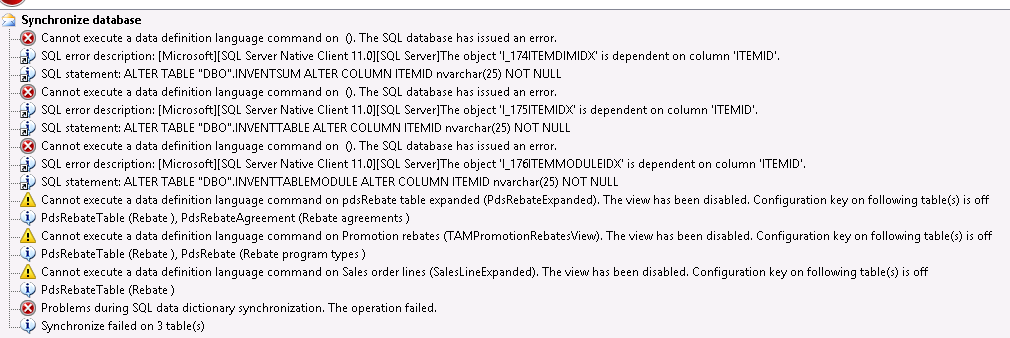
1234.ModifyDataTypes_2D00_AfterSynchronize.PNG

SQL error description: [Microsoft][SQL Server Native Client 11.0][SQL Server]The object 'I_174ITEMDIMIDX' is dependent on column 'ITEMID'.

SQL statement: ALTER TABLE "DBO".INVENTSUM ALTER COLUMN ITEMID nvarchar(25) NOT NULL

SQL error description: [Microsoft][SQL Server Native Client 11.0][SQL Server]The object 'I_175ITEMIDX' is dependent on column 'ITEMID'.

SQL error description: [Microsoft][SQL Server Native Client 11.0][SQL Server]The object 'I_176ITEMMODULEIDX' is dependent on column 'ITEMID'.

Hope you guys give me a hand with this, any help is highly appreciated,

thanks a lot for your time

I have the same question (0)
  • Suggested answer
    Sergei Minozhenko Profile Picture
    23,095 on at

    Hi,

    Have you performed build and global sync after you modified data types?

  • Verified answer
    André Arnaud de Calavon Profile Picture
    304,711 Super User 2026 Season 1 on at

    Hi CBNestor,

    When you have changed the length of a field, it will not affect all directly. Have a look at the last part of this blog, which explains what might be done to get the length recognized correctly: dynamicspedia.com/.../

  • CBNestor Profile Picture
    46 on at

    Hi André, I trying the link but I looks like broken, please resend

    thanks a lot

  • CBNestor Profile Picture
    46 on at

    Hi Sergei, I have performed Complete : Compile + Db Synchronization. and i Got those errors on 3 databases.

  • Suggested answer
    nmaenpaa Profile Picture
    101,172 Moderator on at

    Not directly related to your technical problem, but have you considered storing the size of the item in the "Size" field, instead of inside the item id? It seems that you are using the ItemId field to store other information about the product than just the identified (such as AISI316).

  • CBNestor Profile Picture
    46 on at

    Hi Nikolaos. I have considered many things. included renaming the items id to fit the 20 standard length. but I have 11,733 items to import. And everyone is already familiarize with the item codes, I just one the AX 3.0 to be working as it is in the axa3.0

  • Sergei Minozhenko Profile Picture
    23,095 on at

    Hi CBNestor,

    To resolve sync issues I would drop mentioned indexes (make a backup script for them) from SQL manually before sync. The indexes should be re-created after sync.

  • CBNestor Profile Picture
    46 on at

    I have performed the change in the DMFDefinitionGroupEntityXMLFields change the 20 to 25 on both sides. 

    pastedimage1583746845116v1.png

    Now in staging table. The item number is complete. But when getting into Target table it brakes again with the truncate

    pastedimage1583746982649v2.png

  • Verified answer
    nmaenpaa Profile Picture
    101,172 Moderator on at

    Based on the information that you shared, you haven't yet succesfully synced your database after increasing the length of the data type. This means that the length of the data type is actually still 20 characters. So you need to first have the sync finalize succesfully before you can move forward.

  • CBNestor Profile Picture
    46 on at

    TITLE: Microsoft SQL Server Management Studio

    ------------------------------

    Drop failed for Index 'I_176ITEMMODULEIDX'.  (Microsoft.SqlServer.Smo)

    The primary key constraint 'I_176ITEMMODULEIDX' on table 'INVENTTABLEMODULE' cannot be dropped because change tracking is enabled on the table. Change tracking requires a primary key constraint on the table. Disable change tracking before dropping the constraint.

    Could not drop constraint. See previous errors. (Microsoft SQL Server, Error: 3735)

Under review

Thank you for your reply! To ensure a great experience for everyone, your content is awaiting approval by our Community Managers. Please check back later.

Helpful resources

Quick Links

Introducing the 2026 Season 1 community Super Users

Congratulations to our 2026 Super Stars!

Meet the Microsoft Dynamics 365 Contact Center Champions

We are thrilled to have these Champions in our Community!

Congratulations to the April Top 10 Community Leaders

These are the community rock stars!

Leaderboard > Finance | Project Operations, Human Resources, AX, GP, SL

#1
Giorgio Bonacorsi Profile Picture

Giorgio Bonacorsi 608

#2
André Arnaud de Calavon Profile Picture

André Arnaud de Cal... 591 Super User 2026 Season 1

#3
CP04-islander Profile Picture

CP04-islander 430

Last 30 days Overall leaderboard

Product updates

Dynamics 365 release plans
