web
You’re offline. This is a read only version of the page.
close
Skip to main content

Notifications

Announcements

No record found.

Community site session details

Community site session details

Session Id :
Finance | Project Operations, Human Resources, ...
Suggested Answer

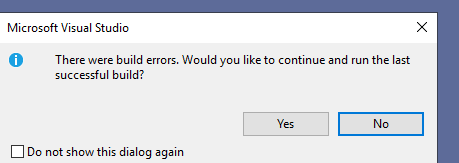
There were build errors. Would you like to continue and run the last sucessful build?

(0) ShareShare
ReportReport
Posted on by 6

Hi, 

This is very common one, I have small doubt here. I created a runnable job and then ran it. It threw this error.

The solution itself doesn't have any errors. But the model does.
pastedimage1668593592486v1.png

1: Does the dialog message is pointing the that model has errors? Hence it wont run.

2: Is there way to make it run without fixing the errors in model 

Thanks,

Daxer

I have the same question (0)
  • Suggested answer
    GirishS Profile Picture
    27,827 Moderator on at

    Hi Noob,

    You need to clear all the errors in the model before running that. Also without successful build you are new objects will not be synched.

    You can click on yes on the dialog box to proceed with debugging. But sometimes your new changes will not be reflected until you clear your errors which means successful build

    Thanks,

    Girish S.

  • Bharani Preetham Peraka Profile Picture
    3,634 Moderator on at

    No it is not pointing about the model errors. If there are model errors you should already get that error when you start the build.

    Once you have created a runnable job first you need to make sure no errors then save and build and sync. If all these things were perfectly done then you won't get such type of dialog when you click start  Creating a job and running directly won't help. Hope you understood. If this resolves your query please mark my answer as verified.

  • Stijn Mattens Profile Picture
    10 on at

    Could it be that your service isn't restarting during build?
    Had the issue myself a couple of time that the Batch service failed to start/stop during my build.
    Causes the same popup.
    However hard to see without the actual errors .. 

  • André Arnaud de Calavon Profile Picture
    301,069 Super User 2025 Season 2 on at

    Hi Daxer,

    You probably used the button to start the debugger which will then perform a build of your project and starts Dynamics 365 with the startup object.

    This error means that there is at least one error in your model. Like mentioned above, this should be fixed. Otherwise, it will debug and run the previous successful build.

    If you isolate the runnable class in a separate project, you can build that project only and run the class.

Under review

Thank you for your reply! To ensure a great experience for everyone, your content is awaiting approval by our Community Managers. Please check back later.

Helpful resources

Quick Links

Responsible AI policies

As AI tools become more common, we’re introducing a Responsible AI Use…

Neeraj Kumar – Community Spotlight

We are honored to recognize Neeraj Kumar as our Community Spotlight honoree for…

Leaderboard > Finance | Project Operations, Human Resources, AX, GP, SL

#1
Martin Dráb Profile Picture

Martin Dráb 559 Most Valuable Professional

#2
André Arnaud de Calavon Profile Picture

André Arnaud de Cal... 464 Super User 2025 Season 2

#3
Sohaib Cheema Profile Picture

Sohaib Cheema 250 User Group Leader

Last 30 days Overall leaderboard

Product updates

Dynamics 365 release plans



