web
You’re offline. This is a read only version of the page.
close
Skip to main content

Announcements

No record found.

News and Announcements icon
Community site session details

Community site session details

Session Id :
Small and medium business | Business Central, N...
Suggested Answer

Difference in GL & Subledger LCY Value becoz of Currency Rate (Not Direct Posting)

(1) ShareShare
ReportReport
Posted on by 767

Hi (Thank You in Advance)

When I am Posting a Purchase Invoice in the System then Currency Exchange rate is Changing in General ledger and Vendor Ledger Entry, and as per my Knowledge the Currency rate is changing.

Posted Purchase Invoice - EUR 43,441.58 

Currency Rates

1.053032 SAR = 0.234007 EUR

So, In Short 1 SAR = 0.222222116
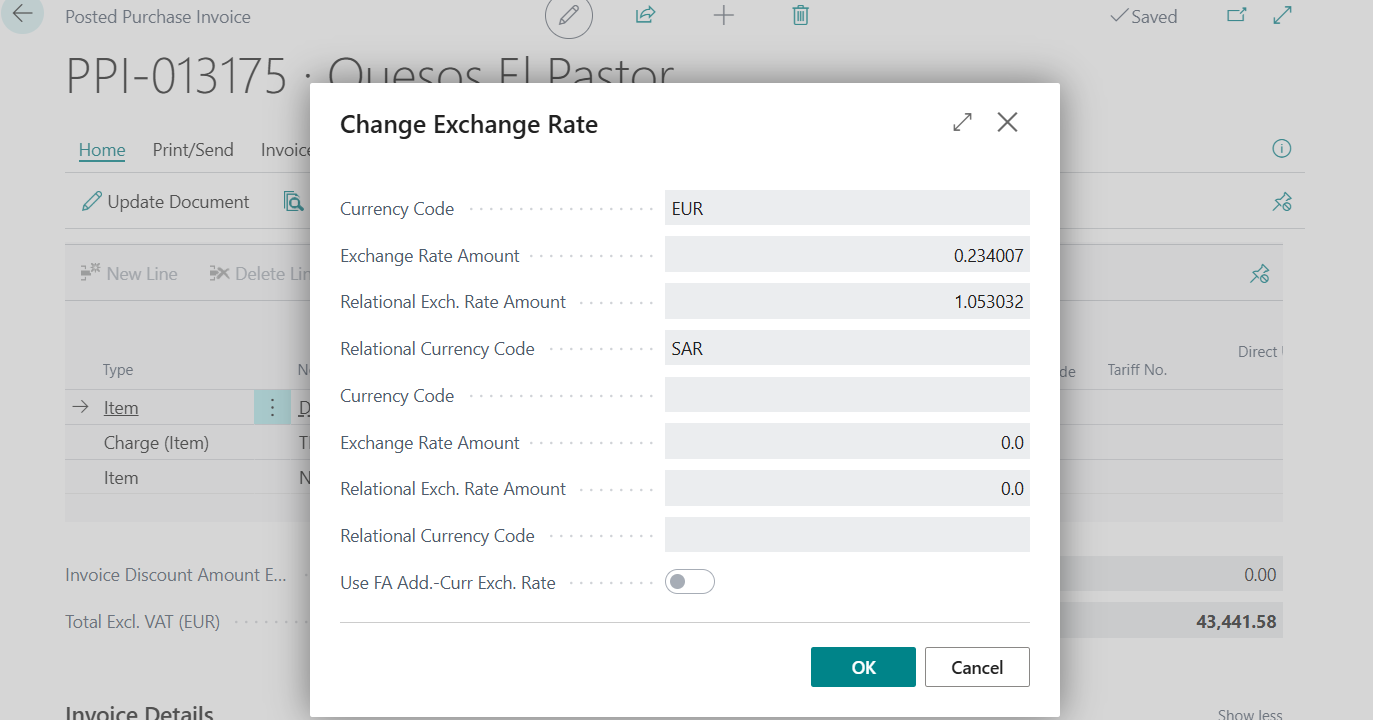
So, EUR 43441.58 / 0.222222116 = SAR 195,487.20

Now Let's Check the Entries

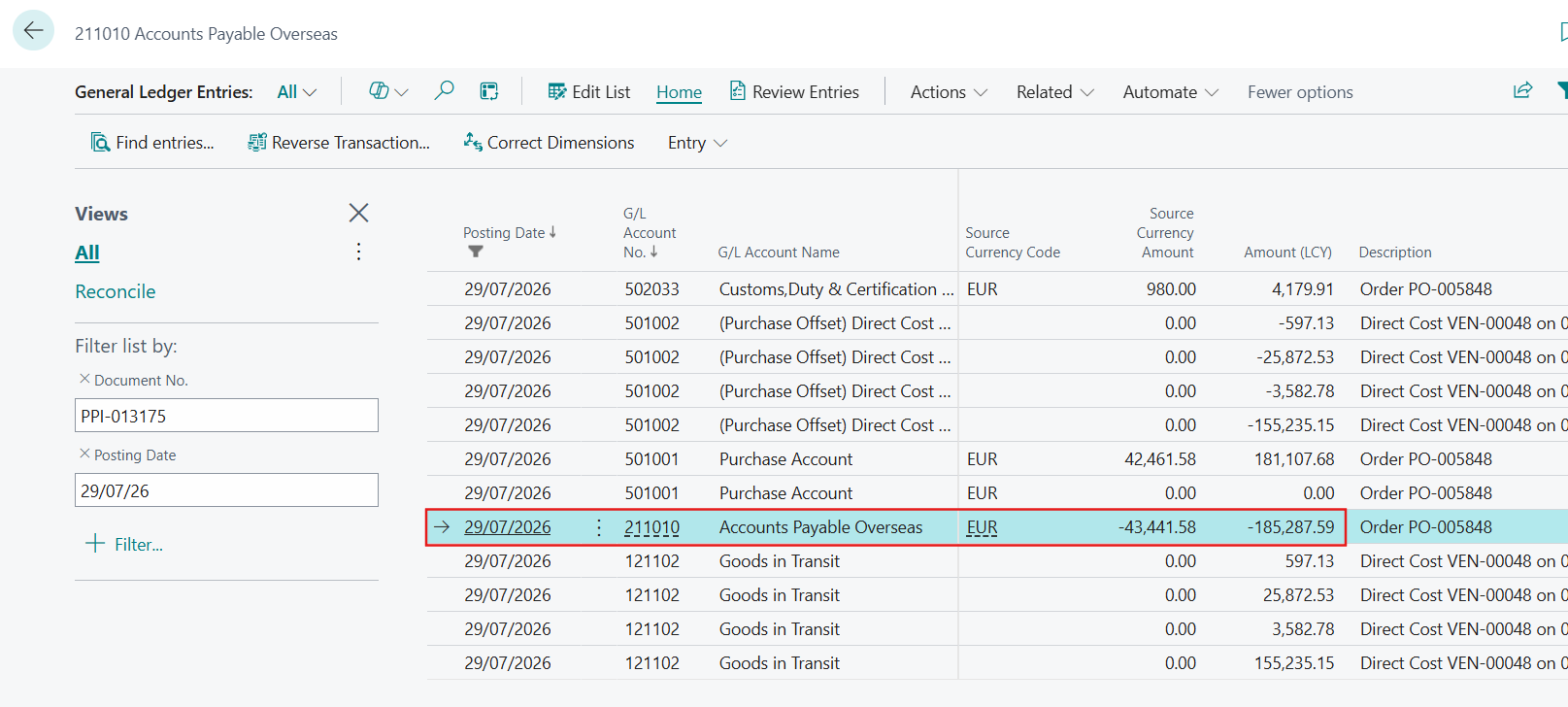
G/L Entry

The value that is coming in GL Entry is 185,287.59
Vendor Ledger Entry

The Value that is coming in Vendor Ledger Entries is 195,487.12
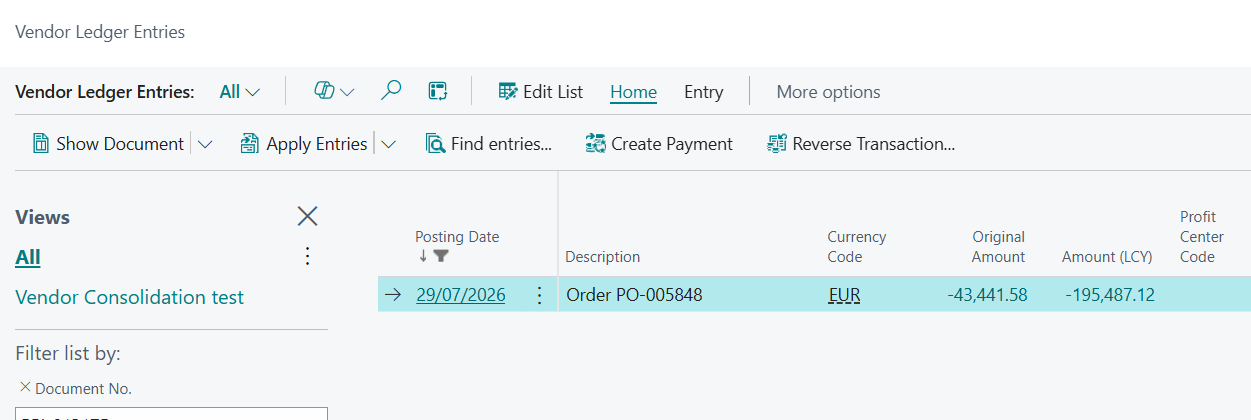
Difference ( SAR 195,487.12 - SAR 185,287.59 ) = SAR 10,199.53

Payment Time

Now when the Payment is Done Against that then it posted that Difference in Debit Rounding Accuont.
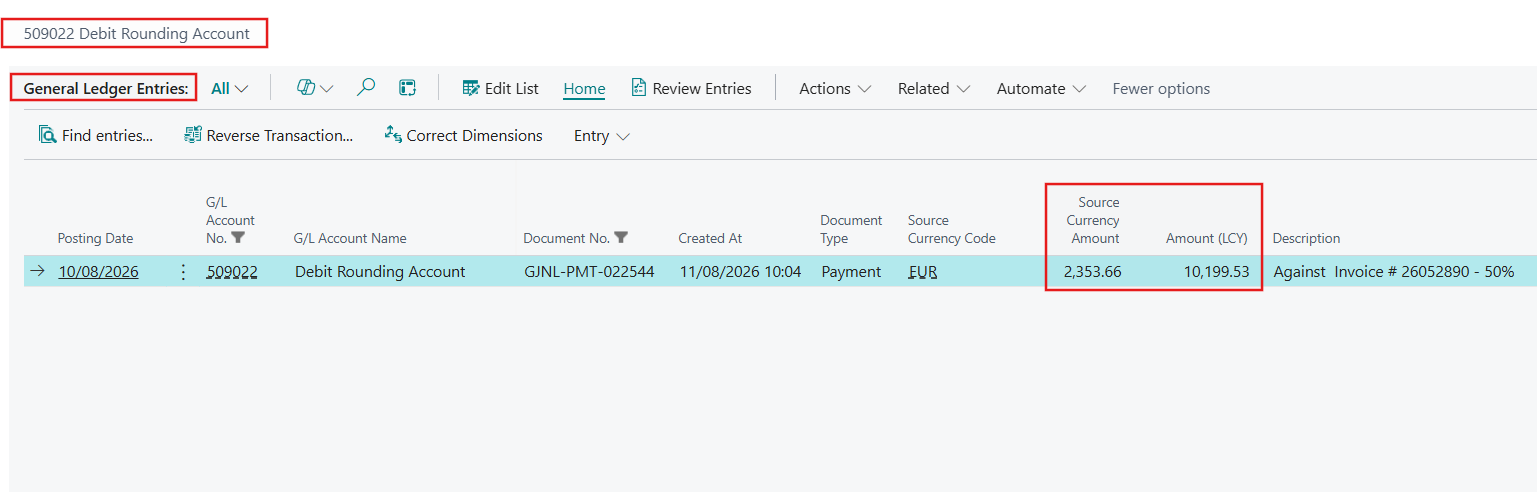
Payment is done 50% (43,441.58 * 50% = 21,720.79) at the rate 1 SAR = 0.23076179 EUR

Question

1- Why the Values are different in General Ledger and Vendor Ledger Entries?

2- Why the value goes in Debit Rounding Account?

3- What is the adjustment entry going to be to correct the balances only in GL Level (Other than Direct Posting)? 


Configurations I have Checked are all Correct


  • AndrewThomas81 Profile Picture
    2,663 Super User 2026 Season 2 on at

    I am assuming SAR is your LCY


    Do you also have SAR in the currency list?


    Kind Regards


    Andrew Thomas FCCA MCP

    YouTube - Use Business Central

    LinkedIn

  • Suggested answer
    OussamaSabbouh Profile Picture
    19,260 Super User 2026 Season 2 on at

    Hello Ahmad Subhani,

    The first thing I would check is Detailed Vendor Ledger Entries, because the Amount (LCY) shown on Vendor Ledger Entries is calculated from detailed entries and can change after Adjust Exchange Rates or applications, whereas the original invoice G/L entry remains at the LCY amount posted on 29/07; therefore comparing 185,287.59 from the original G/L entry directly with the current Vendor Ledger Amount (LCY) = 195,487.12 does not necessarily mean the subledger and G/L are out of balance—run Reconcile Cust. and Vend. Accs. (Report 33) and drill into the Detailed Vendor Ledger Entries to find where the 10,199.53 originated. For the second point, if 509022 Debit Rounding Account is configured as Debit Curr. Appln. Rndg. Acc. in the Vendor Posting Group, Business Central uses it when applying entries involving different currencies; however, 10,199.53 SAR is far too large to treat as normal rounding, and if both invoice and payment are genuinely EUR, the exchange-rate difference would normally be handled through the currency's Realized Gain/Loss accounts, so check the payment currency, application entries, Vendor Posting Group, Currency setup, and exchange-rate adjustment history. Finally, I would not post a manual G/L-only correction to the AP control account: with Direct Posting disabled, there is intentionally no standard method to adjust only that control account while bypassing the vendor subledger. If the application is wrong, unapply and repost it; if the difference comes from exchange-rate revaluation, use Adjust Exchange Rates; and only after Report 33 identifies an actual historical corruption should a controlled correction/support approach be considered.

    Regards,
    Oussama Sabbouh

  • Ahmad Subhani Profile Picture
    767 on at

    @AndrewThomas81 SAR is my Local Currency

    @OussamaSabbouh 

    Did not attach Debit Curr. Appln. Rndg. Acc. account or Conv. LCY Rndg. Debit Acc.

    Reconcile Customer and Vendor Balance Report is Showing No Difference (Zero)

    I am attaching the Detailed Entries over here

    At the time of Invoice

    At the time of Payment (that 10199 Amount Detailed Entry)

Under review

Thank you for your reply! To ensure a great experience for everyone, your content is awaiting approval by our Community Managers. Please check back later.

Helpful resources

Quick Links

Season of Sharing Community Challenge Winners!

Congratulations to our community stars!

Women in Power Builds Momentum

Expanding mentorship, skilling, and AI innovation

Congratulations to the July Top 10 Community Leaders

These are the community rock stars!

Leaderboard > Small and medium business | Business Central, NAV, RMS

#1
OussamaSabbouh Profile Picture

OussamaSabbouh 621 Super User 2026 Season 2

#2
YUN ZHU Profile Picture

YUN ZHU 362 Super User 2026 Season 2

#3
Grigorios Mavrogeorgis Profile Picture

Grigorios Mavrogeorgis 323 Super User 2026 Season 2

Last 30 days Overall leaderboard

Featured topics

Microsoft Training Manuals

Product updates

Dynamics 365 release plans
