web
You’re offline. This is a read only version of the page.
close
Skip to main content

Notifications

Announcements

No record found.

Community site session details

Community site session details

Session Id :
Finance | Project Operations, Human Resources, ...
Answered

Valid financial dimension in PO/SO according to account structure

(0) ShareShare
ReportReport
Posted on by

Hi all,

I have an account structure with defined combination on financial dimensions:

pastedimage1625652108944v1.png

When I insert a line in a journal, if I pick "Sede"=Bergamo, the system proposes only the other valid values for BusinessUnit and Cost Center, according to account structure, and not all the values for BU and CC:
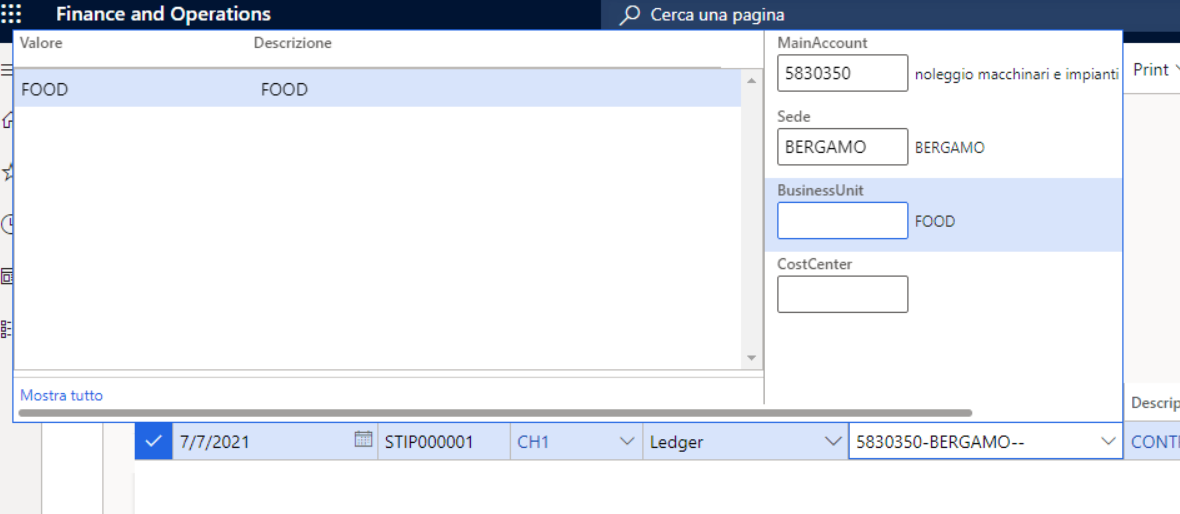
pastedimage1625652624092v4.png

I would like to have the same behaviour also in purchase orders, sales orders and free text invoices. At the moment, when I pick one financial dimension in purchase orders, sales orders or free text invoices, the system proposes all financial dimension values valid for the other segment, not taking care of the financial dimension I have already picked.
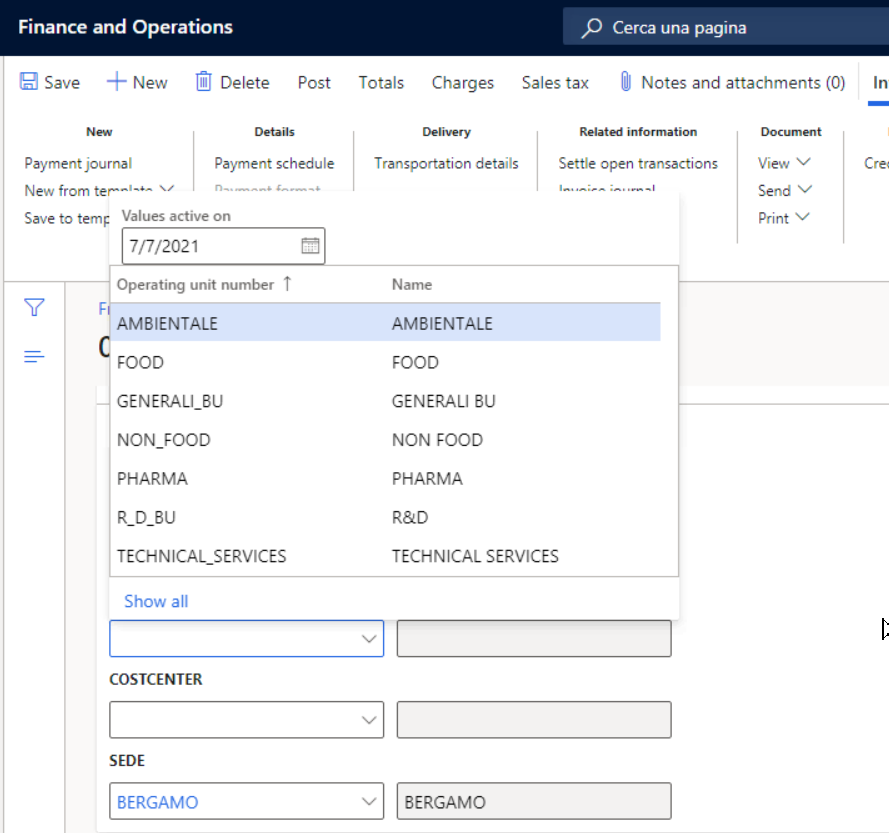
pastedimage1625652544306v3.png

Thanks

ANG.A.

I have the same question (0)
  • Ramit Paul Profile Picture
    22,797 Most Valuable Professional on at

    Hello Ana,

    Can you kindly share the screen shot of acc structure with expanded? full details can not be seen from there right now.

  • Community Member Profile Picture
    on at

    Hello Ramit,

    The account structure has many lines with various combination of financial dimensions for specific main accounts, but that's not the problem.

    I just would like to know why if I choose Sede=Bergamo in a journal, it shows me ONLY BU=Food and CC=Microbiologia (that are the only values admitted when Sede=Bergamo), but when I do the same thing from a SO/PO or free text invoice, if I pick Sede=Bergamo, the system displays all values for BU and CC, not only Food and Microbiologia (that are the only allowed when Sede=Bergamo)

    There are no other combination for Sede=Bergamo, just the one you can see in the screeenshot

  • Verified answer
    Ludwig Reinhard Profile Picture
    Microsoft Employee on at

    Hello Ang.A,

    As far as I know the validation/verification you are looking for would require a system modification.

    Have you tried setting up findim templates instead?

    They give you a shortcut entering the findims and if you only work with them ensure that nobody can enter a 'nonsense' findim combination.

    Best regards,

    Ludwig

  • Bharath jain Profile Picture
    1,443 Super User 2025 Season 2 on at

    Hi Ang.A,

    Can you share the screenshots of GL and PO.  

    Also have you used Advance rules setup, if yes can you share that screen shot.

  • Community Member Profile Picture
    on at

    Thank you Ludwig, yes I tried to use findim templates but this is not suitable for the request of the customer.

    Thank you for you reply.

Under review

Thank you for your reply! To ensure a great experience for everyone, your content is awaiting approval by our Community Managers. Please check back later.

Helpful resources

Quick Links

Responsible AI policies

As AI tools become more common, we’re introducing a Responsible AI Use…

Neeraj Kumar – Community Spotlight

We are honored to recognize Neeraj Kumar as our Community Spotlight honoree for…

Leaderboard > Finance | Project Operations, Human Resources, AX, GP, SL

#1
André Arnaud de Calavon Profile Picture

André Arnaud de Cal... 456 Super User 2025 Season 2

#2
Martin Dráb Profile Picture

Martin Dráb 429 Most Valuable Professional

#3
BillurSamdancioglu Profile Picture

BillurSamdancioglu 239 Most Valuable Professional

Last 30 days Overall leaderboard

Product updates

Dynamics 365 release plans
