web
You’re offline. This is a read only version of the page.
close
Skip to main content

Notifications

Announcements

No record found.

Community site session details

Community site session details

Session Id :
Microsoft Dynamics AX (Archived)

POS Error

(0) ShareShare
ReportReport
Posted on by

Hello,


I am getting the following error, when I open the Retail POS.

Error 1: "The application couldn't be initialized"

Error2: "A system error has occurred.The application will close."

In the Event Viewer it is showing the following .

LSRetailPosis.Settings.ApplicationSettings: System.Exception: Information about store: 001 was not found.
   at LSRetailPosis.Settings.ApplicationSettings.LoadSettingsForTerminal(Terminal terminal)
   at LSRetailPosis.Settings.ApplicationSettings.InitializeSettings(String[] args).


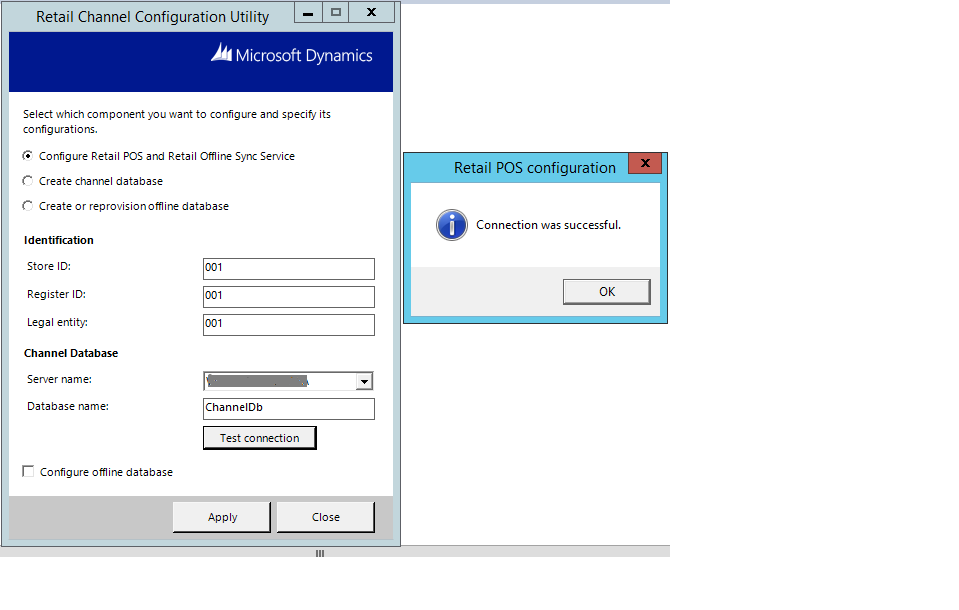
The connection is successful in Retail Channel Configuration Utility

4274.error1.png

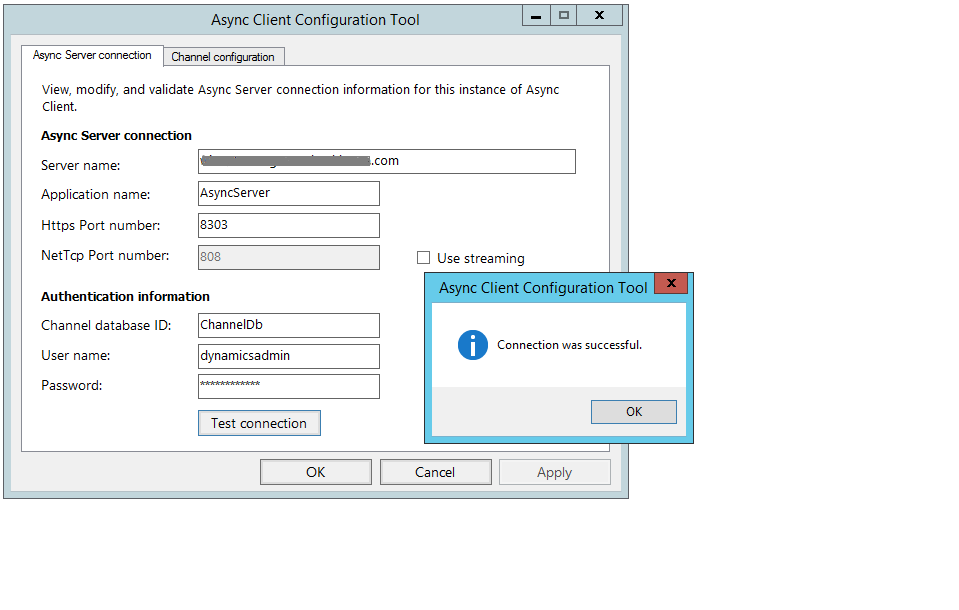
Connection is also successful in Async Client Configuration tool
7888.error2.png

7888.error3.png

I had run the full data-sync in channel database and channel data group. but the ax.RETAILSTORETABLE is empty.

There is no "Microsoft Dynamics AX for Retail Commerce Data Exchange Async Client" service in Windows Services.

Could anyone help me out with the issue? Thanks in advance :)

*This post is locked for comments

I have the same question (0)
  • Rodolfo Recalde Profile Picture
    on at

    Hi,

    Please, check download sessions status, to confirm that the packages were applied.

    https://technet.microsoft.com/en-us/library/dn497795.aspx

    I did not understand very well. You have not  installed the Async Client in your environment? What is your version of AX?  This component is required in retail (R3) topology. Please,

    review your environment:

    https://technet.microsoft.com/en-us/library/dn741439.aspx

    Topologies:

    https://technet.microsoft.com/en-us/library/jj991928.aspx

    I Hope this Helps!

    Regards,

    Rodolfo Recalde.

  • Suggested answer
    Community Member Profile Picture
    on at

    Hi

    Check your Channel database, in RetailStoreTable and RetailTerminalTable. See if your storeId and terminal id is populated in these tables respectively.

    If not, Verify the CDX message database tables for details of the error. there are tables like Downloadsessions and DownloadSessionLog If I remember which will give you details of the error message why the data is not in the tables

  • Community Member Profile Picture
    on at

    I have installed dynamics ax(Dynamics AX 2012 R3) successfully with all the configurations. When I start the POS, it is asking to enter Operator ID and Password.

    Screenshot-_2800_24_2900_.png

    We have followed the link https://daxing2012.wordpress.com/2014/07/11/ax2012-r3-retail-linking-employees-to-a-store/ and created 2 workers in Dynamics AX with the  Staff ID's 100003 and 100004 with the respective passwords. Both these workers are in the Store "Store1". The address book of store1 and both the workers(employees) are same. I have run the full data sync. In the ax.RETAILSTAFFTABLE data is getting reflected and there are 2 rows with the data we have provided.

    With those Staff ID's and passwords, when I login to POS it is still showing "Operator ID is not invalid", even  after restarting the POS.

    Screenshot-_2800_24_2900_.png

  • Rodolfo Recalde Profile Picture
    on at

    Double check:

    a. If your POS properly configured for the store. Check: Retail Channel Configuration Utility.

    b. If worker has permission and operations assigned

    https://technet.microsoft.com/en-us/library/hh597187.aspx

    https://blogs.msdn.microsoft.com/axsupport/2015/11/09/modifying-retail-pos-permissions-and-operations/

    https://technet.microsoft.com/en-us/library/dn736915.aspx

    I Hope this Helps!

    Regards,

    Rodolfo Recalde.


Under review

Thank you for your reply! To ensure a great experience for everyone, your content is awaiting approval by our Community Managers. Please check back later.

Helpful resources

Quick Links

Responsible AI policies

As AI tools become more common, we’re introducing a Responsible AI Use…

Neeraj Kumar – Community Spotlight

We are honored to recognize Neeraj Kumar as our Community Spotlight honoree for…

Leaderboard > 🔒一 Microsoft Dynamics AX (Archived)

#1
Priya_K Profile Picture

Priya_K 4

#1
Martin Dráb Profile Picture

Martin Dráb 4 Most Valuable Professional

#3
Ali Zaidi Profile Picture

Ali Zaidi 2

Last 30 days Overall leaderboard

Featured topics

Product updates

Dynamics 365 release plans
