web
You’re offline. This is a read only version of the page.
close
Skip to main content

Notifications

Announcements

No record found.

Community site session details

Community site session details

Session Id :
Finance | Project Operations, Human Resources, ...
Unanswered

Multiple lines are showing in "InventOnHandItem" form after updating "InventSum" table's custom field by assigning a value from a buffer even if no dimensions have been selected in the form

(0) ShareShare
ReportReport
Posted on by 59

Hi Everyone!

We are having a requirement which includes bringing up a new calculated field to "InventOnHandItem" form instead of a custom display method which we already have in InventSum table, we need this field because we need to include filtering options for that calculated field.

What I did:

We need to update the calculated field with some calculations for all LE and I don't want to lock the "InventSum" table for a prolonged time so I have created a table (MyTable) with these fields - "MyCalculatedField, ItemId, InventDimID" and created a batch job which would update MyTable with the calculations for all LE then it would update the "InventSum" table's "MyCalculatedField" with the values.

Alternate way I tried:

Instead of bringing a new table I just used "InventSum.MyCalculatedField" to update. Facing the same below mentioned issue.

My Problem:

Just a note - MyTable would be holding values for the combination of "ItemID and InventDimID" so a unique record would be this combination. Hence for an item it would hold multiple records just like "InventSum" table.

I've updated InventSum table with the records we have in MyTable. My problem is, in "InventOnHandItem" form I'm able to see multiple lines even if we do not select Dimensions [Site, Warehouse and Location].

So what I did was just blandly inserted value - 100 to the field "MyCalculatedField" in "InventSum" table by just hardcoding. I'm able to see only one record in "InventOnHandItem" form (Which is correct) even though we do have multiple lines for an item in "InventSum" table via SQL. 

I dont know why it is bringing multiple lines while updating the "MyCalculatedField" in InventSum like as follow,


CompanyInfo  companyInfo;
InventTable     inventTable;
InventSum      inventSum,selectingRPOQ;
InventDim       inventDimension;
InventQty        InventQty;
MyTable MyTable,insertRPOQ,updateRPOQ;

while select DataArea from companyInfo
{
changecompany(companyInfo.DataArea)
{
inventTable = null;
while select ItemId from inventTable
{
inventSum = null;
inventDimension = null;

while select forupdate inventSum
where inventSum.ItemId == inventTable.ItemId
join inventDimension
where inventDimension.inventDimId == inventSum.InventDimId
{

if(inventSum != null)
{

InventQty = ABC; //Calculation to be done.
ttsbegin;
MyTable= null;
insertRPOQ = null;

select forupdate MyTable
where MyTable.ItemId == inventSum.ItemId
&& MyTable.InventDimId == inventSum.InventDimId;
if(!MyTable)
{

insertRPOQ.ItemId = inventSum.ItemId;
insertRPOQ.InventDimId = inventSum.InventDimId;
insertRPOQ.MyCalculatedField= InventQty;
insertRPOQ.insert();
}
ttscommit;
}
}
}
updateRPOQ = null;
while select * from updateRPOQ
where updateRPOQ.MyCalculatedField!= 0
{
selectingRPOQ = null;
ttsbegin;
while select forupdate selectingRPOQ
where selectingRPOQ.ItemId == updateRPOQ.ItemId
&& selectingRPOQ.InventDimId == updateRPOQ.InventDimId
{
if(selectingRPOQ != null)
{
selectingRPOQ.reread();
selectingRPOQ.selectForUpdate(true);
selectingRPOQ.MyCalculatedField= updateRPOQ.MyCalculatedField;
selectingRPOQ.update();

}
}
ttscommit;
}
}
}

If we give like,

selectingRPOQ.MyCalculatedField= 100;

instead of 

selectingRPOQ.MyCalculatedField= updateRPOQ.MyCalculatedField;

then it is correct.

This is the screenshots,

While giving like "selectingRPOQ.MyCalculatedField= updateRPOQ.MyCalculatedField;"
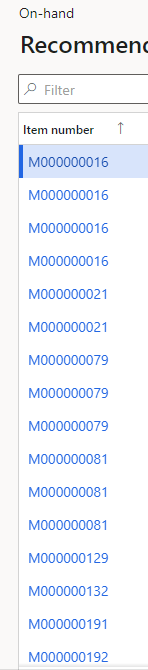
6366.pastedimage1683782362733v1.png

While giving like selectingRPOQ.MyCalculatedField= 100;

7180.pastedimage1683782420989v2.png

I need some guidance. Thanks in advance!

I have the same question (0)
  • Anton Venter Profile Picture
    20,343 Super User 2025 Season 2 on at

    I don't recommend updating the InventSum system table at all. Even if it's only a custom field on the InventSum. When InventSum is being updated by your code it is locked and this can cause unexpected issues. You don't want to risk it.

    Having said that, why not use a tempory table (with a new custom form) to add the on hand data? You can search and sort on the on hand quantity ( all fields in the temp table.

    An alternative is to create a report or export to Excel with this data.

  • Martin Dráb Profile Picture
    237,722 Most Valuable Professional on at

    Your code lacks is difficult to read because it lacks line indentation. It's because you pasted in in a wrong way - please use Insert > Code next time. For the same reason, we don't have line numbers to refer to.

    Your code also looks over-complicated to me. Let me try to simplify it. Does this correspond to what you want?

    void runForAllCompanies()
    {
    	CompanyInfo companyInfo;
    
    	while select DataArea from companyInfo
    	{
    		changecompany(companyInfo.DataArea)
    		{
    			this.populateMyTable();
    			this.writeMyCalculatedFieldToInventSum();
    		}
    	}
    }
    
    private void populateMyTable()
    {
    	InventSum inventSum;
    
    	while select inventSum
    	{
    		InventQty inventQty = ABC; //Calculation to be done.
    		
    		MyTable myTable;
    
    		select forupdate myTable
    			where myTable.ItemId == inventSum.ItemId
    			   && myTable.InventDimId == inventSum.InventDimId;
    		
    		if (!myTable)
    		{
    			myTable.ItemId = inventSum.ItemId;
    			myTable.InventDimId = inventSum.InventDimId;
    			myTable.MyCalculatedField = inventQty;
    			myTable.insert();
    		}
    		// If the record exists, we don't update it.
    	}
    }
    
    private void writeMyCalculatedFieldToInventSum()
    {
    	MyTable myTable;
    	
    	// TODO: replace with update_recordset
    	while select myTable
    		where myTable.MyCalculatedField != 0
    	{
    		ttsbegin;
    	
    		InventSum inventSum = InventSum::find(myTable.ItemId, myTable.InventDimId, true);
    		if (inventSum)
    		{
    			inventSum.MyCalculatedField = myTable.MyCalculatedField;
    			inventSum.update();
    		}
    		
    		ttscommit;
    	}
    }

    Where does it fail when you run it?

    I think the best way to avoid a blocking of InventSum is completely skipping the step of writing the value to InventSum, Instead, join InventSum with MyTable to get the data.

Under review

Thank you for your reply! To ensure a great experience for everyone, your content is awaiting approval by our Community Managers. Please check back later.

Helpful resources

Quick Links

Responsible AI policies

As AI tools become more common, we’re introducing a Responsible AI Use…

Neeraj Kumar – Community Spotlight

We are honored to recognize Neeraj Kumar as our Community Spotlight honoree for…

Leaderboard > Finance | Project Operations, Human Resources, AX, GP, SL

#1
Martin Dráb Profile Picture

Martin Dráb 700 Most Valuable Professional

#2
André Arnaud de Calavon Profile Picture

André Arnaud de Cal... 567 Super User 2025 Season 2

#3
BillurSamdancioglu Profile Picture

BillurSamdancioglu 408 Most Valuable Professional

Last 30 days Overall leaderboard

Product updates

Dynamics 365 release plans



