web
You’re offline. This is a read only version of the page.
close
Skip to main content

Notifications

Announcements

No record found.

Community site session details

Community site session details

Session Id :
Customer experience | Sales, Customer Insights,...
Answered

Convert Lead to Contact with data

(0) ShareShare
ReportReport
Posted on by 65

Hello, how i can convert lead to contact with data? Can you give me step instruction?

I have the same question (0)
  • Verified answer
    LuHao Profile Picture
    40,892 on at

    Hi Hrytsak,

    1. With OOTB function

    When you Qualify a Lead, it will convert to a Contact, and the fields First Name, Last Name, Job Title, Business Phone, Mobile Phone, Email and address will be copied to Contact.

    pastedimage1620199892665v1.png

    pastedimage1620199932682v2.png

    If you want to make more fields to be copied when qualify Lead, you can edit the solution and navigate to the contact_originating_lead relationship and add some mappings.
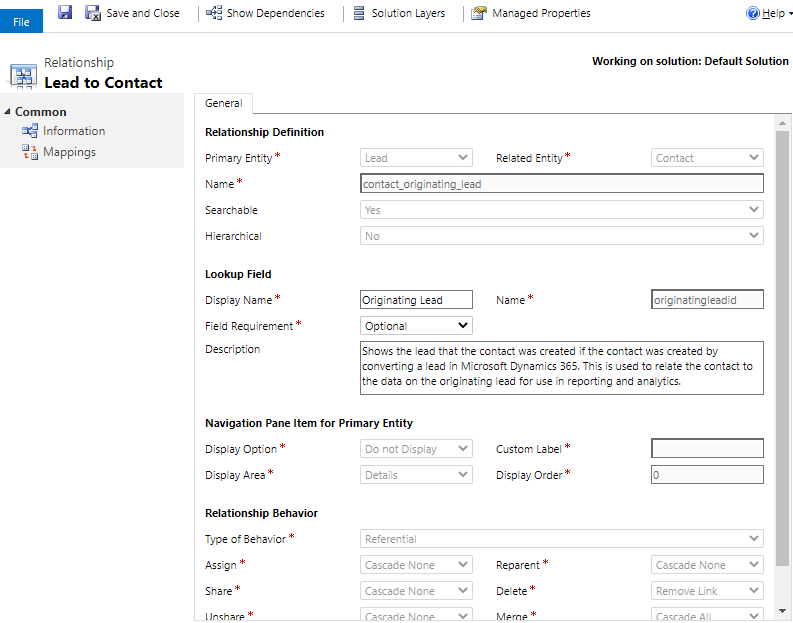
    pastedimage1620200395221v3.png

    2. With custom function

    If you don't want to convert Lead to Contact by Qualify button, we can use an on-demand workflow to ahcieve it. So you can insert dynamic values of Lead to the new Contact in Create a record step.
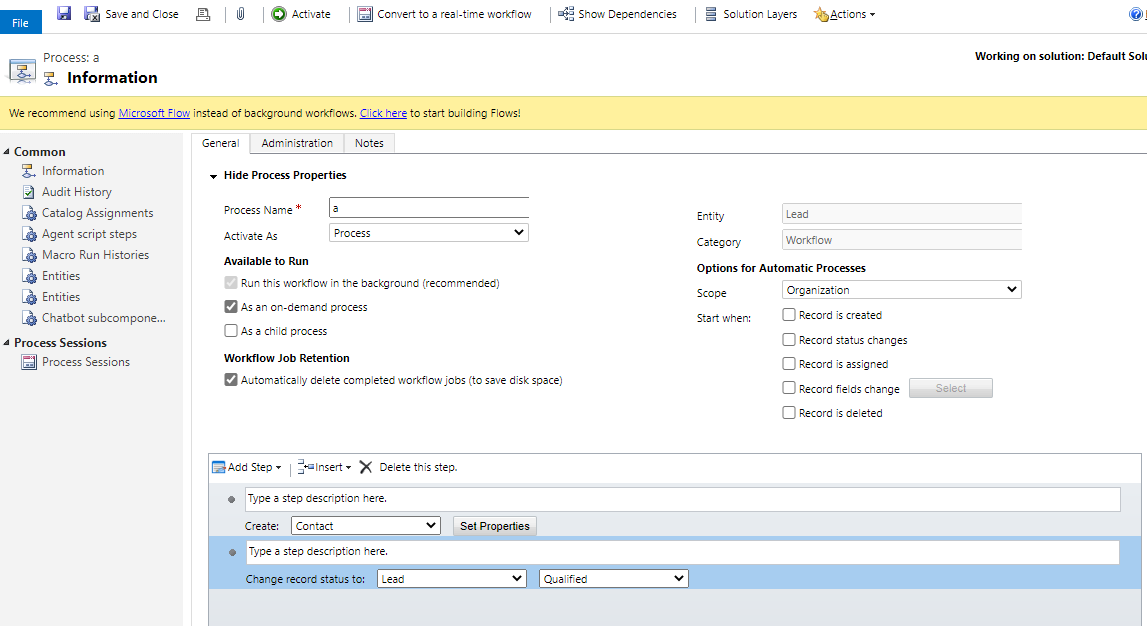
    pastedimage1620200567769v4.png

  • Verified answer
    CRMJetty Profile Picture
    3,512 on at

    Hello Hrytsak,

    Lead conversion in Microsoft Dynamics CRM enables you to quickly create the necessary customer records in Microsoft Dynamics365 by automatically creating an account, a contact, or an opportunity from the existing information on the lead.

    To convert a lead to contact follow the below steps:
    1. Navigate to Dynamics 365 -> Sales -> Leads (Select your lead and open lead detail) -> Click on Qualify from upper ribbon buttons.

    pastedimage1620203601942v1.png

    2. Now go to your lead, the Status will be changed to Qualified, and contact will be created based on lead information.

    pastedimage1620203640837v2.png

    You can see created contact in lead detail Contact field.

    I hope it helps,

    Thanks.

    Please mark as verified if the answer is helpful. Welcome to join hot discussions in Dynamics 365

    Dynamics CRM Customer Portal

Under review

Thank you for your reply! To ensure a great experience for everyone, your content is awaiting approval by our Community Managers. Please check back later.

Helpful resources

Quick Links

Responsible AI policies

As AI tools become more common, we’re introducing a Responsible AI Use…

Neeraj Kumar – Community Spotlight

We are honored to recognize Neeraj Kumar as our Community Spotlight honoree for…

Leaderboard > Customer experience | Sales, Customer Insights, CRM

#1
Tom_Gioielli Profile Picture

Tom_Gioielli 170 Super User 2025 Season 2

#2
#ManoVerse Profile Picture

#ManoVerse 61

#3
Gerardo Rentería García Profile Picture

Gerardo Rentería Ga... 52 Most Valuable Professional

Last 30 days Overall leaderboard

Product updates

Dynamics 365 release plans
Liquid error: parsing "/globalsearch/?q=Intel(r" - Not enough )'s.
