web
You’re offline. This is a read only version of the page.
close
Skip to main content

Announcements

No record found.

News and Announcements icon
Community site session details

Community site session details

Session Id :
Microsoft Dynamics AX (Archived)

WHS - Add new Table to a Query

(0) ShareShare
ReportReport
Posted on by

Hi all,

I wanted to add the Shipments table to a query on a Work Template to use the field "Stop number for loads". I added it, however it doesn't appear in the "Sorting" tab as you can see in the following picture (but it does appear in the "Range" tab):
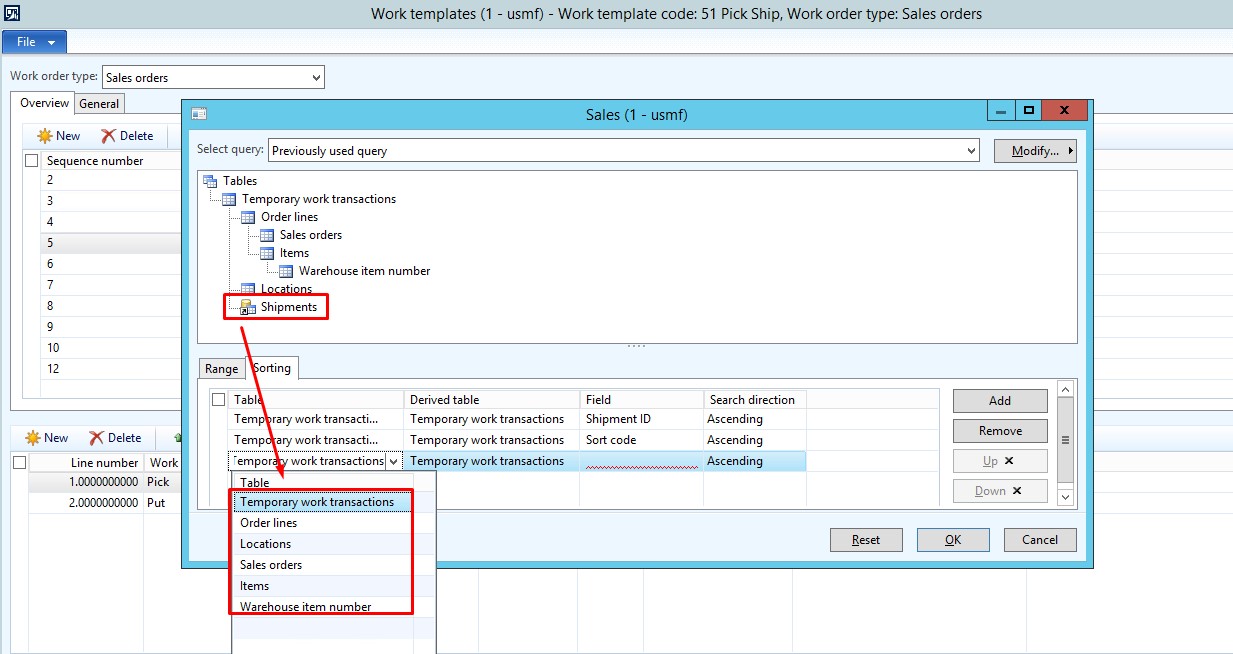
wms1.jpg

I think it is strange because if I want to use any other table in the "Sorting" tab different from the "Temporary work transactions" table, I'm receiving the following error:
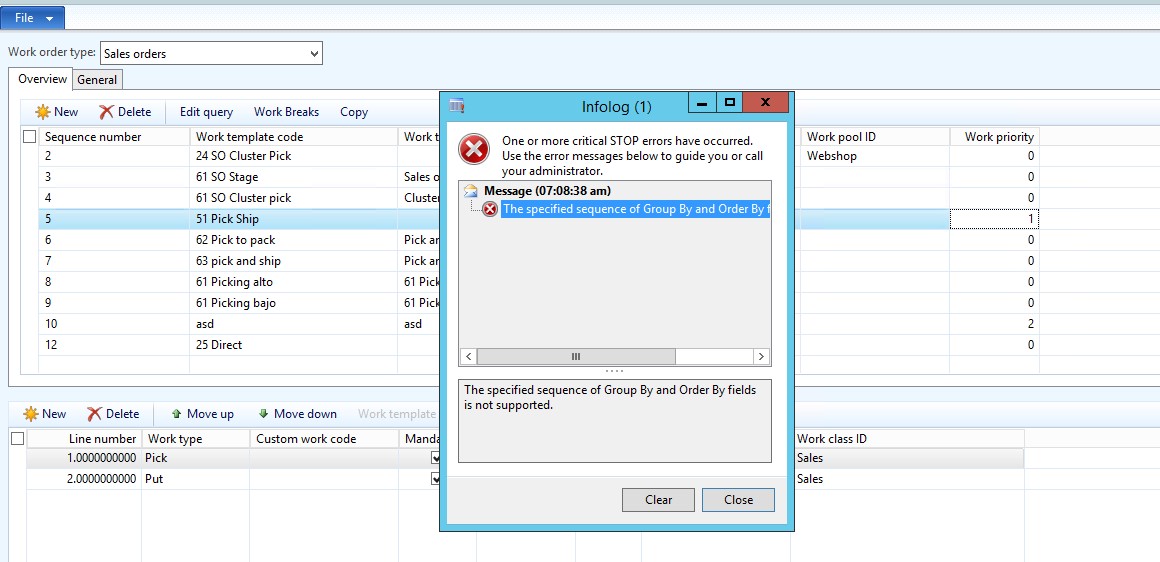
wms2.jpg

Has anybody faced this issue?

*This post is locked for comments

I have the same question (0)
  • Guy Terry Profile Picture
    28,977 Moderator on at

    Yes, I find the same.

    There was a similar problem on the Location Directive Action that was fixed:

    community.dynamics.com/.../234548

    But I think on the Work template it is probably deliberate. If you have a small number of 'Stop numbers', you could create a Wave Template for each and pass the value to the Temporary Work Transaction via the 'Attributes'.

    If you have a large number of Stops, you might need to consider a mod to add this field to the Temporary work transaction, or modify the query on the Work template to allow sorting on all tables (although bear in mind that they probably designed it not to work this way for a reason!)

  • Community Member Profile Picture
    on at

    Hi Guy, thanks for your answer.

    I think the number of "Stops" is a large number because it indicates each point where a shipment is delivered on a route.

    My idea was to use that field to indicate the order in which Works are supossed to be created (Works should be picked on the inversed order they will be delivered; in other words, you load first into a lorry what you deliver last).

    I will analyze any chance to pass it as a value to the Temporary work transaction table.

    Thanks again.

Under review

Thank you for your reply! To ensure a great experience for everyone, your content is awaiting approval by our Community Managers. Please check back later.

Helpful resources

Quick Links

Introducing the 2026 Season 1 community Super Users

Congratulations to our 2026 Super Stars!

Meet the Microsoft Dynamics 365 Contact Center Champions

We are thrilled to have these Champions in our Community!

Congratulations to the April Top 10 Community Leaders

These are the community rock stars!

Leaderboard > 🔒一 Microsoft Dynamics AX (Archived)

#1
CP04-islander Profile Picture

CP04-islander 39

#2
Michel ROY Profile Picture

Michel ROY 14

#3
imran ul haq Profile Picture

imran ul haq 8

Last 30 days Overall leaderboard

Featured topics

Product updates

Dynamics 365 release plans
