web
You’re offline. This is a read only version of the page.
close
Skip to main content

Announcements

News and Announcements icon
Community site session details

Community site session details

Session Id :
Small and medium business | Business Central, N...
Suggested Answer

QR implementation of Invoices without an amount

(0) ShareShare
ReportReport
Posted on by

Dear partners

I would be interested in know-how about the "new" QR implementation of QR Invoices without an amount (Figure 15) in Business Central ?

Can anyone describe an "efficient" procedure ?

from Import of purchase invoice to vendor payment -> export payment file

Thank you very much for your help!

pastedimage1655188476527v1.png

I have the same question (0)
  • Suggested answer
    Andy Sather Profile Picture
    Microsoft Employee on at

    I found this from our docs site

    docs.microsoft.com/.../ui-extensions-qr-bill-management

  • Suggested answer
    YUN ZHU Profile Picture
    102,476 Super User 2026 Season 1 on at

    Hi, This appears to be a localized feature for the Swiss region, if you can reproduce the problem in the Cronus database, it is recommended that you submit it to Microsoft.

    https://www.linkedin.com/pulse/ready-release-qr-bill-management-dynamics-365-central-s%C3%B8ren-friis/

    Hope this helps as well.

    Thanks.

    ZHU

  • Sleina Profile Picture
    on at

    Hi YUN ZHU

    Thank you very much for the answer!

    I add the following for documentation, I created a Microsoft Ticket for my case.

    Maybe somebody can relate.

    We are currently using the feature and it works if you have a QR-Reader. The QR-Bill part is available.

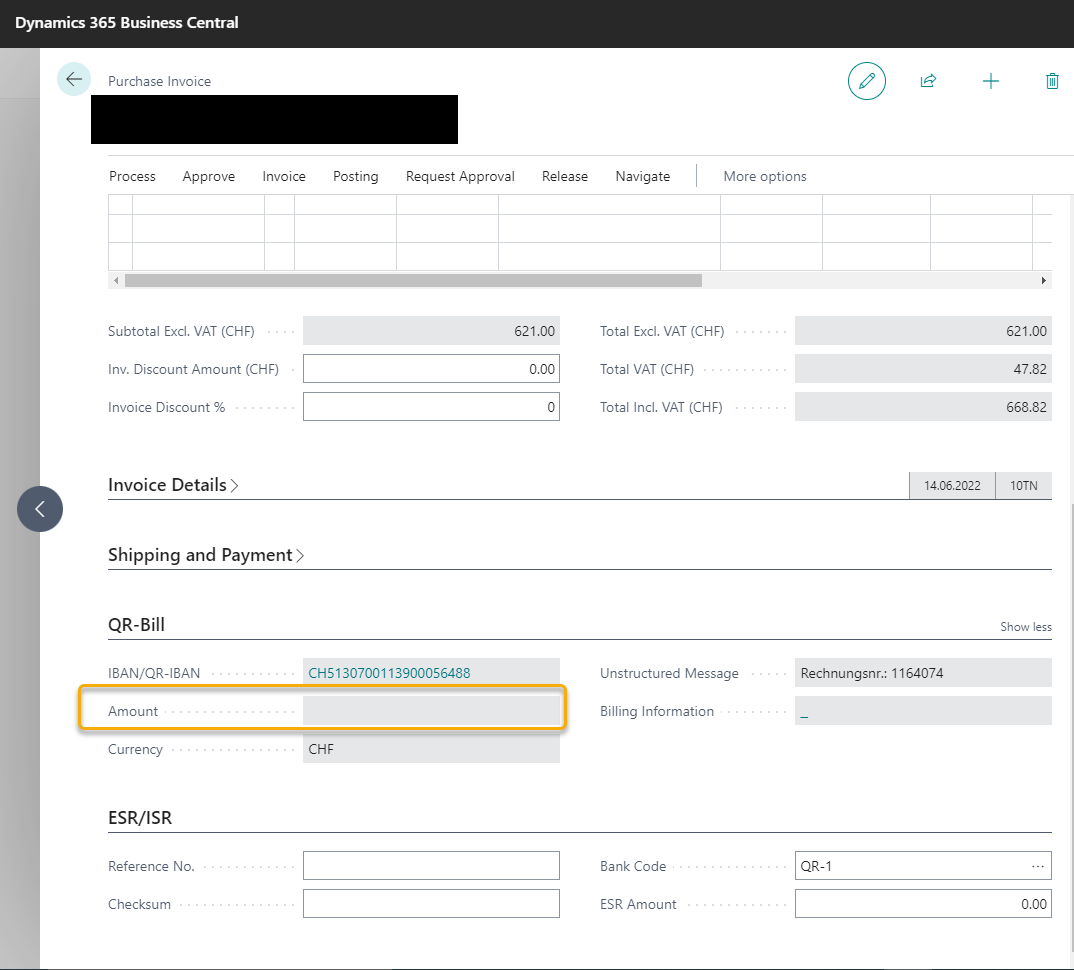
    But in some cases we receive QR-Invoices in which the amount is left empty, it has to be filled out by the accountant of the company that receives the Bill, pretty common in Switzerland. Every thing else is filled out like the reference no. , the payment information etc.

    See below example:
    pastedimage1655881384139v1.png

    The main problem now is that we can not change the value in this field after we "read" the QR-Bill, it's non editable. And since there is no amount the invoice can't be posted.

    Currently as a "workaround" for such invoices we add them manually, which is not the best solution.

Under review

Thank you for your reply! To ensure a great experience for everyone, your content is awaiting approval by our Community Managers. Please check back later.

Helpful resources

Quick Links

Season of Sharing Community Challenge Winners!

Congratulations to our community stars!

Women in Power Builds Momentum

Expanding mentorship, skilling, and AI innovation

Congratulations to the June Top 10 Community Leaders

These are the community rock stars!

Leaderboard > Small and medium business | Business Central, NAV, RMS

#1
OussamaSabbouh Profile Picture

OussamaSabbouh 702 Super User 2026 Season 1

#2
YUN ZHU Profile Picture

YUN ZHU 481 Super User 2026 Season 1

#3
Khushbu Rajvi. Profile Picture

Khushbu Rajvi. 328 Super User 2026 Season 1

Last 30 days Overall leaderboard

Featured topics

Microsoft Training Manuals

Product updates

Dynamics 365 release plans
