web
You’re offline. This is a read only version of the page.
close
Skip to main content

Announcements

No record found.

News and Announcements icon
Community site session details

Community site session details

Session Id :
Microsoft Dynamics AX (Archived)

Project management and accounting

(0) ShareShare
ReportReport
Posted on by 405

We have some projects for which the status has been changed to finished and there is no pending transactions in the project .

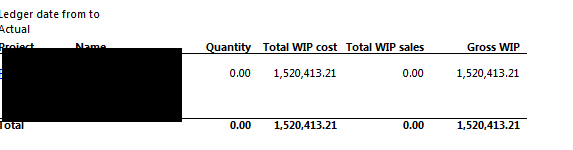
But when i run the WIP report i am getting the value in the WIP report .

2017_2D00_01_2D00_24_5F00_18_2D00_59_2D00_51.png

Parameters Used.

2017_2D00_01_2D00_24_5F00_19_2D00_00_2D00_30.png

Output.

2017_2D00_01_2D00_24_5F00_19_2D00_00_2D00_59.png

What process need to be done so that the WIP value will get removed

*This post is locked for comments

I have the same question (0)
  • Suggested answer
    Ludwig Reinhard Profile Picture
    Microsoft Employee on at

    Hi,

    This seems to be a time and material project.

    Can you verify whether all project transactions have been invoiced?

    This should actually clear the WIP account.

    If this does not help please check if you have some non-chargable transactions pending on the WIP account. They can be moved to the P&L by making use of the post cost functinality.

    Best regards,

    Ludwig

  • santarzan Profile Picture
    405 on at

    Hi Ludwig,

    Can you pls help me to check that all the transactions are been invoiced or not

    i saw in the posted entries but dint get any

  • Ludwig Reinhard Profile Picture
    Microsoft Employee on at

    Hi Nandhini Devi,

    The Project Control forms include a special tab for the invoice Control.

    This form allows you checking whether some Transactions have not been invoiced.

    It also lists the non-chargeable transactions that cannot be invoiced and might cause the balance on your WIP account.

    Best regards,

    Ludwig

  • santarzan Profile Picture
    405 on at

    Hi Ludwig,

    On seeing the invoice control i found the below.

    In the Invoice controls the form seems to be blank.

    2017_2D00_01_2D00_25_5F00_12_2D00_51_2D00_40.png

    While navigating.

    2017_2D00_01_2D00_25_5F00_12_2D00_43_2D00_37.png

    Values in invoice Journal.

    2017_2D00_01_2D00_25_5F00_12_2D00_44_2D00_26.png

    On Account no data is there.

    2017_2D00_01_2D00_25_5F00_12_2D00_51_2D00_40.png

    Do it means all are invoiced.

  • Verified answer
    Ludwig Reinhard Profile Picture
    Microsoft Employee on at

    Hi Nandhini Devi,

    The first screen that you posted above should show some data if you have invoiced something to the customer.

    Can you open it again and select the calculate button on the very top?

    Best regards,

    Ludwig

  • santarzan Profile Picture
    405 on at

    Hi Ludwig,

    Yes there are data in it .

    thanks a lot for the help.

Under review

Thank you for your reply! To ensure a great experience for everyone, your content is awaiting approval by our Community Managers. Please check back later.

Helpful resources

Quick Links

Introducing the 2026 Season 1 community Super Users

Congratulations to our 2026 Super Stars!

Congratulations to our 2025 Community Spotlights

Thanks to all of our 2025 Community Spotlight stars!

Leaderboard > 🔒一 Microsoft Dynamics AX (Archived)

#1
Joris dG Profile Picture

Joris dG 5

#2
Alexey Lekanov Profile Picture

Alexey Lekanov 2

#2
Henrik Nordlöf Profile Picture

Henrik Nordlöf 2 User Group Leader

Last 30 days Overall leaderboard

Featured topics

Product updates

Dynamics 365 release plans