Hello,
I have enabled Knowledge Management in all my 6 custom entities. I am creating my articles on the Customer Service Hub and article creation offers no problem at all. I have added the Knowledge Base Search control on the main forms of the entities. I can search for the articles through the control. But I have several issues with the controls that need to be resolved ASAP.
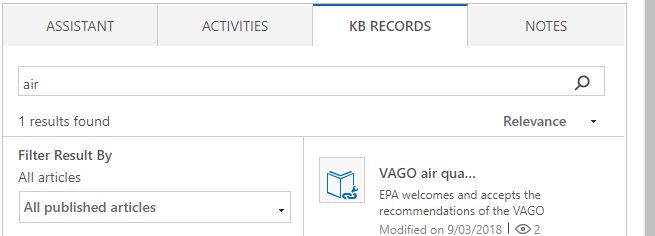
- Having the Knowledge Management enabled on all 6 entities, the expected behavior is that the KB Records tab should appear in the Activities pane on the main form of each entity. But it is only appearing in only one form.
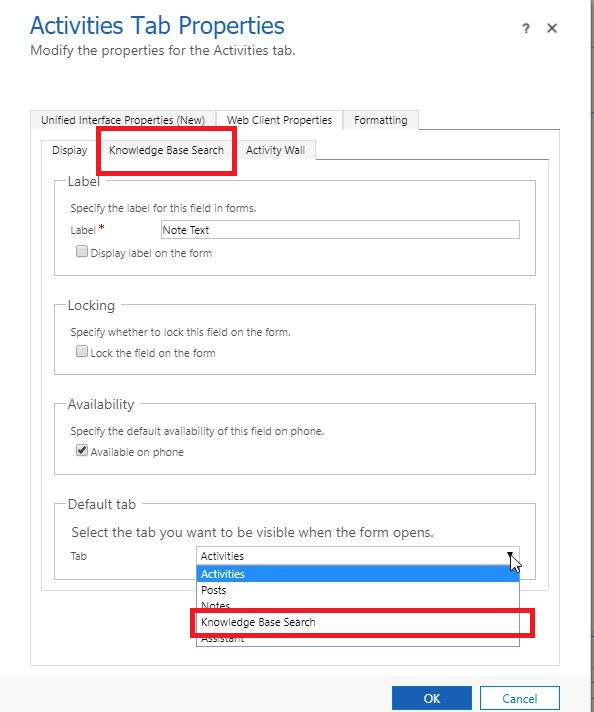
- When I check on the Activities Tab of each main form, the Knowledge Base Search is missing under the Web Client properties tab.
- When I drill down on the "Select the tab you want to be visible when the form opens", Knowledge Base Search is missing on the options. This happens on five entities.
- My temporary resolution is to add a separate KB Search control on each main form. Search is working on all 6 entities. I can link a search article to a record under one entity. However, when I try to navigate to another entity and select a case record on it to link to an article I noticed that the KB search control is still referencing to the previous entity. I would have to click the refresh button of my browser to make the link button reference the current record under the current entity.
- I try to display the linked articles for a particular record under each entity using a subgrid, but the articles are not showing on the subgrid. I might be doing it incorrectly.
- The following images are provided.

I will appreciate your help on this.
Thank you,
CRMFan
*This post is locked for comments
I have the same question (0)









 Share
Share Report
 All responses (
 Answers (


 4
4

