web
You’re offline. This is a read only version of the page.
close
Skip to main content

Announcements

No record found.

News and Announcements icon
Community site session details

Community site session details

Session Id :
Microsoft Dynamics AX (Archived)

Applying Quantity Discounts

(0) ShareShare
ReportReport
Posted on by

I am learning how to use the various discount options in Retail for Dynamics AX 2012 R3 (6.3.124.0). I set up a quantity discount with the idea of if you buy five items from a category then a 10% discount is added to all items from that category on the order.
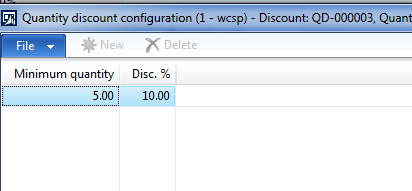
qtydiscount.PNG

However, when I do this it only applies the discount to items after item 4. Am I misunderstanding the functionality of the quantity discounts? If so, any advice on how to set up a discount for this scenario? 

Thanks,

J.M.

*This post is locked for comments

I have the same question (0)
  • Suggested answer
    Pir_Rana Profile Picture
    836 on at

    Hi,

    In your discount setup, you configure the 10% discount with minimum purchase of 5 qty.

    So it is applicable after the purchase of 4th item.  

  • Suggested answer
    Bashir Ahmad Profile Picture
    5,248 on at

    you may need to verify the config properties :

    technet.microsoft.com/.../dn716086.aspx

    technet.microsoft.com/.../hh597110.aspx

  • Naru Profile Picture
    10 on at

    Hi All,

    I have configured quantity discount as 15% discount is to be applied on the purchase of 3 or more products.

    The discounts are being applied for the items with the same variants but it is not being applied for the items with different variants. For example, if in a transaction item A with black color is sold for a quantity of 4 then discount is being applied. However, discount is not being applied for a transaction with item A, item B , item C and item D.

    Is this the standard behavior or Am i missing something in set up. Could you please help me on this.

Under review

Thank you for your reply! To ensure a great experience for everyone, your content is awaiting approval by our Community Managers. Please check back later.

Helpful resources

Quick Links

Introducing the 2026 Season 1 community Super Users

Congratulations to our 2026 Super Stars!

Congratulations to our 2025 Community Spotlights

Thanks to all of our 2025 Community Spotlight stars!

Leaderboard > 🔒一 Microsoft Dynamics AX (Archived)

#1
Joris dG Profile Picture

Joris dG 5

#2
Sagar Suman Profile Picture

Sagar Suman 2 Super User 2026 Season 1

#2
Alexey Lekanov Profile Picture

Alexey Lekanov 2

Last 30 days Overall leaderboard

Featured topics

Product updates

Dynamics 365 release plans
