Hi there, I'm having a problem installing the CRM 2016 plugin for Outlook 2016. Its an on premise version.
"The Installation has failed. Dr. Watson installation failed. Clock the link below to view the log file."
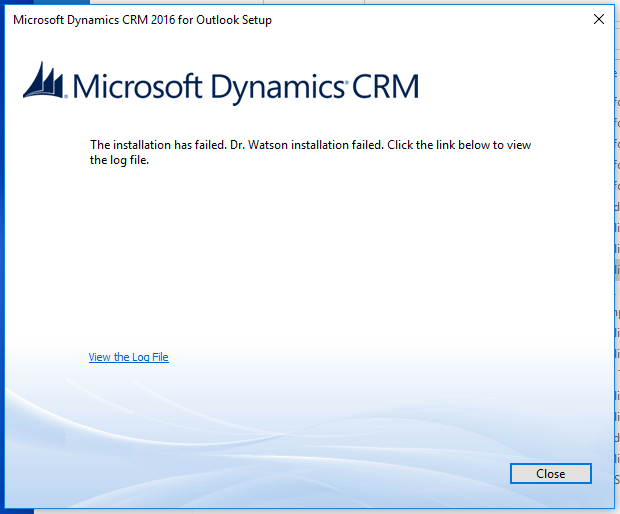
Here is a copy form the log:
10:40:42|   Info| Bootstrap version: 8.0.0.1088.
10:40:42|   Info| User: <user>.
10:40:42|   Info| Initializing COM.
10:40:42|   Info| Initialized COM.
10:40:42|   Info| IsSqlExprRequiredSpInstalled=1
10:40:42|   Info| Current OS Version: 6.2.9200
10:40:42|   Info|   ServicePack:
10:40:42|   Info|   System Type: Workstation
10:40:42|   Info|   Suite Mask: 0x0100
10:40:42|   Info| IsIeInstalled=1
10:40:42|   Info| DotNet v4 Release value: 461808
10:40:42|   Info| IsDotNetInstalled=1
10:40:42|   Info| CIsVcRedist12Installed=1
10:40:42|   Info| VCRedist 12 with version 12.0.21005  is already installed
10:40:42|   Info| CIsVcRedist10Installed=1
10:40:42|   Info| VCRedist 10 SP1 with version 10.0.40219  is already installed
10:40:42|   Info| Initializing COM.
10:40:42|   Info| Initialized COM.
10:40:42|   Info| Uninitializing COM.
10:40:42|   Info| Uninitialized COM.
10:40:42|   Info| IsDrWatsonInstalled=0
10:40:42|   Info| Get the job key value BITSLocalTempDir as C:\Users\<user>~1\AppData\Local\Temp\MSCRM_{7B94AE3C-325E-46E4-AC5A-03DC93BBE85A} from the registry.

10:40:42|   Info| Checking whether installer dw20shared.msi is locally available
10:40:42|   Info| Installer path for Microsoft Application Error Reporting set to C:\Users\<user>\Downloads\CRM\DW\dw20shared.msi
10:40:42|   Info| DotNet v4 Release value: 461808
10:40:42|   Info| IsDotNetInstalled=1
10:40:42|   Info| IsSqlCe64BitInstalled=0
10:40:42|   Info| Prereq component installer will use downloaded installer for SSCERuntime_x64-*.exe.
10:40:42|   Info| Installer path for Microsoft SQL Server Compact 4.0 Service Pack 1 set to C:\Users\<user>~1\AppData\Local\Temp\MSCRM_{7B94AE3C-325E-46E4-AC5A-03DC93BBE85A}\SSCERuntime_x64-1033.exe
10:40:42|   Info| IsSqlSystemClrTypesInstalled=0
10:40:42|   Info| Prereq component installer will use downloaded installer for SQLSysClrTypes_x86.msi.
10:40:42|   Info| Installer path for SQL System Clr Types set to C:\Users\<user>~1\AppData\Local\Temp\MSCRM_{7B94AE3C-325E-46E4-AC5A-03DC93BBE85A}\SQLSysClrTypes_x86.msi
10:40:42|   Info| IsReportViewerControlInstalled=0
10:40:42|   Info| Prereq component installer will use downloaded installer for ReportViewer.msi.
10:40:42|   Info| Installer path for Microsoft SQL Reporting Service Report Viewer Control set to C:\Users\<user>~1\AppData\Local\Temp\MSCRM_{7B94AE3C-325E-46E4-AC5A-03DC93BBE85A}\ReportViewer.msi
10:40:43|   Info| Patchfile target Product code: {0C524D20-0409-0080-8A9E-0C4C490E4E54}
10:40:43|   Info| Patchfile target version: 8.0.0000.0000
10:40:43|   Info| Patchfile target language: 1033
10:40:43|   Info| Patchfile target upgrade code: {B9D53805-50DD-4898-8B87-1B2891471F5A}
10:40:43|   Info| Patchfile passed validation checks.
10:40:43|   Info| MSP file C:\Users\<user>\Downloads\CRM\Update\Client_KB3121695_I386_1033.msp will be installed
10:40:43|   Info| GetSIDOfLoggedOnUser: Starting
10:40:43|   Info| GetSIDOfLoggedOnUser: before WTSQueryUserToken, session=5
10:40:43|   Info| GetSIDOfLoggedOnUser: return code = 1314
10:40:43|   Info| Using the following Language Pack msi - C:\Users\<user>\Downloads\CRM\MUISetup_1033_i386.msi
10:40:43|   Info| Initializing COM.
10:40:43|   Info| Initialized COM.
10:40:43|   Info| Installing Microsoft Application Error Reporting
10:40:43|   Info| Log file: C:\Users\<user>\AppData\Local\Microsoft\MSCRM\Logs\watson.log
10:40:43|   Info| Launching external process:
10:40:43|   Info|      CmdLine:  <msiexec /i "C:\Users\<user>\Downloads\CRM\DW\dw20shared.msi" /LV* "C:\Users\<user>\AppData\Local\Microsoft\MSCRM\Logs\watson.log" /qn REBOOT=ReallySuppress APPGUID={0C524D20-0409-0080-8A9E-0C4C490E4E54} REINSTALL=ALL REINSTALLMODE=vomus>
10:40:43|   Info|   WorkingDir: <C:\Users\<user>\Downloads\CRM\DW>
10:40:53|   Info| Installation of Microsoft Application Error Reporting failed. Exit code: 1603. Result: Fatal error during installation.
10:40:53|   Info| Uninitializing COM.
10:40:53|   Info| Uninitialized COM.
10:40:53|   Info| Uninitializing COM.
10:40:53|   Info| Uninitialized COM.
10:40:53|   Info| === Setup bootstrap logging started 2/7/2019 10:40:53 AM ===
10:40:53|   Info| Bootstrap version: 8.0.0.1088.
10:40:53|   Info| User: <user>.
10:40:53|  Error| Installation of Microsoft Dynamics CRM for Outlook failed.
*This post is locked for comments
I have the same question (0)







