web
You’re offline. This is a read only version of the page.
close
Skip to main content

Announcements

No record found.

News and Announcements icon
Community site session details

Community site session details

Session Id :
Finance | Project Operations, Human Resources, ...
Answered

BYOD export using DIXF intermittently getting stuck and failing

(0) ShareShare
ReportReport
Posted on by

Hi All,

We have schedule the DIXF export project as batch job that export to BYOD in azure.

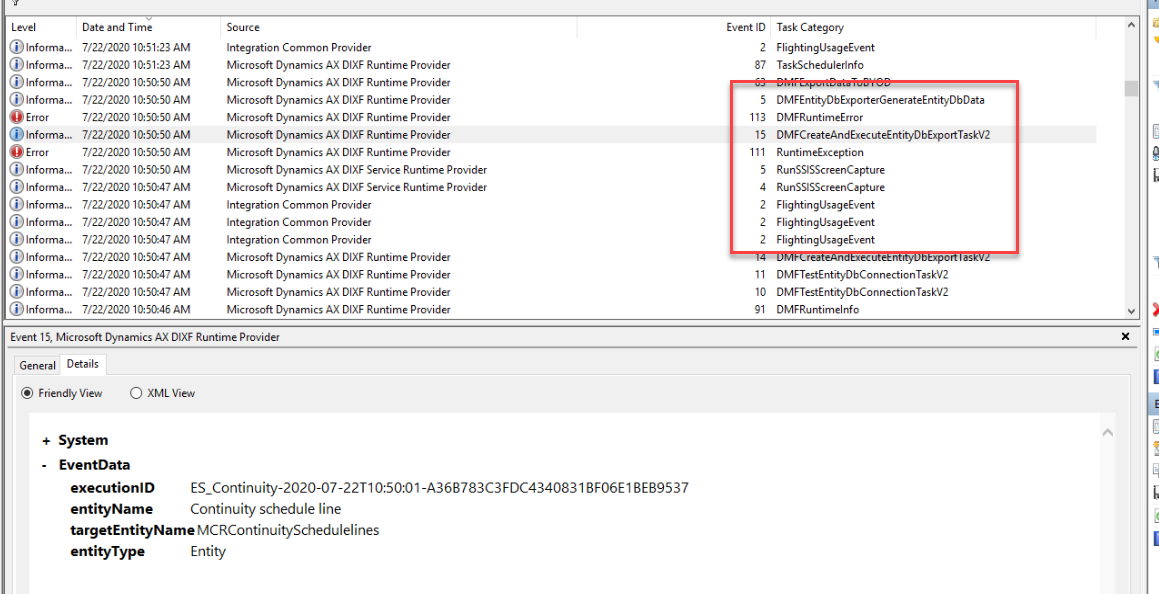
Batch job is failing at the below shown task and it's errors & warnings beside it.

pastedimage1595387809022v3.png pastedimage1595387929243v4.png

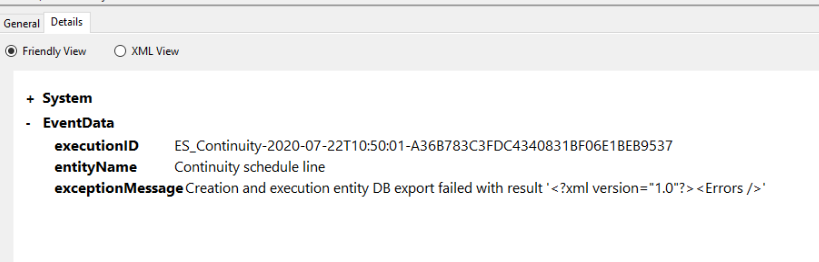
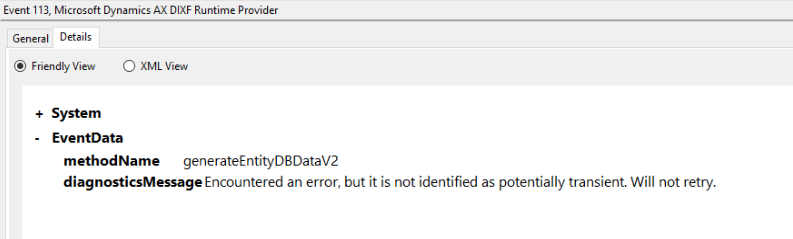
Below are the error logged in windows event viewer on AOS server where batch was running and failed.
pastedimage1595387621660v1.png

pastedimage1595387643585v2.png

eventvwr.msc.png

Any idea on what is going wrong with this? This is intermittently happening with many other data entity exports to BYOD.  We are on 10.012 preview version at the moment.

Please let me know if you have come across this.

I have the same question (0)
  • Suggested answer
    Laura Manache Profile Picture
    Microsoft Employee on at

    Hi Vikky,

    Thank you for reaching out to Microsoft community.

    Please make sure that the entities are published to BYOD with latest schema. So, better to unpublish the entities from BYOD, delete entities from entity list which are causing issue, while deleting make sure it is not part of any data project and do the entity refresh.

    Please also check the entity staging tables in BYOD and make sure the property Mandatory is set to No(allow null) on all the columns. This issue might be caused by an index violation on the BYOD side or constraint violation on inserting to the destination table if there is a column set to not allow nulls that is not set on this export. One recommended workaround for this would be check the indexes and to go through the column settings in the destination database for your data entities and set all columns to allow nulls that are not already set to allow nulls.

    Additionally, it might be also that the connection to SQL is unable to handle the volumes infused by the exports and please try to set the connection mode from proxy to redirect as explained into below article and retry the export:docs.microsoft.com/.../connectivity-architecture

    Please let us know if this helps or if you need any other information, and we will be more than glad to assist further. Also, kindly mark as verified if the answer is helpful.

    If there is no helpful information, then please open a Support Ticket with Microsoft to get this investigated further.

    With kind thoughts,
    Laura

  • VRD Profile Picture
    on at

    Hi Laura,

    Thanks for your reply.

    Please note that this has started happening after 10.0.12 preview update only.

    It was all running fine earlier.

    May I ask for your advice on what would be the outcome if we unpublish the entity and republish? Wouldn't it restart the full sync again? We have a large volume of data to sync and hence it's not good idea to do full sync again.

    Thanks,

  • Suggested answer
    Alireza Eshaghzadeh Profile Picture
    14,865 Super User 2026 Season 1 on at

    Hi Vikky ,

    Have tried to update entity list after the update?

    Please check the feedback from Laura regarding the un-publish and publish the entity against the database and follow the steps.

    By publishing an entity to the database (again), the first export run will be "FullPush" automatically although you have chosen "Incremental push only".

  • Suggested answer
    Ajit Profile Picture
    8,788 on at

    Republishing will full push the data but anyway row count might not be matching between D365 and BYOD since it is failing. Are they standard entities or custom entities? I would also check if any column part of the entity is disabled (obsolete) in 10.0.12. 

  • VRD Profile Picture
    on at

    I have added event viewer screenshot in the original question in case if anyone get the hint of the issue.

  • Ajit Profile Picture
    8,788 on at

    Hi Vicky, It would be helpful if you can give answer to asked questions? 

    1. Standard entities or custom or mix?

    2. Global or company specific

    3. Provide some examples if it is happening for standard entities. 

    4. Did you try same entities in non prod instances?

  • VRD Profile Picture
    on at

    Hi Ajit,

    These are happening with both standard and custom entities on non production instance. For standard one, Inventory On hand by warehouse. Please note that it's happening intermittently. It fails 3 to 4 times a day.

  • Suggested answer
    Rahul Mohta Profile Picture
    21,046 on at
  • Verified answer
    VRD Profile Picture
    on at

    MS did resolve it for us by enabling the flight ''DMFExecuteSSISInProc''

Under review

Thank you for your reply! To ensure a great experience for everyone, your content is awaiting approval by our Community Managers. Please check back later.

Helpful resources

Quick Links

Introducing the 2026 Season 1 community Super Users

Congratulations to our 2026 Super Stars!

Meet the Microsoft Dynamics 365 Contact Center Champions

We are thrilled to have these Champions in our Community!

Congratulations to the April Top 10 Community Leaders

These are the community rock stars!

Leaderboard > Finance | Project Operations, Human Resources, AX, GP, SL

#1
Giorgio Bonacorsi Profile Picture

Giorgio Bonacorsi 621

#2
André Arnaud de Calavon Profile Picture

André Arnaud de Cal... 575 Super User 2026 Season 1

#3
CP04-islander Profile Picture

CP04-islander 430

Last 30 days Overall leaderboard

Product updates

Dynamics 365 release plans