web
You’re offline. This is a read only version of the page.
close
Skip to main content

Notifications

Announcements

No record found.

Community site session details

Community site session details

Session Id :
Small and medium business | Business Central, N...
Suggested Answer

Dimension error on payment journal posting

(0) ShareShare
ReportReport
Posted on by 63

Where do we go to fix the default dimension on the cash discount on payment runs?

7268.Capture.PNG

I have the same question (0)
  • Suggested answer
    Mohana Yadav Profile Picture
    61,001 Super User 2025 Season 2 on at

    It is showing the line no.s 10000 and 180000

    Please update the dimensions as per the errors in the above lines.

  • DebbieCOH Profile Picture
    63 on at

    Yes I saw that but was unable to correct that way.

    I'm asking where does the payment journal pull the information for the vendor discount account from?  Is there a setup somewhere that tells it what GL account to use?

  • MetaKa Profile Picture
    on at

    In the chart of accounts for the accounts of the lines should be a requirement for dimensions.

    You must fill in the dimensions of the lines or define a default dimension for the accounts you are trying to register.

    Usually, it is maked mandatory for the user to configure the correct dimension before posting, but there could be accounts that always have the same dimensions (case 2).

  • DebbieCOH Profile Picture
    63 on at

    Let me back track.

    The controller made the dimension mandatory for the vendor discount GL account.  After that I got the error message on the payment run.  The only way I was able to post is he took the mandatory dimension off.  How do we get it to post to the correct dimension without causing the payment run to have an error?

  • MetaKa Profile Picture
    on at

    In the journal, in the upper actions > Line > Dimensions

    You must indicate the mandatory dimension.

    This action button is located in every page where u could need it.

    Best regards!

  • DebbieCOH Profile Picture
    63 on at

    Sorry I'm not following.

    Let me ask this, where do we assign what GL account # we want vendor payment discounts to go to?

  • Suggested answer
    Cynthia Priebe, MCT, MCP Profile Picture
    203 on at

    You can find the accounts for payment, line and invoice discounts in General Posting Setup. I hope this is finally the answer you are looking for ;-)

    Look for the record with the General Business Posting Group assigned to the Vendor and the General Product Posting Group(s) assigned to the item, GL account, etc. assigned to the lines.

  • DebbieCOH Profile Picture
    63 on at

    Thank you Full of BC !  That helps but I have a follow-up question.  I do not see where we can specify a dimension in general posting setup and the dimension is what caused the error (the controller made a dimension mandatory for that account).

  • Cynthia Priebe, MCT, MCP Profile Picture
    203 on at

    Dimensions can be assigned to master data then defaulted into transactions when that master data is used. For example, assign dimensions on a vendor that default into a purchase document or payment ledger entry. If you are posting from a payment journal and want a dimension to be posted to entries for the payment discount account (50350) it will most likely need to be entered manually on the line unless you can assign it as a default to the vendor.

    Dimensions on payment journal lines will apply to all GL accounts used in the entry. Dimensions cannot be assigned to posting groups.

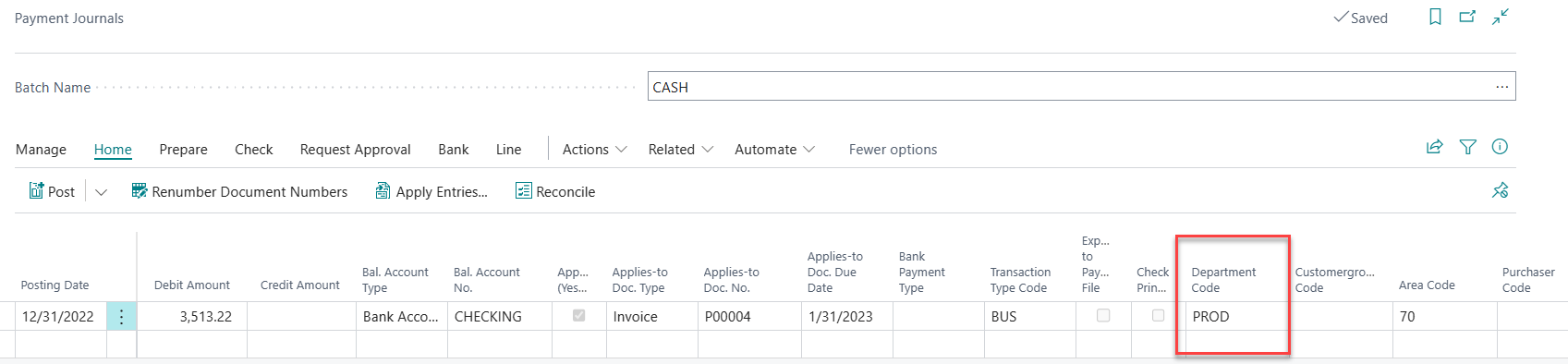
    Example of Dimensions on Payment Journal Line. The Department and Area are both assigned as defaults on the Vendor card.
    pastedimage1682379991903v2.png

    Example of Dimensions shown in Posting Preview (the third line in the entry is the payment discount account)

    pastedimage1682379976314v1.png

    I am curious for the business case for tracking a department dimension on discounts taken GL account.

Under review

Thank you for your reply! To ensure a great experience for everyone, your content is awaiting approval by our Community Managers. Please check back later.

Helpful resources

Quick Links

Responsible AI policies

As AI tools become more common, we’re introducing a Responsible AI Use…

Neeraj Kumar – Community Spotlight

We are honored to recognize Neeraj Kumar as our Community Spotlight honoree for…

Leaderboard > Small and medium business | Business Central, NAV, RMS

#1
OussamaSabbouh Profile Picture

OussamaSabbouh 3,010

#2
Jainam M. Kothari Profile Picture

Jainam M. Kothari 1,270 Super User 2025 Season 2

#3
YUN ZHU Profile Picture

YUN ZHU 1,085 Super User 2025 Season 2

Last 30 days Overall leaderboard

Featured topics

Product updates

Dynamics 365 release plans
