web
You’re offline. This is a read only version of the page.
close
Skip to main content

Notifications

Announcements

No record found.

Community site session details

Community site session details

Session Id :
Finance | Project Operations, Human Resources, ...
Answered

Create a Query AOT object with 2 times the same table and a GROUPBY

(0) ShareShare
ReportReport
Posted on by 329

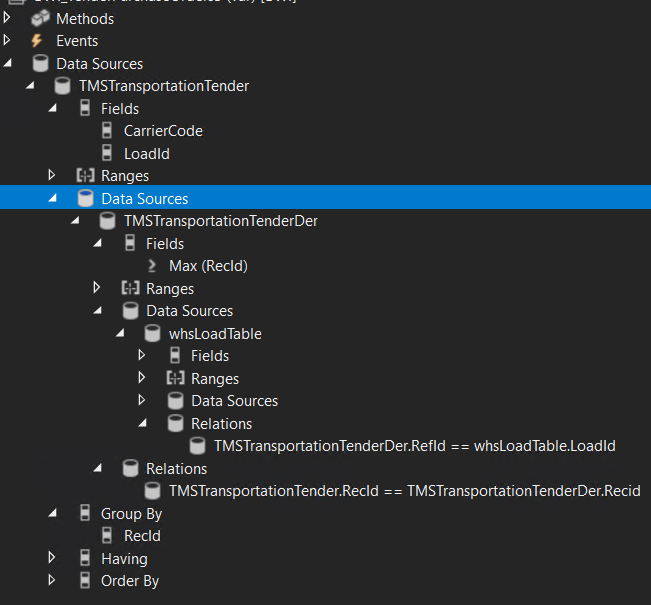
I created the following query.
pastedimage1680261972004v1.png
This query is created because I need unique TMSTransportationTender/whsLoadTable combinations and I want to grab the most recent TMSTransportationTender record and therefore GROUPBY on whsLoadTable.RecId and then grab the MAX(TMSTransportationTender.RecId).

Afterwards I join another instance of the TMSTransportationTender to grab the other columns from the Max(RecId) row.

It seems the query itself returns the correct rows, because via the bactch filters I pass a TMSTransportation's ReferenceId, of which there are two.

In the Service's process method I have the following code:

 while (queryRun.next())
        {
            try
            {
                ttsbegin;
                TMSTransportationTender tMSTransportationTender = queryRun.get(tableNum(TMSTransportationTender),1);
                TMSTransportationTender tMSTransportationTender2 = queryRun.get(tableNum(TMSTransportationTender),2);
                WHSLoadTable whsLoadTable = queryRun.get(tableNum(WHSLoadTable));
                CreatePurchaseOrdersForTendersService:: CreatePurchaseOrderForTender(tMSTransportationTender, whsLoadTable, shouldProcessDocumentStatusPurchaseOrder, shouldProcessDocumentStatusPurchaseInvoice);
                ttscommit;
            }
            catch (Exception::Info)
            {
                continue;
            }
        }

The good thing is that I only enter the loop once (so the GROUPBY is working as intended, returning only 1 resultset) and the TMSTransportationTender2 contains the highest RecId of both the rows.

The whsLoadTable is filled correctly as well.

But the problem is that I expect TMSTransportationTender1 to contain the values for carriercode and loadId, as I set them in my query object, but it only returns NULL values. 

Does anyone know what I am doing wrong or what could be missing here?

EDIT: add of SQL query that would be expected:
1185.sql-query.png

I have the same question (0)
  • Martin Dráb Profile Picture
    237,801 Most Valuable Professional on at

    Do I understand correctly that you want to get CarrierCode and LoadId from a query where you group by another field and you don't aggregate them? If so, they have no value defined, because the DB server doesn't know how to aggregate values from all the records in the group.

  • Superbunny Profile Picture
    329 on at

    Hey Martin,

    Yes, I indeed want to get carrierCode and LoadId unaggregated.

    The GROUPBY is however on a field of the WHS table and not on that instance of the TMSTransportationTenderTable.

    I will add an image of the expected query in basic SQL as well for better explanation

  • Verified answer
    Martin Dráb Profile Picture
    237,801 Most Valuable Professional on at

    You group a query, not a table. If you join T1 and T2 and group by T1.FieldA, no fields from T2 will be fetched (and only FieldA from T1).

    To get such a thing working, create a view for the grouped data and then join the view with the other table.

  • Superbunny Profile Picture
    329 on at

    ah, so do I understand correctly that it does work in plain SQL because I use a derived table there, but this does not work in the D365 query object because I do not get a derived table query in here?

    And the view allows me to GROUPBY within the view and then join the grouped result to a non-grouped set?

Under review

Thank you for your reply! To ensure a great experience for everyone, your content is awaiting approval by our Community Managers. Please check back later.

Helpful resources

Quick Links

Responsible AI policies

As AI tools become more common, we’re introducing a Responsible AI Use…

Neeraj Kumar – Community Spotlight

We are honored to recognize Neeraj Kumar as our Community Spotlight honoree for…

Leaderboard > Finance | Project Operations, Human Resources, AX, GP, SL

#1
Martin Dráb Profile Picture

Martin Dráb 660 Most Valuable Professional

#2
André Arnaud de Calavon Profile Picture

André Arnaud de Cal... 549 Super User 2025 Season 2

#3
Sohaib Cheema Profile Picture

Sohaib Cheema 307 User Group Leader

Last 30 days Overall leaderboard

Product updates

Dynamics 365 release plans



