web
You’re offline. This is a read only version of the page.
close
Skip to main content

Notifications

Announcements

No record found.

Community site session details

Community site session details

Session Id :
Microsoft Dynamics CRM (Archived)

Hide button when record is ACTIVE / Display button when record is IN-ACTIVE in Ribbon Workbench

(0) ShareShare
ReportReport
Posted on by

I've been at this for 2 hours and am ready to give up.

I want to make the Re-Open button disappear or be disabled when the record (Service Activity is OPEN)
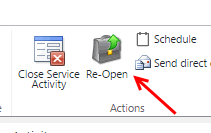
11_2D00_9_2D00_2016-9_2D00_38_2D00_21-PM.gif

Then when it's CLOSED, I want the button TO appear.

I believe this is done with FormStateRule, looking for condition = ReadOnly

I have reviewed all the relevant articles on the Develop1 site, watched 3 of the videos he's made, read every blog i could find and tried every conceivable combination of Display and Enable Rules, True/False/Null and cannot make this work.

I *was* able to make the button disappear entirely, whether the record was open/closed but that's not what I want.

Any input would be appreciated.  

Thank you.
 3_5B00_1_5D00_.png

*This post is locked for comments

I have the same question (0)
  • Community Member Profile Picture
    on at

    Hi,

    Refer this discussion.

    community.dynamics.com/.../153867

    Thanks...

  • Daniel at VNS Profile Picture
    on at

    yep - that was one of the many i read, as well as the articles linked from that one.  none worked.  whether i had blank/true/false default, invertresult = true/false/null and same with state.  Problem is, i can't find anything on the Develop1 site that clearly explains how each field works, or what I'd think would be a common scenario.  

    This is where I'm currently at and i've tried the same with enable rules.  I'm out of ideas.

    11_2D00_9_2D00_2016-10_2D00_01_2D00_12-PM.gif

  • Suggested answer
    Daniel at VNS Profile Picture
    on at

    Resolved:

    11_2D00_11_2D00_2016-9_2D00_11_2D00_33-AM.gif

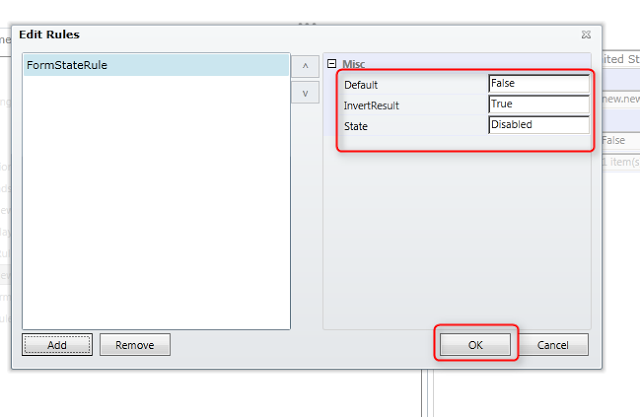
    This is what was needed.  I don't know if this is the right or best way (using both display/enable rules) but it did the job.  I was operating under the assumption that the default state should be disabled since that's when i wanted to trigger this but the inverse was true.   default state = an existing form, then we invert it:

    11_2D00_11_2D00_2016-9_2D00_11_2D00_33-AM.gif

    I would have expected True/ReadOnly/False to do the same thing but that resulted in no Re-Open icon whether the case was new/open or closed (read only).  Does not make sense.

    would be nice of the docs explained this more clearly but hey, the product is free and it's an incredible product.  BTW - this is from the beta version, running inside XRM Toolbox - also another incredible and free product.

  • Verified answer
    Daniel at VNS Profile Picture
    on at

    Update - had to add a 2nd rule for condition on NEW S/A.  Still don't understand why a single rule that tells ribbon to show icon ONLY when S/A status = read-only/closed but whatever, this works.

    11_2D00_11_2D00_2016-10_2D00_02_2D00_05-AM.gif

  • HenriquePalomo Profile Picture
    510 on at

    Daniel, YOU SAVED MY LIIIIIFE!!!

    Thank you!!!!

    I was facing the same problem. Probably this is a GAP from RibbonWorkbench 'BETA' version because i think the  previous version was working  normally just adding display rule, not both.

    So.... I don't know you but i can't use the previous version of RWB because it shows me a message that i need to install SilverLight.

  • MMK Profile Picture
    745 on at

    Awesome solution worked for me

Under review

Thank you for your reply! To ensure a great experience for everyone, your content is awaiting approval by our Community Managers. Please check back later.

Helpful resources

Quick Links

Responsible AI policies

As AI tools become more common, we’re introducing a Responsible AI Use…

Neeraj Kumar – Community Spotlight

We are honored to recognize Neeraj Kumar as our Community Spotlight honoree for…

Leaderboard > 🔒一 Microsoft Dynamics CRM (Archived)

#1
SA-08121319-0 Profile Picture

SA-08121319-0 4

#1
Calum MacFarlane Profile Picture

Calum MacFarlane 4

#3
Alex Fun Wei Jie Profile Picture

Alex Fun Wei Jie 2

Last 30 days Overall leaderboard

Featured topics

Product updates

Dynamics 365 release plans



