web
You’re offline. This is a read only version of the page.
close
Skip to main content

Notifications

Announcements

No record found.

Community site session details

Community site session details

Session Id :
Microsoft Dynamics CRM (Archived)

Ms Crm 2015 Reports can not be displayed.

(0) ShareShare
ReportReport
Posted on by 262

Hi everyone,

I can not run all the reports in crm 2015. When i create new reports using report wizard or using ssrc, the result can not be changed.

I can not run any report. How can i achieve this problem?

Can anyone help me please? 
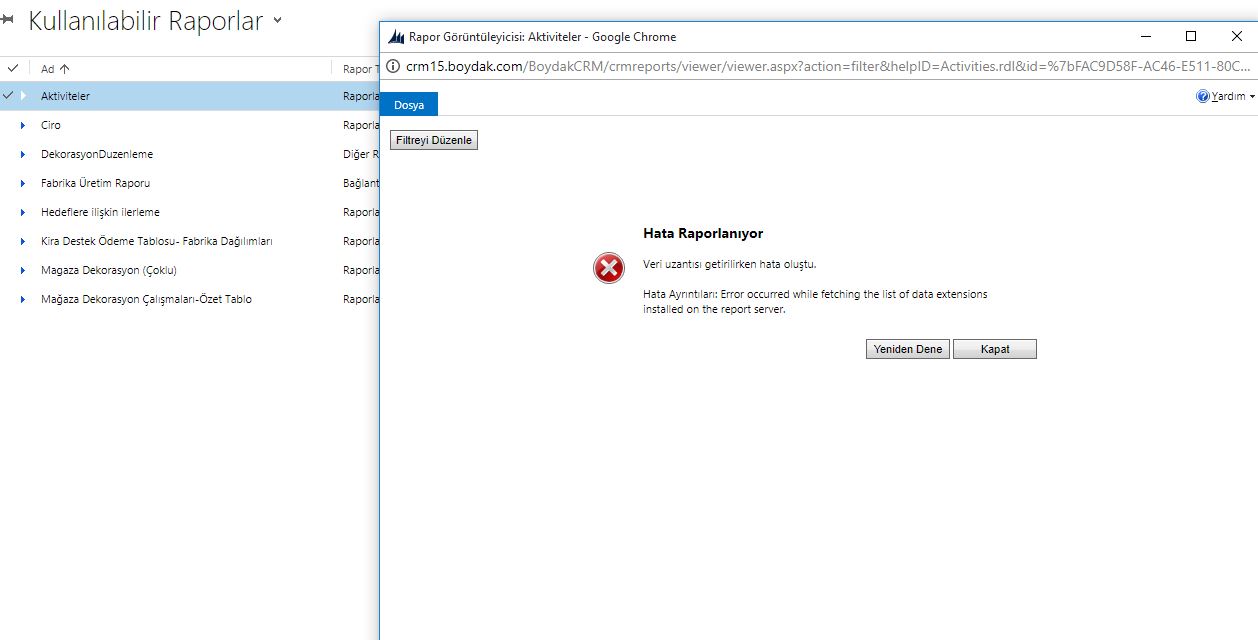
ask2.JPG

*This post is locked for comments

I have the same question (0)
  • Verified answer
    Radu Chiribelea Profile Picture
    6,667 on at

    Hi Muharrem,

    There are some steps you can check:

    Is the SSRS Data Connector installed correctly on the SSRS Server?

    Can you access the report server from the browser and run a report from there?

    Do you see anything in the SSRS Logs? (see technet.microsoft.com/.../cc512029.aspx)

    Are the SPNs configured correctly on the CRM & SSRS Server?

    Hope this helps,

    Radu

  • Suggested answer
    Preeti Sharma Profile Picture
    2,678 on at

    Hi,

    Is this crm online or on premise?

    If its on premise please check if you are having appropriate security roles on report server.

    Thanks:)

  • altun8tr Profile Picture
    262 on at

    Hi, ı looked the logs:

    * (from micrososft sql server 2014)  Web service request ListExtensions to Report Server 10.200.130.201/.../ReportService2005.asmx failed with SoapException. Error: The report server cannot open a connection to the report server database. A connection to the database is required for all requests and processing.

    *(From the sql server logs)    --- End of inner exception stack trace ---;

    crypto!ReportServer_0-1!520!02/07/2018-10:59:19:: i INFO: Initializing crypto as user: NT AUTHORITY\SYSTEM

    crypto!ReportServer_0-1!520!02/07/2018-10:59:19:: i INFO: Exporting public key

    crypto!ReportServer_0-1!520!02/07/2018-10:59:19:: i INFO: Performing sku validation

    crypto!ReportServer_0-1!520!02/07/2018-10:59:19:: i INFO: Importing existing encryption key

    crypto!ReportServer_0-1!520!02/07/2018-10:59:19:: i INFO: Importing existing encryption key using 1024 bit key

    library!ReportServer_0-1!520!02/07/2018-10:59:19:: e ERROR: Throwing Microsoft.ReportingServices.Library.ReportServerDisabledException: , Microsoft.ReportingServices.Library.ReportServerDisabledException: The report server cannot decrypt the symmetric key that is used to access sensitive or encrypted data in a report server database. You must either restore a backup key or delete all encrypted content. ---> System.Runtime.InteropServices.COMException (0x80090016): Keyset does not exist (Exception from HRESULT: 0x80090016)

      at System.Runtime.InteropServices.Marshal.ThrowExceptionForHRInternal(Int32 errorCode, IntPtr errorInfo)

      at RSManagedCrypto.RSCrypto.ReencryptSymmetricKey(Byte[] symKeyBlob, Byte[] pPublicKeyBlob)

      at Microsoft.ReportingServices.Library.ConnectionManager.<GetEncryptionKey>b__2()

      --- End of inner exception stack trace ---;

    library!ReportServer_0-1!520!02/07/2018-10:59:19:: e ERROR: Throwing Microsoft.ReportingServices.Library.ReportServerDatabaseUnavailableException: , Microsoft.ReportingServices.Library.ReportServerDatabaseUnavailableException: The report server cannot open a connection to the report server database. A connection to the database is required for all requests and processing. ---> Microsoft.ReportingServices.Library.ReportServerDisabledException: The report server cannot decrypt the symmetric key that is used to access sensitive or encrypted data in a report server database. You must either restore a backup key or delete all encrypted content. ---> System.Runtime.InteropServices.COMException: Keyset does not exist (Exception from HRESULT: 0x80090016)

      --- End of inner exception stack trace ---;

  • altun8tr Profile Picture
    262 on at

    i want to reach report from crm15.boydak.com

  • Verified answer
    Radu Chiribelea Profile Picture
    6,667 on at
  • altun8tr Profile Picture
    262 on at

    I tried a lot of things but fail to succeed.

    3681.report2.jpg

  • altun8tr Profile Picture
    262 on at

    I changed the encryption key. When i create or want to see an excisting report, it seems to be running. While openint the report i got the error message

    8037.report8.JPG

  • Radu Chiribelea Profile Picture
    6,667 on at

    Can you please check again the SSRS logs for this new error?

  • altun8tr Profile Picture
    262 on at

    Hi,

    I really do not understand this error.

    1. Status : 

    rsProcessingAborted
    <AdditionalInfo><ProcessingEngine>2</ProcessingEngine><ScalabilityTime><Processing>0</Processing></ScalabilityTime><EstimatedMemoryUsageKB><Processing>0</Processing></EstimatedMemoryUsageKB><DataExtension><MSCRMFETCH>1</MSCRMFETCH></DataExtension><Connections /></AdditionalInfo>

    2.

    rsProcessingAborted

    <AdditionalInfo><ProcessingEngine>2</ProcessingEngine><ScalabilityTime><Processing>0</Processing></ScalabilityTime><EstimatedMemoryUsageKB><Processing>0</Processing></EstimatedMemoryUsageKB><DataExtension><MSCRMFETCH>1</MSCRMFETCH></DataExtension><Connections /></AdditionalInfo>
  • altun8tr Profile Picture
    262 on at

    Hi, I did it. All reports are working now. Thanks a lot

Under review

Thank you for your reply! To ensure a great experience for everyone, your content is awaiting approval by our Community Managers. Please check back later.

Helpful resources

Quick Links

Responsible AI policies

As AI tools become more common, we’re introducing a Responsible AI Use…

Neeraj Kumar – Community Spotlight

We are honored to recognize Neeraj Kumar as our Community Spotlight honoree for…

Leaderboard > 🔒一 Microsoft Dynamics CRM (Archived)

#1
SA-08121319-0 Profile Picture

SA-08121319-0 4

#1
Calum MacFarlane Profile Picture

Calum MacFarlane 4

#3
Alex Fun Wei Jie Profile Picture

Alex Fun Wei Jie 2

Last 30 days Overall leaderboard

Featured topics

Product updates

Dynamics 365 release plans



