web
You’re offline. This is a read only version of the page.
close
Skip to main content

Notifications

Announcements

No record found.

Community site session details

Community site session details

Session Id :
Small and medium business | Business Central, N...
Answered

Early payment Discount terms is not working for customers

(0) ShareShare
ReportReport
Posted on by 915

Hi 

I setup an early payment discount payment term and I m trying to use it on the sales posted invoices, but its not working and honoring the early payment discount term

my payment terms is NET30 2%10 days.  The invoice date is on 22nd of march and paying on the 23rd of march
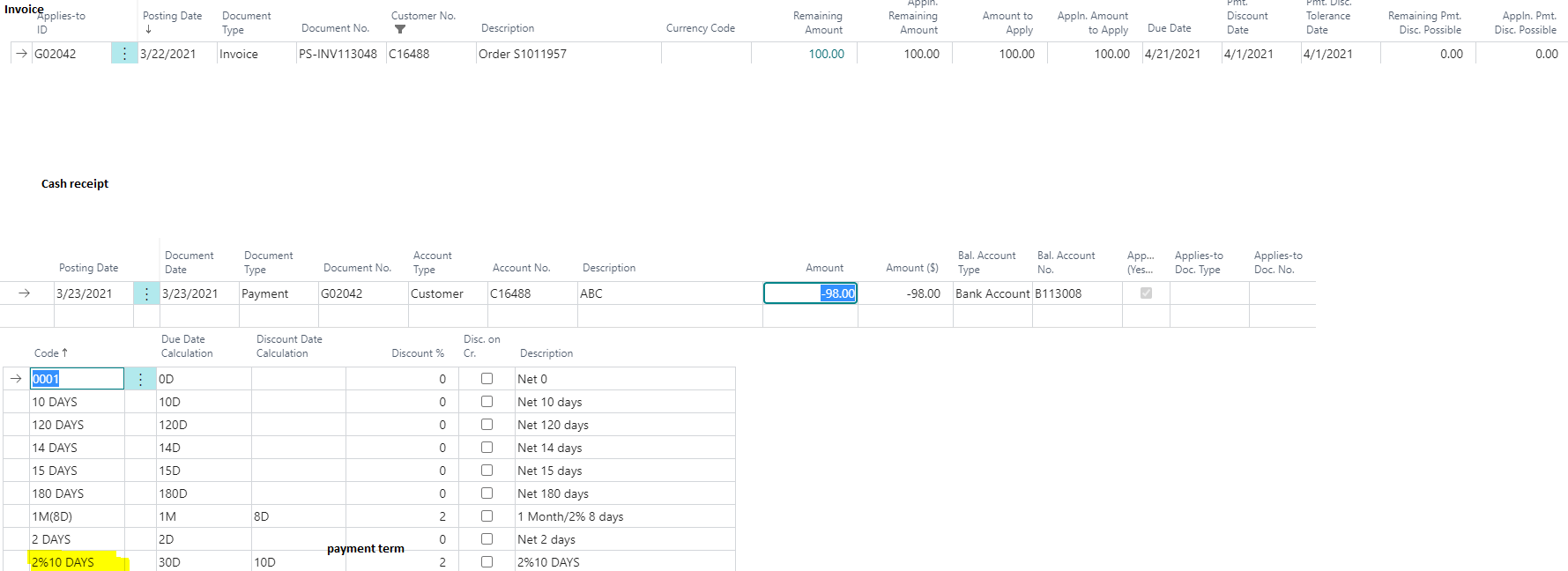
 Discount.png

after the payment is posted, it should post to the payment discount account the difference since its within 10D disc and close out the invoice but that doesnt happen

wondering what could be missed in the setup?

Thanks 

Ola

I have the same question (0)
  • Suggested answer
    Community Member Profile Picture
    on at

    Ola,

    In your Customer Ledger Entry image what I do not see if the Payment Discount Possible amount. Here is my image using 2%-10/Net 30. Was the Payment Terms used on the Posted Sales Invoice? If not, you can write-off the discount manually using a Sales Credit Memo against the Posted Sales Invoice (Apply-To).

    pastedimage1616438898071v1.png

    Hope this helps.

    Thanks,

    Steve

  • Ola Darwish Profile Picture
    915 on at

    Thanks Steven for your reply. for me those 2 fields are displaying zero.  I m not sure why. it should calculate automatically the $2.  I try this in Cronus it works fine, I try it in my environment, it doesn't work.  not sure what could be missing! other than creating the payment term with discount % and assigning it to the invoice before posting, I m not sure where else to look

  • Verified answer
    Community Member Profile Picture
    on at

    Ola,

    You can edit the Customer Ledger Entry List and enter the Remaining Pmt. Disc. Possible amount of $2.00. This will help in the future if this occurs again. I would say if in Cronus it works but not in your Production Database and the Posted Sales Invoice document shows the Payment Terms correctly, I would contact your Partner to debug the issue.

    Thanks,

    Steve

Under review

Thank you for your reply! To ensure a great experience for everyone, your content is awaiting approval by our Community Managers. Please check back later.

Helpful resources

Quick Links

Responsible AI policies

As AI tools become more common, we’re introducing a Responsible AI Use…

Neeraj Kumar – Community Spotlight

We are honored to recognize Neeraj Kumar as our Community Spotlight honoree for…

Leaderboard > Small and medium business | Business Central, NAV, RMS

#1
OussamaSabbouh Profile Picture

OussamaSabbouh 2,135

#2
YUN ZHU Profile Picture

YUN ZHU 733 Super User 2025 Season 2

#3
Sumit Singh Profile Picture

Sumit Singh 612

Last 30 days Overall leaderboard

Featured topics

Product updates

Dynamics 365 release plans
