web
You’re offline. This is a read only version of the page.
close
Skip to main content

Announcements

No record found.

News and Announcements icon
Community site session details

Community site session details

Session Id :
Customer experience | Sales, Customer Insights,...
Suggested Answer

D365 9.1 : Not able to place Email Template in Sitemap navigation

(0) ShareShare
ReportReport
Posted on by 232

Hi Experts,

We have a requirement to place Email Template, in the sitemap navigation. We tried using the following URL "/tools/templates/templates.aspx?pid=03" in the Sitemap. The same has been used under the Settings->Templates->Email Templates as well.

Below is the sitemap configuration for reference.
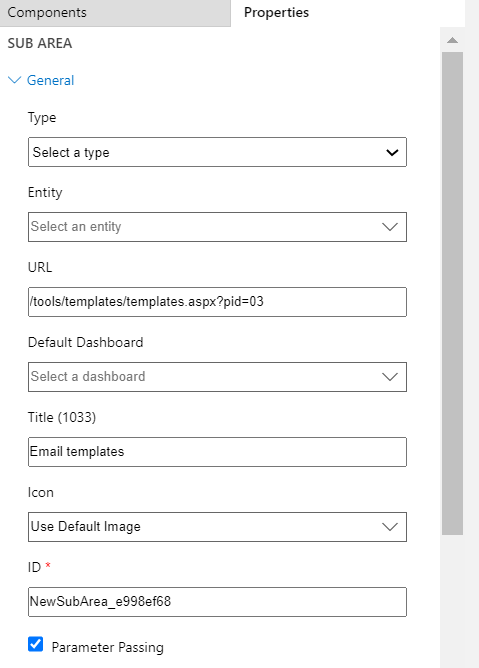
Email-template.png

But it is not showing up in the left side navigation.

Has anybody faced this issue earlier? Any pointers on resolving this issue is highly appreciated.

Regards,

Nithya

I have the same question (0)
  • Suggested answer
    Muhammad Salahuddin Profile Picture
    470 on at

    Hi Nithiya,

    Add a Sub Area and then => Select Type = Entity and then select Entity = Email Template. Please have a look at the screenshot:

    pastedimage1591445210122v1.png

    I have added the Email Template to Settings area and then Sub Area Email Templates.

  • Suggested answer
    SS-01100907-0 Profile Picture
    Microsoft Employee on at

    Hi,

    I agree with Muhammad. Please open the app in app designer, add a sub area and select Email template entity. No need to use any sort of URL.

    Let me know if you need any further help on this.

    THanks,

    Soumen

  • Nithya Palanisamy Profile Picture
    232 on at

    Thanks Muhammed and Soumen for the suggestion.

    We already tried this option by adding Email Template entity in the sitemap. It showed up in the sitemap. But records were read only. Also, no new option was there to create a new email template. So tried with URL.

    Regards,

    Nithya

  • Suggested answer
    Muhammad Salahuddin Profile Picture
    470 on at

    Nithya, privileges (read, write / edit) and level of access is governed by security roles. As a best practice, specific users should have CREATE / EDIT access to email templates.

    Check the security roles of users and make sure that they CREATE /  Write privilege:

    pastedimage1591531061909v1.png

    The screenshot shows access level on Email Template entity for Sales Manager (security role).

    If you have further questions, please do mention.

Under review

Thank you for your reply! To ensure a great experience for everyone, your content is awaiting approval by our Community Managers. Please check back later.

Helpful resources

Quick Links

Introducing the 2026 Season 1 community Super Users

Congratulations to our 2026 Super Stars!

Meet the Microsoft Dynamics 365 Contact Center Champions

We are thrilled to have these Champions in our Community!

Congratulations to the April Top 10 Community Leaders

These are the community rock stars!

Leaderboard > Customer experience | Sales, Customer Insights, CRM

#1
Muhammad Shahzad Shafique Profile Picture

Muhammad Shahzad Sh... 69 Most Valuable Professional

#2
ManoVerse Profile Picture

ManoVerse 62 Super User 2026 Season 1

#3
11manish Profile Picture

11manish 47

Last 30 days Overall leaderboard

Product updates

Dynamics 365 release plans
