web
You’re offline. This is a read only version of the page.
close
Skip to main content

Announcements

No record found.

News and Announcements icon
Community site session details

Community site session details

Session Id :
Finance | Project Operations, Human Resources, ...
Answered

Using batch jobs to export to BYOD

(0) ShareShare
ReportReport
Posted on by 15

Hi

I would like to set up one batch job to run a number of export data projects to our Azure BYOD.  I have read that using the "recurring data job" is not the best (but can't find any evidence why?!) and setting up batch jobs is the way to go.

I can set one data project export up using the option to "Export in batch", but i would like to add all of the data projects (approx. 6) to the same batch job and then "chain" them using Constraints.  This is so they don't all run at once.

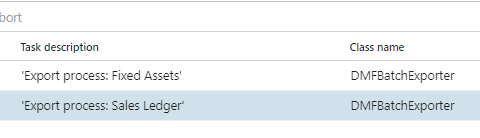
But I don't see any reference to the data project, other than the "Task description"?  I've tried the below, but only the Sales ledger data project worked because that was the data project I was in when i clicked "Export in batch", the other one I added manually:
pastedimage1642759291423v1.png

How can I manually add a data project to the batch job using that class?  Or, are my concerns regarding parallel running of export data projects warranted?  Should I just set them up to run 10 minutes or so (depending how long each takes) apart?  

I have the same question (0)
  • Suggested answer
    Alireza Eshaghzadeh Profile Picture
    14,839 Super User 2026 Season 1 on at

    Hi ChrisJGC,

    You can export BYOD jobs via batch job and set recurrence as follows:

    pastedimage1642766612664v1.png

    pastedimage1642766653989v2.png

    You can create several BYOD export jobs based on priority and frequency that they need to be exported. You can set recurrence for each batch job in regards to how often they should be exported and how long does it take that the BYOD batch job get finished (You can get this info via batch job history by calculating run time)

  • ChrisJGC Profile Picture
    15 on at

    Many thanks Alireza, but do you know if you can have multiple exports in the same batch job?

  • Suggested answer
    Alireza Eshaghzadeh Profile Picture
    14,839 Super User 2026 Season 1 on at

    You can create several export jobs from one BYOD export job (e.g. You can export this job for each company in batch or  you can activate "Export across all companies"  to export the BYOD job across all companies)

  • ChrisJGC Profile Picture
    15 on at

    Thanks but I was hoping to have one batch job with multiple "tasks"; each task handling one data project.  Is this possible?

  • Suggested answer
    Alireza Eshaghzadeh Profile Picture
    14,839 Super User 2026 Season 1 on at

    Can you elaborate about the scenario that you have (i.e. multiple "tasks")?

  • ChrisJGC Profile Picture
    15 on at

    Please see screenshot

    pastedimage1642777550990v1.png

  • Suggested answer
    Alireza Eshaghzadeh Profile Picture
    14,839 Super User 2026 Season 1 on at

    Hi,

    Can your elaborate why you need to add several tasks for batch job related to BYOD job?

    You need to define each task via DMF (Data Management Framework) since it is source for the export-

    There can be several alternatives:

    -Create a BYOD job and export this via batch for each company

    -Create a BYOD job and activate "Export across all companies" and export it via batch som one batch job will export for all companies.

    -Create several BYOD jobs based on priority or frequency and entities-

  • Suggested answer
    Alireza Eshaghzadeh Profile Picture
    14,839 Super User 2026 Season 1 on at

    As en example:

    BYOD Export:

    pastedimage1642779658747v1.png

    Batch job:

    pastedimage1642779724429v2.png

    DMF Status:

    pastedimage1642779754248v3.png

  • ChrisJGC Profile Picture
    15 on at

    Close!  But I have multiple data projects with multiple entities in, do you advise putting all the entities into the same data project?

  • Suggested answer
    Alireza Eshaghzadeh Profile Picture
    14,839 Super User 2026 Season 1 on at

    It is better to create several BYOD jobs and export them via Batch job. We have some cases that we have created BYOD jobs based on entities (Global entity or company specific) and frequency that they needed to be exported.

Under review

Thank you for your reply! To ensure a great experience for everyone, your content is awaiting approval by our Community Managers. Please check back later.

Helpful resources

Quick Links

Introducing the 2026 Season 1 community Super Users

Congratulations to our 2026 Super Stars!

Meet the Microsoft Dynamics 365 Contact Center Champions

We are thrilled to have these Champions in our Community!

Leaderboard > Finance | Project Operations, Human Resources, AX, GP, SL

#1
Giorgio Bonacorsi Profile Picture

Giorgio Bonacorsi 659

#2
André Arnaud de Calavon Profile Picture

André Arnaud de Cal... 465 Super User 2026 Season 1

#3
Syed Haris Shah Profile Picture

Syed Haris Shah 304 Super User 2026 Season 1

Last 30 days Overall leaderboard

Product updates

Dynamics 365 release plans



