web
You’re offline. This is a read only version of the page.
close
Skip to main content

Announcements

No record found.

News and Announcements icon
Community site session details

Community site session details

Session Id :
Finance | Project Operations, Human Resources, ...
Suggested Answer

Scrollable dynamic date design

(0) ShareShare
ReportReport
Posted on by 212

Hello 

I want to design a form in which there is a requirement to add dynamics date as attached in the screenshot below. The dates are separated by a six months gap in the screenshot but in our case, we need the date to be separated by 7 days (weekly dates) and should be scrollable from the bottom of the tab. The dates actually represent  column headers here.

I referred to ResActivityResourceBooking form (standard form) available in the application explorer as it looked similar to what was needed but couldn't figure it out much.

Please help on this. Feel free to ask for any clarifications.1447.allocation.png
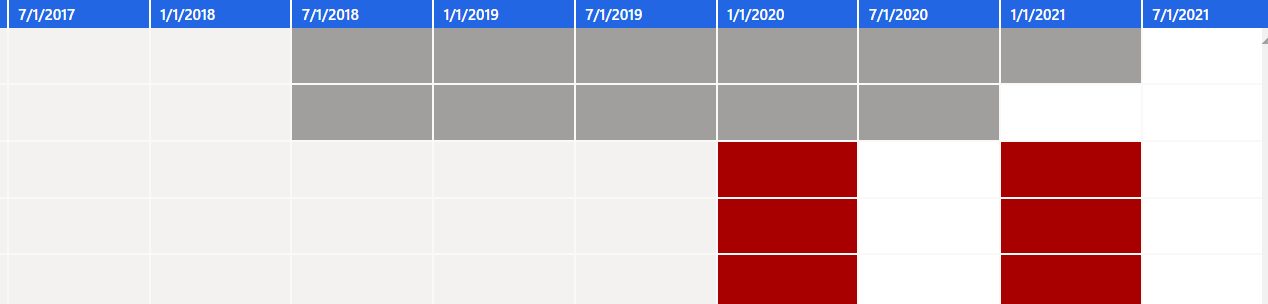
Thank and regards.

I have the same question (0)
  • Suggested answer
    GirishS Profile Picture
    27,833 Moderator on at

    Hi,

    Refer to the standard timesheet form. They will be using edt array elements and they will set label for date values dynamically.

    See how they implemented it.

    Thanks,

    Girish S.

  • Dynamics365Admin Profile Picture
    212 on at

    Hi Girish

    Thank you for your response.

    I went through the timesheet form code as told by you. I found some snippets of code that could be helpful in our case but yet, I am not sure which functions I should include in my case to fulfill the requirement of displaying dynamic dates.

    Could you please give some more insights as to which function exactly will help us?

    Your response will be highly appreciated.

    Thanks and Regards.

  • GirishS Profile Picture
    27,833 Moderator on at

    In TsTimesheetLineWeek table there will be field named Hours - Edt mapped will be TsWeeklyHours - In that Edt expand the array elements and you can see 7 array elements for Mon to Sun.

    When you add that control to form design it will create 7 controls - Label for the control is set at setLineGridDays method where the label for each control using the for loop. Implement the same for your scenario.

    Thanks,

    Girish S.

Under review

Thank you for your reply! To ensure a great experience for everyone, your content is awaiting approval by our Community Managers. Please check back later.

Helpful resources

Quick Links

Introducing the 2026 Season 1 community Super Users

Congratulations to our 2026 Super Stars!

Congratulations to our 2025 Community Spotlights

Thanks to all of our 2025 Community Spotlight stars!

Leaderboard > Finance | Project Operations, Human Resources, AX, GP, SL

#1
André Arnaud de Calavon Profile Picture

André Arnaud de Cal... 517 Super User 2026 Season 1

#2
Giorgio Bonacorsi Profile Picture

Giorgio Bonacorsi 440

#3
Adis Profile Picture

Adis 266 Super User 2026 Season 1

Last 30 days Overall leaderboard

Product updates

Dynamics 365 release plans
