web
You’re offline. This is a read only version of the page.
close
Skip to main content

Notifications

Announcements

No record found.

Community site session details

Community site session details

Session Id :
Microsoft Dynamics CRM (Archived)

Entitlements are not displaying in Dynamics 365 - Customer Service Portals

(0) ShareShare
ReportReport
Posted on by

Hello Guys,

I am facing with some issue regarding Entitlements in Customer Service Portal.

Here is the Description:

  • I am using Dynamics 365 Online Version 9.0
  • I have also configured the Dynamics 365 Customer Self-Service Portal. The Portal Version is 9.0.6.1
  • The Problem which i am facing is that when the customer creates a case from portal side, my SLA is not applying on that.
  • for apply the SLA to case, I have also created an entitlements.
  • I want to do is when the customer creates a case, he will able to choose entitlement.
  • For that, I have enabled the Site Setting named CustomerSupport/CaseEntitlementEnabled to true.
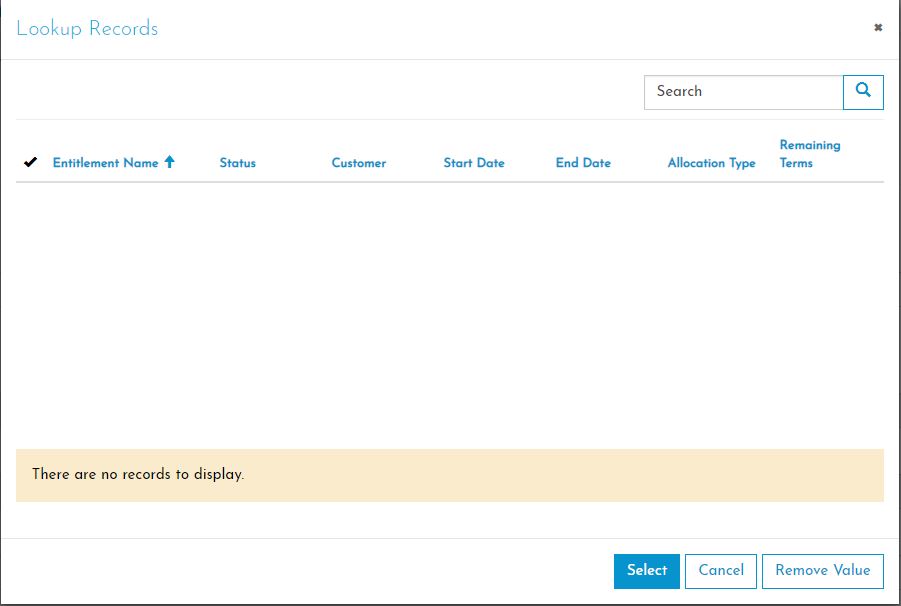
  • Now, the entitlement field displays in Portal Case form. But when i click on Entitlement field, it display "There are no records to display" even though there is an entitlement for that logged in customer.
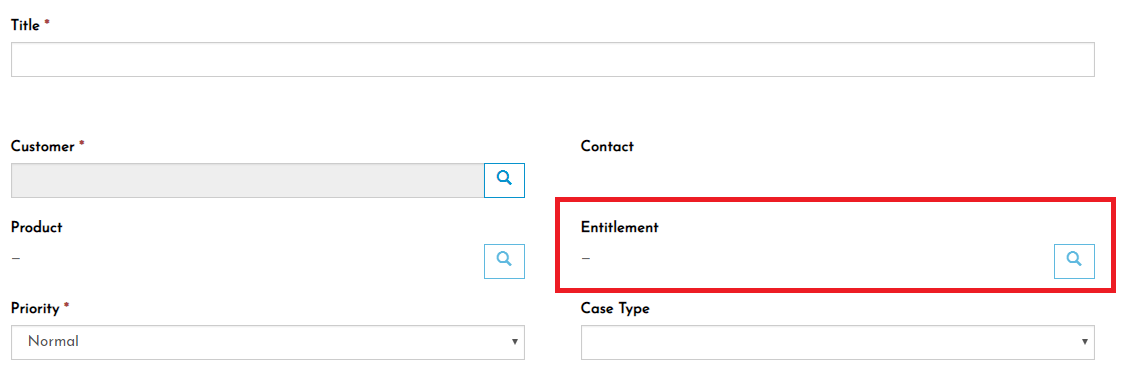
Capture-_2D00_1.JPG

3364.Capture.JPG

  • I have also give the Entity Permission to Global to Entitlements, but still getting the same screen.
  • I have gone through below links to find the solution, but failed.

https://community.dynamics.com/crm/f/117/t/237469

https://community.dynamics.com/crm/f/117/t/271093

  • When I tried to create a Separate Entity List and Entity form for Entitlements, it gives me all the records !
  • Is there any problem with Entitlement Lookup field in Create Case Form ?

In my Scenario, there are multiple entitlements for one customers and also there are many customers.

So, when Customer creates a case; he will able to choose the entitlement.

Thanks in advance.

*This post is locked for comments

I have the same question (0)
  • Verified answer
    Alex Fun Wei Jie Profile Picture
    33,628 on at

    Hi,

    Please directly contact MS support.

  • Suggested answer
    Dmytro Rutkovskyi Profile Picture
    1,835 on at

    Hello Hemz,

    I quickly looking into your problem, and it look like you should have active entitlement for that customer in the system to be able to see it.
    Portals add additional filtering criteria to retrieve entitlements when you open a lookup form, and seems it kind of specific to that type of entity.
    So it implements dependent lookup, but it looks like standard on the form.

    So try to add entitlement for that customer/company, for which you are creating the case:

    7450.entitlement.JPG


Under review

Thank you for your reply! To ensure a great experience for everyone, your content is awaiting approval by our Community Managers. Please check back later.

Helpful resources

Quick Links

Responsible AI policies

As AI tools become more common, we’re introducing a Responsible AI Use…

Neeraj Kumar – Community Spotlight

We are honored to recognize Neeraj Kumar as our Community Spotlight honoree for…

Leaderboard > 🔒一 Microsoft Dynamics CRM (Archived)

#1
SA-08121319-0 Profile Picture

SA-08121319-0 4

#1
Calum MacFarlane Profile Picture

Calum MacFarlane 4

#3
Alex Fun Wei Jie Profile Picture

Alex Fun Wei Jie 2

Last 30 days Overall leaderboard

Featured topics

Product updates

Dynamics 365 release plans
