Hi Guys,
I am trying to export a view in excel but it get hung up.
This view created under Opportunity Entity where we are fetching some fields of opportunity and Accounts Entity.

When I select "Open Excel in on line" i get bellow error
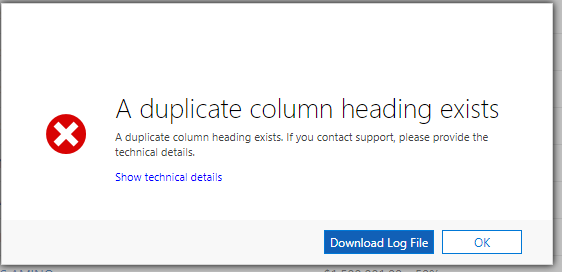
Log file
<s:Envelope xmlns:s="schemas.xmlsoap.org/.../envelope"><s:Body><s:Fault><faultcode>s:Client</faultcode><faultstring xml:lang="en-US">A duplicate column heading exists.</faultstring><detail><OrganizationServiceFault xmlns="schemas.microsoft.com/.../Contracts" xmlns:i="www.w3.org/.../XMLSchema-instance"><ActivityId>3933b1d4-5bfe-4ca1-9aaa-3ab6bf1d774d</ActivityId><ErrorCode>-2147220680</ErrorCode><ErrorDetails xmlns:a="schemas.datacontract.org/.../System.Collections.Generic"><KeyValuePairOfstringanyType><a:key>ApiExceptionSourceKey</a:key><a:value xmlns:b="www.w3.org/.../XMLSchema" i:type="b:string">Plugin/Microsoft.Crm.ObjectModel.ExcelService</a:value></KeyValuePairOfstringanyType><KeyValuePairOfstringanyType><a:key>ApiOriginalExceptionKey</a:key><a:value xmlns:b="www.w3.org/.../XMLSchema" i:type="b:string">Microsoft.Crm.CrmException: A duplicate column heading exists. ---> Microsoft.Crm.CrmException: A duplicate column heading exists.
at Microsoft.Crm.ObjectModel.CrmTableAdapter.GenerateColumns()
at Microsoft.Crm.ObjectModel.CrmTableAdapter.get_Columns()
at Microsoft.Crm.ObjectModel.CrmTableAdapter.GenerateRows()
at Microsoft.Crm.ObjectModel.CrmTableAdapter.get_Rows()
at Microsoft.Xrm.Office.ExcelGenerator..ctor(ISpreadsheet spreadsheet, ITemplate template, Boolean enableExcelTemplatePerfFix)
at Microsoft.Crm.ObjectModel.ExcelService.GenerateXlsx(CrmTableAdapter crmTableAdapter, ITemplate template, ExecutionContext executionContext)
at Microsoft.Crm.ObjectModel.ExcelService.<>c__DisplayClass5_0.<ExportToExcelInternal>b__0()
at Microsoft.Crm.Extensibility.PipelineInstrumentationHelper.Execute(Boolean instrumentationEnabled, String stopwatchName, ExecuteWithInstrumentation action, PipelineExecutionContext context)
at Microsoft.Crm.ObjectModel.ExcelService.ExportToExcelInternal(EntityReference view, String fetchXml, String layoutXml, String queryApi, InputArgumentCollection queryParameters, ExecutionContext executionContext)
at Microsoft.Crm.ObjectModel.ExcelService.ExportToExcel(EntityReference view, String fetchXml, String layoutXml, String queryApi, InputArgumentCollection queryParameters, ExecutionContext executionContext)
at Microsoft.Crm.ObjectModel.ExcelService.<>c__DisplayClass15_0.<ExportToExcelOnline>b__0()
at Microsoft.Crm.ObjectModel.ExcelService.ExportExcelToExcelOnline(EntityReference entityReference, String fetchXml, Func`1 generatorFunction, String queryApi, InputArgumentCollection queryParameters, ExecutionContext executionContext)
at Microsoft.Crm.ObjectModel.ExcelService.ExportToExcelOnline(EntityReference view, String fetchXml, String layoutXml, String queryApi, InputArgumentCollection queryParameters, ExecutionContext executionContext)
--- End of inner exception stack trace ---
at Microsoft.Crm.Extensibility.VersionedPluginProxyStepBase.Execute(PipelineExecutionContext context)
at Microsoft.Crm.Extensibility.PipelineInstrumentationHelper.Execute(Boolean instrumentationEnabled, String stopwatchName, ExecuteWithInstrumentation action, PipelineExecutionContext context)
at Microsoft.Crm.Extensibility.Pipeline.<>c__DisplayClass2_1.<Execute>b__0()</a:value></KeyValuePairOfstringanyType><KeyValuePairOfstringanyType><a:key>ApiStepKey</a:key><a:value xmlns:b="schemas.microsoft.com/.../Serialization" i:type="b:guid">9edf2c3a-95f2-4d79-b623-beabe0d0d934</a:value></KeyValuePairOfstringanyType><KeyValuePairOfstringanyType><a:key>ApiDepthKey</a:key><a:value xmlns:b="www.w3.org/.../XMLSchema" i:type="b:int">1</a:value></KeyValuePairOfstringanyType><KeyValuePairOfstringanyType><a:key>ApiActivityIdKey</a:key><a:value xmlns:b="schemas.microsoft.com/.../Serialization" i:type="b:guid">3933b1d4-5bfe-4ca1-9aaa-3ab6bf1d774d</a:value></KeyValuePairOfstringanyType><KeyValuePairOfstringanyType><a:key>ApiPluginSolutionNameKey</a:key><a:value xmlns:b="www.w3.org/.../XMLSchema" i:type="b:string">System</a:value></KeyValuePairOfstringanyType><KeyValuePairOfstringanyType><a:key>ApiStepSolutionNameKey</a:key><a:value xmlns:b="www.w3.org/.../XMLSchema" i:type="b:string">System</a:value></KeyValuePairOfstringanyType></ErrorDetails><Message>A duplicate column heading exists.</Message><Timestamp>2018-09-29T18:39:09.7896289Z</Timestamp><ExceptionRetriable>false</ExceptionRetriable><ExceptionSource i:nil="true"/><InnerFault><ActivityId>3933b1d4-5bfe-4ca1-9aaa-3ab6bf1d774d</ActivityId><ErrorCode>-2147220680</ErrorCode><ErrorDetails xmlns:a="schemas.datacontract.org/.../System.Collections.Generic"/><Message>A duplicate column heading exists.</Message><Timestamp>2018-09-29T18:39:09.7896289Z</Timestamp><ExceptionRetriable>false</ExceptionRetriable><ExceptionSource i:nil="true"/><InnerFault i:nil="true"/><OriginalException i:nil="true"/><TraceText i:nil="true"/></InnerFault><OriginalException i:nil="true"/><TraceText i:nil="true"/></OrganizationServiceFault></detail></s:Fault></s:Body></s:Envelope>
Kindly help







