web
You’re offline. This is a read only version of the page.
close
Skip to main content

Announcements

No record found.

News and Announcements icon
Community site session details

Community site session details

Session Id :
Microsoft Dynamics AX (Archived)

How to move new fields on form extension

(0) ShareShare
ReportReport
Posted on by 6,480

Hello,

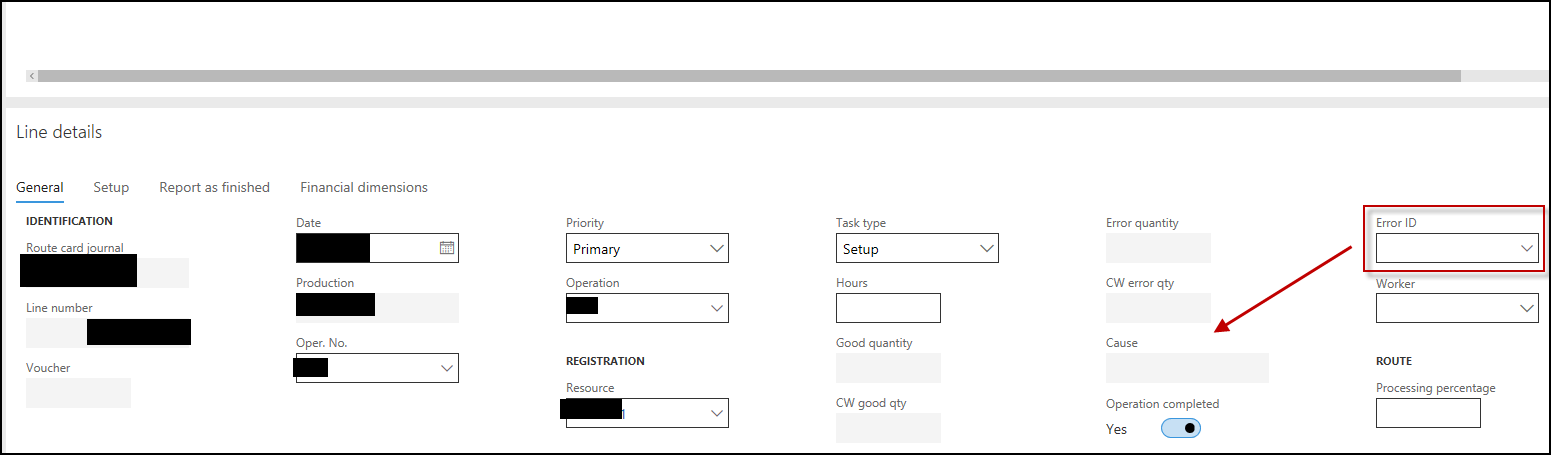
I have requirement to add new field in "Route card" form, Line details, under the "CW enter qty" field as shown below:
commm.png

This is the Registration group of "ProdJournalRoute" table.

I have created an extension of this table, added the desired EDT as a field and added this field to the registration group.

I've also created an extension of the form itself.

New field is added at the bottom of the field group and also it is the last field on the form.

The "ALT + arrow keys" does not work to move the field up / down.

Is there any trick I can use to put it in the place I desire?

Thanks.

*This post is locked for comments

I have the same question (0)
  • Johnny Profile Picture
    6,480 on at

    Hello Sukrut,

    was your example same as mine? Adding EDT as field in Standard table extension, adding this field in field groups? And is it movable within the field group or on form extension which uses the field group?

    Thanks.

  • Verified answer
    Basheer17 Profile Picture
    2,720 on at

    I don't think it's possible. Position of the fields coming from a field group can only be changed from field group from table level not from form level. This would have been possible if we are working with regular table. Newly added field to an existing field group using extensions will be added at the bottom we can change their position among themselves (newly added fields) but not with existing fields.

Under review

Thank you for your reply! To ensure a great experience for everyone, your content is awaiting approval by our Community Managers. Please check back later.

Helpful resources

Quick Links

Introducing the 2026 Season 1 community Super Users

Congratulations to our 2026 Super Stars!

Meet the Microsoft Dynamics 365 Contact Center Champions

We are thrilled to have these Champions in our Community!

Congratulations to the March Top 10 Community Leaders

These are the community rock stars!

Leaderboard > 🔒一 Microsoft Dynamics AX (Archived)

#1
Joris dG Profile Picture

Joris dG 5

#2
Alexey Lekanov Profile Picture

Alexey Lekanov 2

#2
Henrik Nordlöf Profile Picture

Henrik Nordlöf 2 User Group Leader

Last 30 days Overall leaderboard

Featured topics

Product updates

Dynamics 365 release plans
