web
You’re offline. This is a read only version of the page.
close
Skip to main content

Notifications

Announcements

No record found.

Community site session details

Community site session details

Session Id :
Microsoft Dynamics CRM (Archived)

The authentication endpoint Username was not found on the configured Secure Token Service.

(0) ShareShare
ReportReport
Posted on by

I am stuck in this issue. When ever I connect CRM using Web or Console Application from Local system I receive this error while authentication.

On many post regarding this error to Enable proxy for "/adfs/services/trust/13/username" which is enabled in my case.
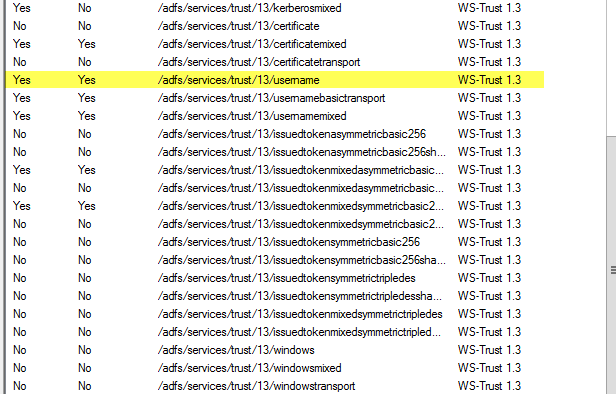

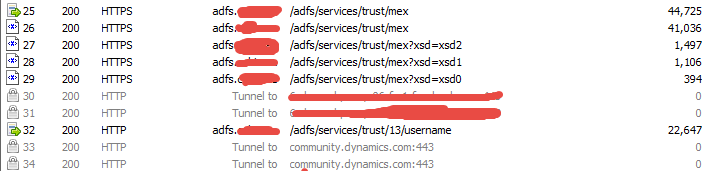
in the morning i install the Fiddler to check calls.  When I run the Application from My local system while Fiddler running then I get authenticate with the CRM and I get able to create sample contact in it. It is very strange that If I keep on the Fiddler my Web Application and Console Application communicate with CRM without any issue but once I close the fiddler again it Throw the same error.

Here is the Fiddler Log.

If any one is expert in this issue please help.

Regards

*This post is locked for comments

I have the same question (0)
  • Ragnar Hilmarsson Profile Picture
    3,427 on at

    Hi 
    What error do you get if you turn of friddler? 
    Fiddler acts as proxy so you have to turn it off in IE network settings under proxy settings

  • Waqar Sohail Profile Picture
    on at

    "The authentication endpoint Username was not found on the configured Secure Token Service".  Actually CRM Authentication is throwing above exception but If I turn On the Fiddler with Https monitoring then I do not receive above exception. I get connect with the CRM from web Application.

    Now I deploy the Application on the Same server of CRM with the Same certification (HTTPS)  then I be able to connect with CRM and able to perform operation.

    I have Error of Certification seem like certification is causing this Issue.

  • Suggested answer
    Satish Tiwari - CRM Profile Picture
    on at

    Hi Waqar,

    When the /adfs/services/trust/13/username endpoint is enabled, web/client will be unable to reach the usernamemixed and kerberosmixed endpoints, which causes authentication to fail. To fix this issue, Disable the /adfs/services/trust/13/username endpoint and restart the ADFS service. To perform this action, please see the below steps:

    1.Open the AD FS Management Console

    2.In the left navigation pane, expand Service, and then click Endpoints.

    3.In the endpoint list, locate and right-click the /adfs/services/trust/13/username endpoint

    4.Select disable

    5.Restart the AD FS service.

  • Waqar Sohail Profile Picture
    on at

    Thanks Satish For your help, We have done this before but this not help us. I Think there is certification Issue.

    Regards

  • Ragnar Hilmarsson Profile Picture
    3,427 on at

    Have tried  to install ADFS certification into personal certificate store on your local system?

  • Waqar Sohail Profile Picture
    on at

    Hi Ragnar Thanks, I didn't try but As I will need to connect crm from any where So not only from my System.  What If I install certification on my system as well. Can we sort out our issue if it works?

  • Ragnar Hilmarsson Profile Picture
    3,427 on at

    Hi

    Can you please share your C# code  with connection maybe you have to do some change there.

  • luoyong Profile Picture
    on at

    When installing Microsoft Dynamics CRM on the same server as Windows Server 2012 R2 AD
    FS (not a recommended scenario), you may need to change the port used by AD FS to a port
    other than TCP 808. Sandbox Processing Service listens on Port 808, Microsoft Dynamics CRM
    Asynchronous Service and Web Application Server services communicates with the Sandbox
    Processing Service on Port 808. A port conflict could also cause issues for Microsoft Dynamics
    CRM Email Router, Microsoft Dynamics CRM for Outlook, and the Plug-in Registration Tool.
    Check your AD FS event log for EventID 102 and the following in Exception details:
    “System.ServiceModel.AddressAlreadyInUseException: There is already a listener on IP
    endpoint 0.0.0.0:808.”
    If this exists, you need to change your AD FS port.
    To change the port used by AD FS to another port such as 809, use the following PowerShell
    command: Set-ADFSProperties -nettcpport 809
    Restart AD FS Windows service.

  • DREWLFE Profile Picture
    55 on at

    This solved the issue for me: Server 2016: ADFS 4/CRM 2016 (8.2) on one box.

    Event log is a clue, also browsing to: adfs.mydomain.com/.../mex gave a 503 error.

    Did the Set-ADFSProperties line and now all is good.

    Problem showed for me when I was trying to use InaPort to connect to CRM IFD.  User connections had all been fine

Under review

Thank you for your reply! To ensure a great experience for everyone, your content is awaiting approval by our Community Managers. Please check back later.

Helpful resources

Quick Links

Responsible AI policies

As AI tools become more common, we’re introducing a Responsible AI Use…

Neeraj Kumar – Community Spotlight

We are honored to recognize Neeraj Kumar as our Community Spotlight honoree for…

Leaderboard > 🔒一 Microsoft Dynamics CRM (Archived)

#1
SA-08121319-0 Profile Picture

SA-08121319-0 4

#1
Calum MacFarlane Profile Picture

Calum MacFarlane 4

#3
Alex Fun Wei Jie Profile Picture

Alex Fun Wei Jie 2

Last 30 days Overall leaderboard

Featured topics

Product updates

Dynamics 365 release plans



