Hi Iza,
You could try following 2 methods to achieve your requirement.
- You create a JScript type Web resource for the form that you want to hide phone button.
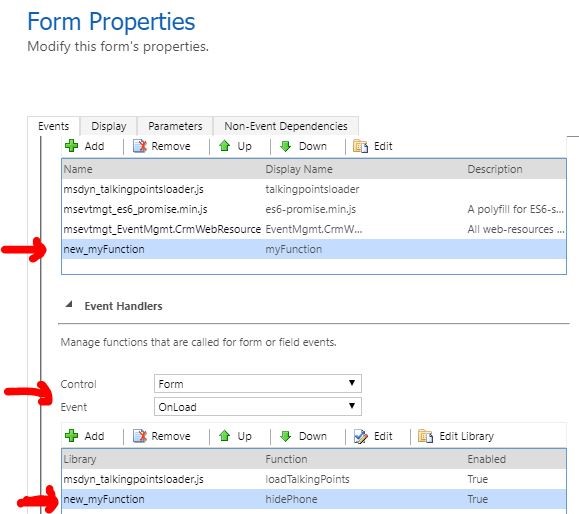
The SCript is below:
function hidePhone() {
setTimeout(function() {
var icons = parent.document.getElementsByClassName("NewPhoneCall-symbol");
for (var i = 0; i < icons.length; i++) {
icons[i].style.display = "none";
}
}, 1500);
}
It will hide phone buttons after form being loaded for about 1 second,
initially you'll still see them, after 1.5 second, both Business Phone and Mobile Phone icons will be hidden.

You should be only aware that this method is not officially supported.
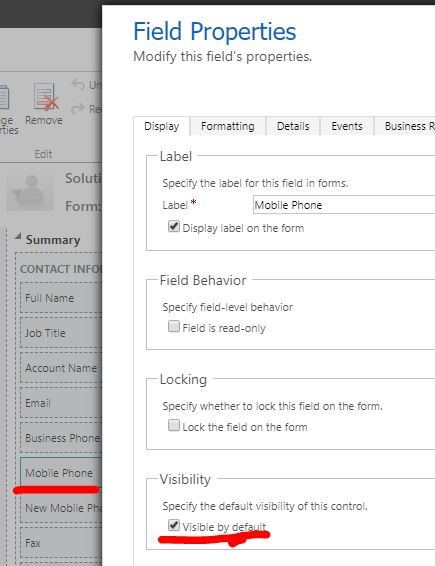
2.Firstly we hide existing phone fields on form:
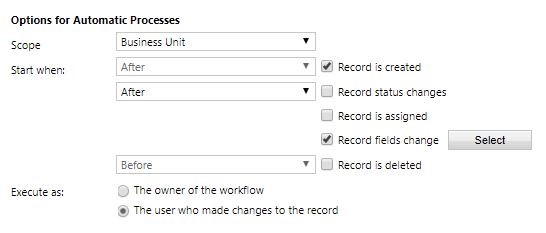
Then create custom fields for existing phone format fields, then build a real-time workflow to run when
we create a record or when we update new custom phone field:
then update the existing phone format fields.
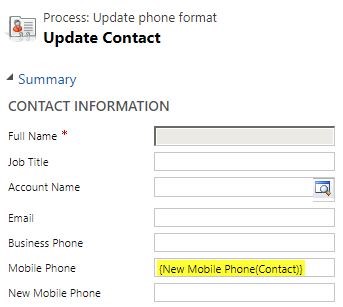
The benefit of this method is that we now work with new custom field without icons to save phone numbers,
while existing fields with icons will be updated synchronously but have been hidden,
we can decide which field to use.
Hope it helps.
Best Regards,
Leo


