web
You’re offline. This is a read only version of the page.
close
Skip to main content

Announcements

No record found.

News and Announcements icon
Community site session details

Community site session details

Session Id :
Microsoft Dynamics AX (Archived)

Missing SYP labels after CU9 installation (AX 2012 R2)

(1) ShareShare
ReportReport
Posted on by 355

Good afternoon everyone

Excuse me if there's already a post about this issue and I missed it..
I couldn't find anything when searching..

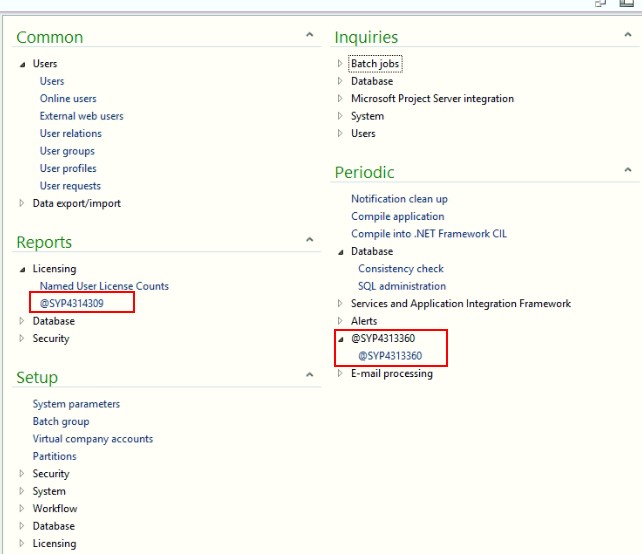
After installing CU9 on an AX 2012 R2 installation I noticed some missing SYP labels.

(Please note that the AOS was stopped, label files in the Standard directory were removed and AOS started again).


I can see the "SYP Labels" model installed (version 6.2.3000.110).

When I open the SYP en-us label in the editor I cannot find the specific labels which I see as missing.

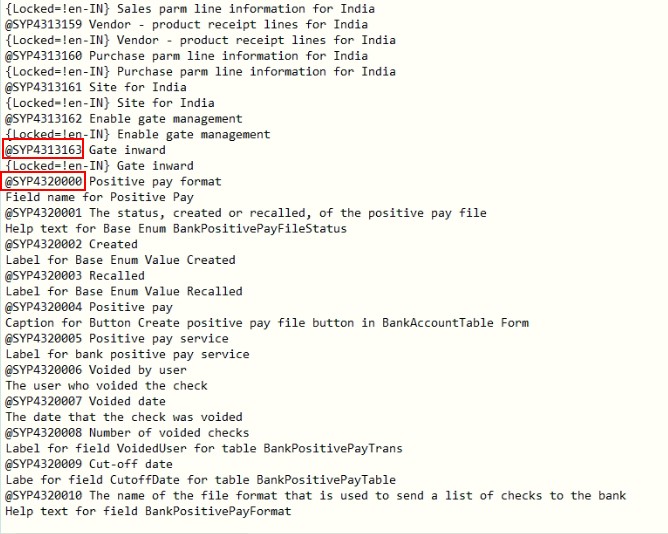
Looking at the corresponding ALD file, I also noticed a huge gap in label IDs (it jumps from @SYP4313163 to @SYP4320000). The labels which I see missing are within this range..

See related screenshots attached

Any ideas are greatly appreciated!
ALD_5F00_File.jpg

Missing_5F00_Labels_5F00_Example.jpg

*This post is locked for comments

I have the same question (0)
  • Abdul Wahab Profile Picture
    12,119 Moderator on at

    I have same problem. any one can give the solution please.

  • Lauras U Profile Picture
    959 on at

    Strange that remove the label file itself from the application folder and restart AOS again does not work.

    Are there any differences between syp and sys on objects which has missing labels?

  • Abdul Wahab Profile Picture
    12,119 Moderator on at

    This solution is not working. I have one work around compare menu item code and get old changes. This will fix your issue.

  • Abdul Wahab Profile Picture
    12,119 Moderator on at

    I do the same to fix my issue. I have same issue that were asked.

  • Lauras U Profile Picture
    959 on at

    Is it only menu items, or in forms also?

  • Bashir Ahmad Profile Picture
    5,248 on at

    1- Stop AOS

    2- Delete ALD and AUC files from Microsoft Dynamics AX\60\Server\<instance>\bin\Application\Appl\Standard folder

    Start AOS again.

  • Joanna Demetriou Profile Picture
    355 on at

    As stated in the original post, the label files were removed from the application directory and the AOS restarted.

    The problem seems to be in the label file itself  (in the model store).

    There's a range of labels missing from it.

  • Joanna Demetriou Profile Picture
    355 on at

    It would be great if'd read the post before posting a generic reply like this.

    As stated in the original post, the label files were removed from the application directory and the AOS restarted.

    The problem seems to be in the label file itself  (in the model store).

    There's a range of labels missing from it.

  • Abdul Wahab Profile Picture
    12,119 Moderator on at

    Could you compare your menu item code?

  • Verified answer
    Vilmos Kintera Profile Picture
    46,149 on at

    For development it is a common practice to use Label ranges, to keep together certain module labels independently from the general applications' label sequence, so big gaps are normal.

    I only have access to R3 CU 10 application which has those new menu items, and for SysUserLicenseCountHistoryReport I can see @SYP4861430 for the label "Named User Licence Counts History".

    If it is missing for you, check the setup / installation log file to see if there were any errors during the AOS / hotfix deployment for the particular model file. You could try to find it on the installation media and manually try to import it on a developer workspace with the IDConflict overwrite or Conflict Push flag, to see if that resolves the issue.

Under review

Thank you for your reply! To ensure a great experience for everyone, your content is awaiting approval by our Community Managers. Please check back later.

Helpful resources

Quick Links

Introducing the 2026 Season 1 community Super Users

Congratulations to our 2026 Super Stars!

Meet the Microsoft Dynamics 365 Contact Center Champions

We are thrilled to have these Champions in our Community!

Congratulations to the April Top 10 Community Leaders

These are the community rock stars!

Leaderboard > 🔒一 Microsoft Dynamics AX (Archived)

#1
CP04-islander Profile Picture

CP04-islander 39

#2
Michel ROY Profile Picture

Michel ROY 14

#3
imran ul haq Profile Picture

imran ul haq 8

Last 30 days Overall leaderboard

Featured topics

Product updates

Dynamics 365 release plans