web
You’re offline. This is a read only version of the page.
close
Skip to main content

Notifications

Announcements

No record found.

Community site session details

Community site session details

Session Id :
Customer experience | Sales, Customer Insights,...
Suggested Answer

Lead Qualify Business process error

(0) ShareShare
ReportReport
Posted on by 20

Hi Friends,

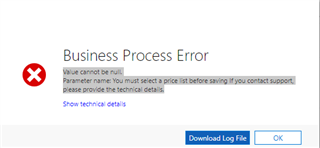
I am facing this issue while qualifying the Lead on Dynamics 365 v9 online.

it's throwing the below error

"Value cannot be null.
Parameter name: You must select a price list before saving If you contact support, please provide the technical details."

And the screenshot of the error is here.
pastedimage1573555646614v1.png

Any help would be much appreciated.

Regards

Shashikant Saxena

I have the same question (0)
  • Suggested answer
    gdas Profile Picture
    50,091 Moderator on at

    Hi,

    Its seems the error coming from plugins , ideally this error is coming when you've not set a price list. I am not sure what exactly you are doing in plugin level , would suggest to write some trace log and see where its failing and set price list before create operation.

    You can take a look few troubleshoot guide.

    https://docs.microsoft.com/en-us/dynamics365/sales-enterprise/troubleshooting#SelectPriceList

  • shashikantsaxena779 Profile Picture
    20 on at

    Thanks for replying but there is no plugin is registered for the same.

  • a33ik Profile Picture
    84,331 Most Valuable Professional on at

    Can you please click "Download Log" file, download it, open it with notepad and post the content of it here?

  • Suggested answer
    Thangamani Profile Picture
    507 on at

    Hi ,

    Whenever you are doing the Lead qualification some values should be kept by default like currency,campaign ,default price list .Pls check the below URL and set the default price list for opportunity and try for Lead qualification process.

    docs.microsoft.com/.../set-default-price-level-for-opportunity-quote-order-invoice

    Hope this helps and if it is useful pls mark this as verified.

    Regards,

    Thangamani

  • Suggested answer
    Pawar Pravin  Profile Picture
    5,237 on at

    Hi Shashikant,

    It might be possible that you have registered plugin on create of contact, account or opportunity create event. While qualifying lead in background, all mentioned entity records created.

    Could you please check any plugin registered on all those entity.  

    Also if possible please share downloaded error log file data here

Under review

Thank you for your reply! To ensure a great experience for everyone, your content is awaiting approval by our Community Managers. Please check back later.

Helpful resources

Quick Links

Responsible AI policies

As AI tools become more common, we’re introducing a Responsible AI Use…

Neeraj Kumar – Community Spotlight

We are honored to recognize Neeraj Kumar as our Community Spotlight honoree for…

Leaderboard > Customer experience | Sales, Customer Insights, CRM

#1
Tom_Gioielli Profile Picture

Tom_Gioielli 108 Super User 2025 Season 2

#2
Jimmy Passeti Profile Picture

Jimmy Passeti 50 Most Valuable Professional

#3
Gerardo Rentería García Profile Picture

Gerardo Rentería Ga... 49 Most Valuable Professional

Last 30 days Overall leaderboard

Product updates

Dynamics 365 release plans
