Hello Everyone,
I am running into the following issue with one of our users. We are using Version 9 Dynamics 365 Online and he has the latest version of the Dynamics 365 for Outlook plug in using Outlook 2016.
We have other users on Outlook 2016/Outlook 2013 working however this one always gets this error when clicking Track. Synchronizing works fine.
I have gone through many help articles but nothing has seemed to help.
Please could someone assist?
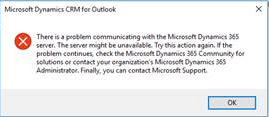
Logs are below:
# CRM Tracing Version 1.1 Unmanaged
# LocalTime: 2019-01-03 16:40:49.114
# Categories: *:Error
# Schedule: No registry key - using default value: Daily
# ComputerName: RFH-SM-L102
# CRMVersion: 9.0.0002.0155
[2019-01-03 16:40:49.114] Process:OUTLOOK |Thread:16256 |Category: Unmanaged.Platform |User: PlatformUser |Level: Error | CMailItemHelper::HrPromoteMailItemInCrm File: EmailHelper.cpp Line: 1985
>hr = 0x80004005
[2019-01-03 16:40:49.460] Process:OUTLOOK |Thread:16256 |Category: Unmanaged.Platform |User: PlatformUser |Level: Error | CMailItemHelper::HrCreateInCrm File: EmailHelper.cpp Line: 1499
>hr = 0x80004005
[2019-01-03 16:40:49.464] Process:OUTLOOK |Thread:16256 |Category: Unmanaged.Platform |User: PlatformUser |Level: Error | CMailItemHelper::HrCreateInCrm File: EmailHelper.cpp Line: 1530
>hr = 0x80004005
[2019-01-03 16:40:50.561] Process:OUTLOOK |Thread:16256 |Category: Unmanaged.Platform |User: PlatformUser |Level: Error | CMailItemHelper::HrCreateInCrm File: EmailHelper.cpp Line: 1552
>hr = 0x80004005
[2019-01-03 16:40:50.562] Process:OUTLOOK |Thread:16256 |Category: Unmanaged.Platform |User: PlatformUser |Level: Error | CMailItemHelper::HrPromoteItemToCrm File: EmailHelper.cpp Line: 326
>hr = 0x80004005
[2019-01-03 16:40:50.563] Process:OUTLOOK |Thread:16256 |Category: Unmanaged.Platform |User: PlatformUser |Level: Error | CMailItemInspectorWrapper::HrHandleCreateOrViewButtonClick File: EmailInspectorEvents.cpp Line: 650
>hr = 0x80004005
[2019-01-03 16:40:55.982] Process:OUTLOOK |Thread:16256 |Category: Unmanaged.Platform |User: PlatformUser |Level: Error | CMailItemInspectorWrapper::HrButtonHandler File: EmailInspectorEvents.cpp Line: 185
>hr = 0x80004005
[2019-01-03 16:40:55.982] Process:OUTLOOK |Thread:16256 |Category: Unmanaged.Platform |User: PlatformUser |Level: Error | CAddin::HrButtonOnActionInternal File: e:\repos\crm\src\core\application\outlook\addin\RibbonCallbacks.h Line: 528
>hr = 0x80004005
[2019-01-03 16:41:15.954] Process:OUTLOOK |Thread:16256 |Category: Unmanaged.Platform |User: PlatformUser |Level: Error | CMailItemHelper::HrPromoteMailItemInCrm File: EmailHelper.cpp Line: 1985
>hr = 0x80004005
[2019-01-03 16:41:15.954] Process:OUTLOOK |Thread:16256 |Category: Unmanaged.Platform |User: PlatformUser |Level: Error | CMailItemHelper::HrCreateInCrm File: EmailHelper.cpp Line: 1499
>hr = 0x80004005
[2019-01-03 16:41:15.955] Process:OUTLOOK |Thread:16256 |Category: Unmanaged.Platform |User: PlatformUser |Level: Error | CMailItemHelper::HrCreateInCrm File: EmailHelper.cpp Line: 1530
>hr = 0x80004005
[2019-01-03 16:41:16.398] Process:OUTLOOK |Thread:16256 |Category: Unmanaged.Platform |User: PlatformUser |Level: Error | CMailItemHelper::HrCreateInCrm File: EmailHelper.cpp Line: 1552
>hr = 0x80004005
[2019-01-03 16:41:16.398] Process:OUTLOOK |Thread:16256 |Category: Unmanaged.Platform |User: PlatformUser |Level: Error | CMailItemHelper::HrPromoteItemToCrm File: EmailHelper.cpp Line: 326
>hr = 0x80004005
[2019-01-03 16:41:16.404] Process:OUTLOOK |Thread:16256 |Category: Unmanaged.Platform |User: PlatformUser |Level: Error | CMailItemInspectorWrapper::HrHandleCreateOrViewButtonClick File: EmailInspectorEvents.cpp Line: 650
>hr = 0x80004005
[2019-01-03 16:41:20.645] Process:OUTLOOK |Thread:16256 |Category: Unmanaged.Platform |User: PlatformUser |Level: Error | CMailItemInspectorWrapper::HrButtonHandler File: EmailInspectorEvents.cpp Line: 185
>hr = 0x80004005
[2019-01-03 16:41:20.646] Process:OUTLOOK |Thread:16256 |Category: Unmanaged.Platform |User: PlatformUser |Level: Error | CAddin::HrButtonOnActionInternal File: e:\repos\crm\src\core\application\outlook\addin\RibbonCallbacks.h Line: 528
>hr = 0x80004005
=================================================================================================================
# CRM Tracing Version 2.0
# LocalTime: 2019-01-03 16:40:49.082
# Categories: *:Error
# CallStackOn: Yes
# ComputerName: RFH-SM-L102
# CRMVersion: 9.0.0002.0409
[2019-01-03 16:40:49.082] Process:OUTLOOK |Organization:f3b4d043-1a22-433b-b6fe-ae5a86402632 |Thread: 1 |Category: Application.Outlook |User: 00000000-0000-0000-0000-000000000000 |Level: Error |ReqId: 00000000-0000-0000-0000-000000000000 |ActivityId: d0c8e39a-ab55-4617-822d-105c0371614c | CrmSqlCeDatabaseBase.ExecuteInNewConnection ilOffset = 0x22
at CrmSqlCeDatabaseBase.ExecuteInNewConnection(ICrmSqlCeDatabaseContext context, Action`1 actions, Func`2 exceptionHandler) ilOffset = 0x22
at CrmSqlCeDatabase.VerifyDatabase() ilOffset = 0x70
at CrmSqlCeDatabase.Initialize() ilOffset = 0xF4
at CrmSqlCeDatabase.<.ctor>b__4_0() ilOffset = 0x0
at CrmSqlCeDatabaseContext.get_ConnectionString() ilOffset = 0x8
at CrmSqlCeConnection..ctor(ICrmSqlCeDatabaseContext context) ilOffset = 0x6
at CrmSqlCeDatabaseBase.ExecuteInNewConnection(ICrmSqlCeDatabaseContext context, Func`2 actions, Func`2 exceptionHandler, Boolean disposeConnection) ilOffset = 0x16
at CrmSqlCeDatabaseBase.ExecuteInNewConnection(Action`1 actions, Func`2 exceptionHandler) ilOffset = 0x21
at EmailIdMappingTable.AddEmailMapping(String messageId, String entryId, String crmId, String regardingId) ilOffset = 0x3D
>CrmSqlCeConnection::ExecuteInNewConnection() Unexpected Exception: System.Data.SqlServerCe.SqlCeException (0x80004005): Internal error: SQL Server Compact made an unsupported request to the host operating system. [ 2949,GetFileDACL,GetFileSecurityW ]
> at System.Data.SqlServerCe.SqlCeConnection.Open(Boolean silent)
> at System.Data.SqlServerCe.SqlCeConnection.Open()
> at Microsoft.Crm.Application.SMWrappers.CrmSqlCeConnection.Open()
> at Microsoft.Crm.Application.SMWrappers.CrmSqlCeConnection..ctor(ICrmSqlCeDatabaseContext context)
> at Microsoft.Crm.Application.SMWrappers.CrmSqlCeDatabaseBase.ExecuteInNewConnection[TReturn](ICrmSqlCeDatabaseContext context, Func`2 actions, Func`2 exceptionHandler, Boolean disposeConnection)
[2019-01-03 16:40:49.099] Process:OUTLOOK |Organization:f3b4d043-1a22-433b-b6fe-ae5a86402632 |Thread: 1 |Category: Application.Outlook |User: 00000000-0000-0000-0000-000000000000 |Level: Error |ReqId: 00000000-0000-0000-0000-000000000000 |ActivityId: d0c8e39a-ab55-4617-822d-105c0371614c | CrmSqlCeDatabaseBase.ExecuteInNewConnection ilOffset = 0x21
at CrmSqlCeDatabaseBase.ExecuteInNewConnection(Action`1 actions, Func`2 exceptionHandler) ilOffset = 0x21
at EmailIdMappingTable.AddEmailMapping(String messageId, String entryId, String crmId, String regardingId) ilOffset = 0x3D
>CrmSqlCeConnection::ExecuteInNewConnection() Unexpected Exception: System.Data.SqlServerCe.SqlCeException (0x80004005): Internal error: SQL Server Compact made an unsupported request to the host operating system. [ 2949,GetFileDACL,GetFileSecurityW ]
> at System.Data.SqlServerCe.SqlCeConnection.Open(Boolean silent)
> at System.Data.SqlServerCe.SqlCeConnection.Open()
> at Microsoft.Crm.Application.SMWrappers.CrmSqlCeConnection.Open()
> at Microsoft.Crm.Application.SMWrappers.CrmSqlCeConnection..ctor(ICrmSqlCeDatabaseContext context)
> at Microsoft.Crm.Application.SMWrappers.CrmSqlCeDatabaseBase.ExecuteInNewConnection[TReturn](ICrmSqlCeDatabaseContext context, Func`2 actions, Func`2 exceptionHandler, Boolean disposeConnection)
> at Microsoft.Crm.Application.SMWrappers.CrmSqlCeDatabaseBase.ExecuteInNewConnection(ICrmSqlCeDatabaseContext context, Action`1 actions, Func`2 exceptionHandler)
> at Microsoft.Crm.Application.SMWrappers.CrmSqlCeDatabase.VerifyDatabase()
> at Microsoft.Crm.Application.SMWrappers.CrmSqlCeDatabase.Initialize()
> at Microsoft.Crm.Application.SMWrappers.CrmSqlCeDatabase.<.ctor>b__4_0()
> at Microsoft.Crm.Application.SMWrappers.CrmSqlCeDatabase.CrmSqlCeDatabaseContext.get_ConnectionString()
> at Microsoft.Crm.Application.SMWrappers.CrmSqlCeConnection..ctor(ICrmSqlCeDatabaseContext context)
> at Microsoft.Crm.Application.SMWrappers.CrmSqlCeDatabaseBase.ExecuteInNewConnection[TReturn](ICrmSqlCeDatabaseContext context, Func`2 actions, Func`2 exceptionHandler, Boolean disposeConnection)
[2019-01-03 16:41:15.944] Process:OUTLOOK |Organization:f3b4d043-1a22-433b-b6fe-ae5a86402632 |Thread: 1 |Category: Application.Outlook |User: 00000000-0000-0000-0000-000000000000 |Level: Error |ReqId: 00000000-0000-0000-0000-000000000000 |ActivityId: d0c8e39a-ab55-4617-822d-105c0371614c | CrmSqlCeDatabaseBase.ExecuteInNewConnection ilOffset = 0x22
at CrmSqlCeDatabaseBase.ExecuteInNewConnection(ICrmSqlCeDatabaseContext context, Action`1 actions, Func`2 exceptionHandler) ilOffset = 0x22
at CrmSqlCeDatabase.VerifyDatabase() ilOffset = 0x70
at CrmSqlCeDatabase.Initialize() ilOffset = 0xF4
at CrmSqlCeDatabase.<.ctor>b__4_0() ilOffset = 0x0
at CrmSqlCeDatabaseContext.get_ConnectionString() ilOffset = 0x8
at CrmSqlCeConnection..ctor(ICrmSqlCeDatabaseContext context) ilOffset = 0x6
at CrmSqlCeDatabaseBase.ExecuteInNewConnection(ICrmSqlCeDatabaseContext context, Func`2 actions, Func`2 exceptionHandler, Boolean disposeConnection) ilOffset = 0x16
at CrmSqlCeDatabaseBase.ExecuteInNewConnection(Action`1 actions, Func`2 exceptionHandler) ilOffset = 0x21
at EmailIdMappingTable.AddEmailMapping(String messageId, String entryId, String crmId, String regardingId) ilOffset = 0x3D
>CrmSqlCeConnection::ExecuteInNewConnection() Unexpected Exception: System.Data.SqlServerCe.SqlCeException (0x80004005): Internal error: SQL Server Compact made an unsupported request to the host operating system. [ 2949,GetFileDACL,GetFileSecurityW ]
> at System.Data.SqlServerCe.SqlCeConnection.Open(Boolean silent)
> at System.Data.SqlServerCe.SqlCeConnection.Open()
> at Microsoft.Crm.Application.SMWrappers.CrmSqlCeConnection.Open()
> at Microsoft.Crm.Application.SMWrappers.CrmSqlCeConnection..ctor(ICrmSqlCeDatabaseContext context)
> at Microsoft.Crm.Application.SMWrappers.CrmSqlCeDatabaseBase.ExecuteInNewConnection[TReturn](ICrmSqlCeDatabaseContext context, Func`2 actions, Func`2 exceptionHandler, Boolean disposeConnection)
[2019-01-03 16:41:15.947] Process:OUTLOOK |Organization:f3b4d043-1a22-433b-b6fe-ae5a86402632 |Thread: 1 |Category: Application.Outlook |User: 00000000-0000-0000-0000-000000000000 |Level: Error |ReqId: 00000000-0000-0000-0000-000000000000 |ActivityId: d0c8e39a-ab55-4617-822d-105c0371614c | CrmSqlCeDatabaseBase.ExecuteInNewConnection ilOffset = 0x21
at CrmSqlCeDatabaseBase.ExecuteInNewConnection(Action`1 actions, Func`2 exceptionHandler) ilOffset = 0x21
at EmailIdMappingTable.AddEmailMapping(String messageId, String entryId, String crmId, String regardingId) ilOffset = 0x3D
>CrmSqlCeConnection::ExecuteInNewConnection() Unexpected Exception: System.Data.SqlServerCe.SqlCeException (0x80004005): Internal error: SQL Server Compact made an unsupported request to the host operating system. [ 2949,GetFileDACL,GetFileSecurityW ]
> at System.Data.SqlServerCe.SqlCeConnection.Open(Boolean silent)
> at System.Data.SqlServerCe.SqlCeConnection.Open()
> at Microsoft.Crm.Application.SMWrappers.CrmSqlCeConnection.Open()
> at Microsoft.Crm.Application.SMWrappers.CrmSqlCeConnection..ctor(ICrmSqlCeDatabaseContext context)
> at Microsoft.Crm.Application.SMWrappers.CrmSqlCeDatabaseBase.ExecuteInNewConnection[TReturn](ICrmSqlCeDatabaseContext context, Func`2 actions, Func`2 exceptionHandler, Boolean disposeConnection)
> at Microsoft.Crm.Application.SMWrappers.CrmSqlCeDatabaseBase.ExecuteInNewConnection(ICrmSqlCeDatabaseContext context, Action`1 actions, Func`2 exceptionHandler)
> at Microsoft.Crm.Application.SMWrappers.CrmSqlCeDatabase.VerifyDatabase()
> at Microsoft.Crm.Application.SMWrappers.CrmSqlCeDatabase.Initialize()
> at Microsoft.Crm.Application.SMWrappers.CrmSqlCeDatabase.<.ctor>b__4_0()
> at Microsoft.Crm.Application.SMWrappers.CrmSqlCeDatabase.CrmSqlCeDatabaseContext.get_ConnectionString()
> at Microsoft.Crm.Application.SMWrappers.CrmSqlCeConnection..ctor(ICrmSqlCeDatabaseContext context)
> at Microsoft.Crm.Application.SMWrappers.CrmSqlCeDatabaseBase.ExecuteInNewConnection[TReturn](ICrmSqlCeDatabaseContext context, Func`2 actions, Func`2 exceptionHandler, Boolean disposeConnection)







