web
You’re offline. This is a read only version of the page.
close
Skip to main content

Notifications

Announcements

No record found.

Community site session details

Community site session details

Session Id :
Microsoft Dynamics CRM (Archived)

Showing alert based on related entity's field value

(0) ShareShare
ReportReport
Posted on by 1,328

Upon loading a Quote form, I want to show an alert based on the value of a field called "new_stage" from the related opportunity. I used CRM REST Builder for retrieveRecord and then added an if statement to check this field and show the alert. Here is the error. I'm new to javascript so I'm having trouble with my code. Any help would be appreciated.
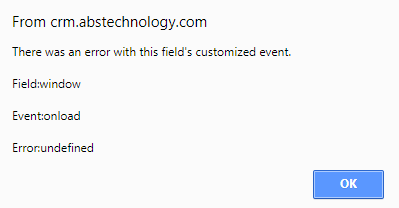
3301.Capture.PNG

        function retrieveStage(opportunityId)
        {
            SDK.REST.retrieveRecord(
                opportunityId, 
                "Opportunity",
                "opportunity_quotes/new_stage", 'opportunity_quotes',
                function (result) {
                    var stage = result.opportunity_quotes.new_stage;
                }, function(error) {
                    Xrm.Utility.alertDialog(error.message);
                });

            if (stage != null && stage != 1) {
                alert("This is my test message.");
            }
        }


*This post is locked for comments

I have the same question (0)
  • Suggested answer
    a33ik Profile Picture
    84,331 Most Valuable Professional on at

    Hello,

    You should learn how to troubleshoot your JS using tools available - blogs.msdn.microsoft.com/.../debugging-custom-javascript-code-in-crm-using-browser-developer-tools

  • epark06 Profile Picture
    1,328 on at

    Thanks, I was able to show the alert properly, but the filter on stage does not work. It is always showing an alert.

                function retrieveStage(opportunityId) {
                    var opportunityID = Xrm.Page.getAttribute("opportunityid").getValue()[0].id;
                    var EntitySchemaName = "Opportunity";
    
                    if (opportunityID != null) {
                        SDK.REST.retrieveRecord(
                        opportunityID, 
                        EntitySchemaName,
                        "new_stage", null,
                        function (result) {
                            var stage = result.new_stage;
                            if (stage != null && stage != 1) {
                                alert("This is my test message.");
                            }
                        }, 
                    errorHandler
                );
                }
                }
                function errorHandler(error) {
                    writeMessage(error.message);
                }


  • Suggested answer
    Mahendar Pal Profile Picture
    45,095 on at

    Hello,

    You may want to test your logic first using Rest builder if code/logic working there you can use it in your js web resource:

    github.com/.../CRMRESTBuilder

  • Abby Kong Profile Picture
    6 on at

    Hi LearningCRM,

    what is the field type of new_stage?

    Regards,

    Abby

  • epark06 Profile Picture
    1,328 on at

    Hi Abby, the field is an option set. Here is my latest attempt. I am still getting the alert every time on quote onload. I only want this alert on values 2 and 3. I also tried adding "Xrm.Page.getAttribute("new_stage").getValue();" but this did not work.

    function retrieveStage(opportunityId) {
        var opportunityID = Xrm.Page.getAttribute("opportunityid").getValue()[0].id;
        var EntitySchemaName = "Opportunity";
    
        if (opportunityID != null) {
            SDK.REST.retrieveRecord(
            opportunityID,
            EntitySchemaName,
            "new_stage", null,
            checkstage, errorHandler );
        }
    }
    function checkstage(opportunity) {
        var stage = opportunity.new_stage;
        if (stage != null && stage != 1) {
            alert("This is my test message.");
        }
    }
    
    function errorHandler(error) {
        alert(error.message);
    }
    

  • Suggested answer
    a33ik Profile Picture
    84,331 Most Valuable Professional on at

    Hello,

    Can you please provide a screenshot from Opportunity attributes that contains new_stage field. You're using 2011 odata and in this case new_stage and new_Stage are different fields. Can you please provide that screenshot?

  • epark06 Profile Picture
    1,328 on at

    [quote user="Andrew Butenko"]

    Hello,

    Can you please provide a screenshot from Opportunity attributes that contains new_stage field. You're using 2011 odata and in this case new_stage and new_Stage are different fields. Can you please provide that screenshot?

    [/quote]

    The name/schema name is all lowercase. None = 1, Partial = 2, All = 3.

    81630.Capture.PNG

  • Suggested answer
    a33ik Profile Picture
    84,331 Most Valuable Professional on at

    You gave me wrong screenshot. What I wanted to see is following:

    2766.Opp.png

    I understand that this is standard attributes but it could be the case for your custom. That's why I asked for "attributes" and not attribute. I believe it could be unclear :)

  • epark06 Profile Picture
    1,328 on at

    Thanks, here it is. I will also try to filter on a different field to see if there's something wrong with the field...

    3248178.Capture.PNG

  • epark06 Profile Picture
    1,328 on at

    Same behavior even with testing on another field.

    When I use "if (stage != null)", it will fire alert every time.

    When I use "if (stage == 2)", it never fires.

    When I use "if (stage = 2)", it will fire alert every time.

Under review

Thank you for your reply! To ensure a great experience for everyone, your content is awaiting approval by our Community Managers. Please check back later.

Helpful resources

Quick Links

Responsible AI policies

As AI tools become more common, we’re introducing a Responsible AI Use…

Neeraj Kumar – Community Spotlight

We are honored to recognize Neeraj Kumar as our Community Spotlight honoree for…

Leaderboard > 🔒一 Microsoft Dynamics CRM (Archived)

#1
SA-08121319-0 Profile Picture

SA-08121319-0 4

#1
Calum MacFarlane Profile Picture

Calum MacFarlane 4

#3
Alex Fun Wei Jie Profile Picture

Alex Fun Wei Jie 2

Last 30 days Overall leaderboard

Featured topics

Product updates

Dynamics 365 release plans



