web
You’re offline. This is a read only version of the page.
close
Skip to main content

Notifications

Announcements

No record found.

Community site session details

Community site session details

Session Id :
Supply chain | Supply Chain Management, Commerce
Answered

Work type- Put Location is blank in work, when release to warehouse is actioned

(0) ShareShare
ReportReport
Posted on by 64

Hi All,

I am trying to created work for sales order, but for some strange reason work type- Put location is BLANK. As per my understanding all the setups seems to be correct. Can anyone please guide what is it which i'm missing here. PICK location is working fine.

Key Setups as below for reference please:

pastedimage1684232083261v1.png

I have also tried in Edit Query Location = Baydoor instead of Location profile ID field.
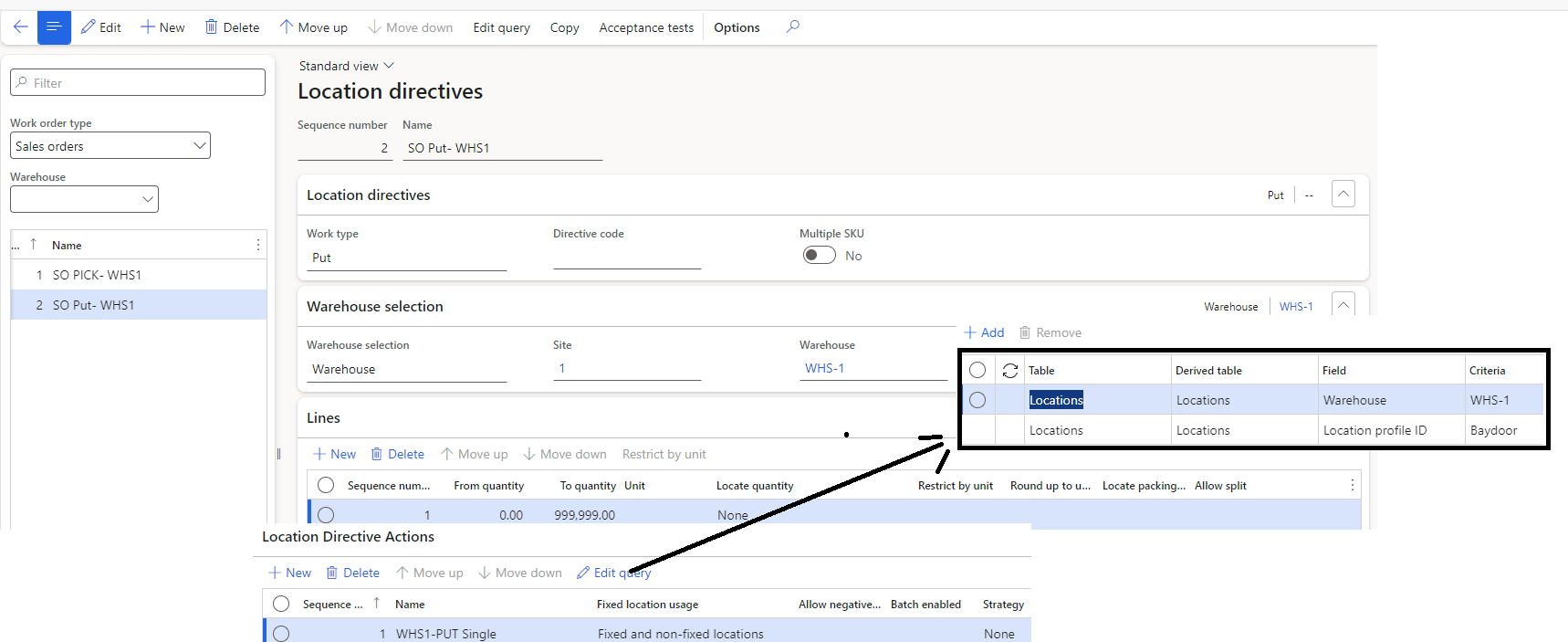
pastedimage1684232389502v2.png

Sales order and On hand inventory:

pastedimage1684232556953v3.png

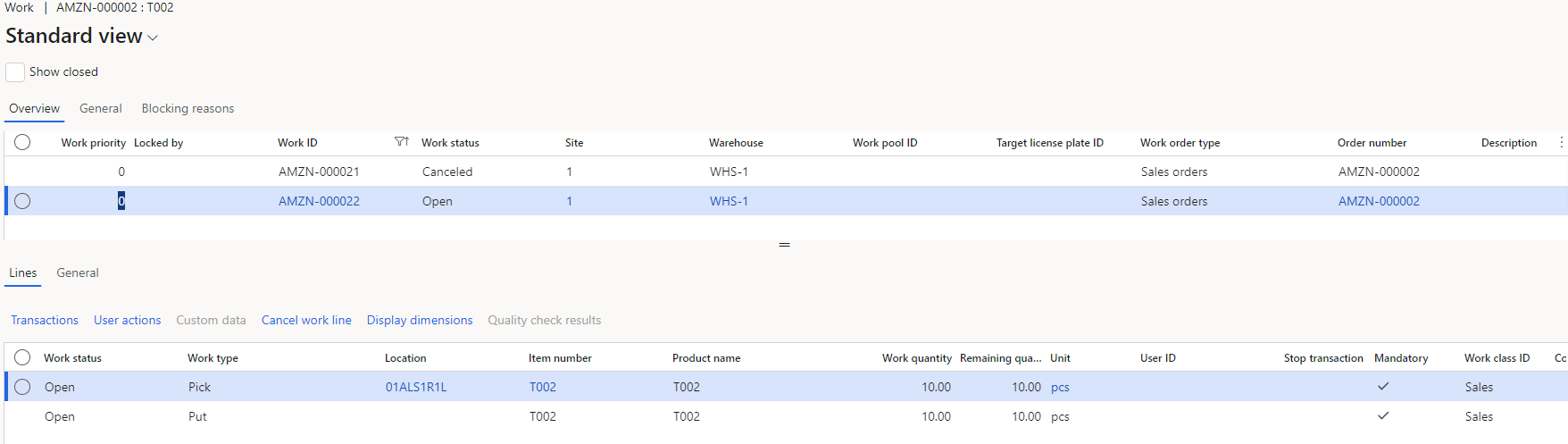
WORK:

pastedimage1684232587406v4.png

Thank You.

I have the same question (0)
  • Suggested answer
    Siv Sagar Profile Picture
    5,268 Super User 2025 Season 2 on at

    Hi Abhishek,

    Kindly check the Location directive for the Put Work type in the query. Try to select the criteria from the dropdown (Baydoor).

    Then try again.

    Best regards,

    Siv Sagar

    This post is my own opinion and does not necessarily reflect the opinion or view of my company.

    Please mark as verified if the answer is helpful. Welcome to join hot discussions in Dynamics 365 Forums.

  • Abhishek001 Profile Picture
    64 on at

    Hi Siv,

    As shown in the snapshot, I have already selected in Edit query criteria as baydoor.

    I also tried using directive code for Put, but still in work its showing blank.

    Thanks

    Abhishek

  • Suggested answer
    sagar_patil Profile Picture
    918 Super User 2025 Season 2 on at

    1. Enable the work creation history log from warehouse management parameters and try to create the sales picking work. If you are not able to get PUT location then please check work creation history log.

    Navigation: Warehouse Management > work > work creation history log.

    2. If above solution doesn't work for you then delete Location directive PUT for sales order and create a new one. 

  • Verified answer
    Gaurav Bharti Profile Picture
    145 on at

    Hi,

    Since you have defined for Put work type, location profile Id as Baydoor.

    You need to map same in Warehouse management parameters> Location types >Final shopping location type = Baydoor.

    Similarly if put work type location defined as Staging or Packing. You need to add them in warehouse management parameters.

    Hope this resolves your issue.

    Thanks

    Gaurav

Under review

Thank you for your reply! To ensure a great experience for everyone, your content is awaiting approval by our Community Managers. Please check back later.

Helpful resources

Quick Links

Responsible AI policies

As AI tools become more common, we’re introducing a Responsible AI Use…

Neeraj Kumar – Community Spotlight

We are honored to recognize Neeraj Kumar as our Community Spotlight honoree for…

Leaderboard > Supply chain | Supply Chain Management, Commerce

#1
Siv Sagar Profile Picture

Siv Sagar 239 Super User 2025 Season 2

#2
Laurens vd Tang Profile Picture

Laurens vd Tang 213 Super User 2025 Season 2

#3
André Arnaud de Calavon Profile Picture

André Arnaud de Cal... 132 Super User 2025 Season 2

Last 30 days Overall leaderboard

Featured topics

Product updates

Dynamics 365 release plans