web
You’re offline. This is a read only version of the page.
close
Skip to main content

Announcements

No record found.

News and Announcements icon
Community site session details

Community site session details

Session Id :
Microsoft Dynamics AX (Archived)

Production Order Status is " COMPLETED " : But Required Quantity underNetRequirements is -72

(0) ShareShare
ReportReport
Posted on by

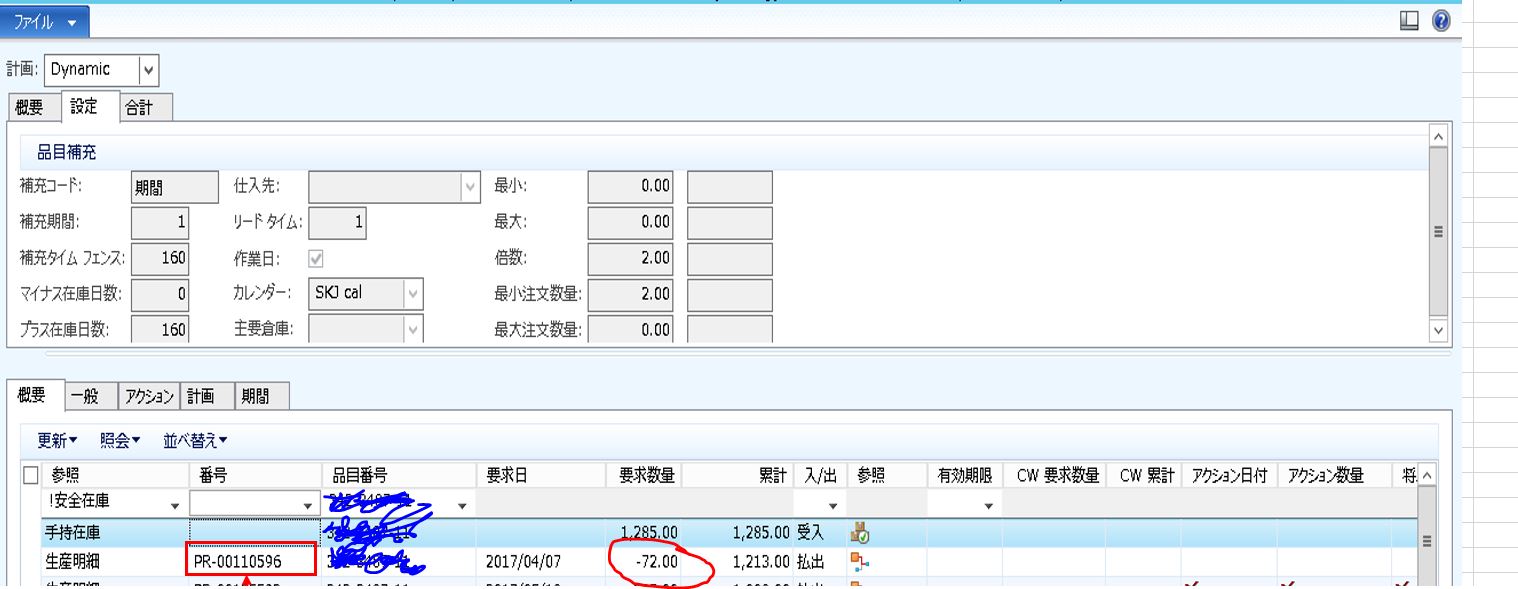
A particular Production Order has been completed.But when I click the Net Requirements

Under Overview , The Required Quantity Field has the Value -72.....

In what case is that possible??

This is the Net Requirements Screen

Production Orders > view > Net Requirements
4152.Capture4.JPG

The Required Quantity says -72 even though the Order has been Completed ??

Why is that?

*This post is locked for comments

I have the same question (0)
  • yasu Profile Picture
    on at

    Why am I  seeing the MRP Information Even though the Order has completed???

  • Community Member Profile Picture
    on at

    Hi Yasu,

    Could you please share the screen of your works order current Status and Remaining Status?

    Regards,

    V

  • yasu Profile Picture
    on at

    thank you

    Current Status     = report as finished

    Remaining Status = Material Consumption

  • Verified answer
    Community Member Profile Picture
    on at

    Hi Yasu,

    Go on your works order, from top action pane select View Tab - Journals - Picking list .. a new form will open

    From there select drop down menu Picking List - Create lines and select proposal "Remaining Quantity" .. new picking list journal will be created with remaining quantity you need to consume against the works order - post the journal.

    You might need to pick materials on the journal line level (From top action pane select Stock - Pick ) before posting.

    Let me know if you still have any issues with it, but it should close the works order and update "Remaining Status" to Ended

    Regards,

    V

  • yasu Profile Picture
    on at

    oh thanks !! I will do it tomorrow and get it back to you .....

  • yasu Profile Picture
    on at

    thanku I solved this .. I posted some other similar problems ..If someone can help :)

Under review

Thank you for your reply! To ensure a great experience for everyone, your content is awaiting approval by our Community Managers. Please check back later.

Helpful resources

Quick Links

Introducing the 2026 Season 1 community Super Users

Congratulations to our 2026 Super Stars!

Meet the Microsoft Dynamics 365 Contact Center Champions

We are thrilled to have these Champions in our Community!

Congratulations to the March Top 10 Community Leaders

These are the community rock stars!

Leaderboard > 🔒一 Microsoft Dynamics AX (Archived)

#1
CP04-islander Profile Picture

CP04-islander 39

#2
Michel ROY Profile Picture

Michel ROY 14

#3
imran ul haq Profile Picture

imran ul haq 8

Last 30 days Overall leaderboard

Featured topics

Product updates

Dynamics 365 release plans
