web
You’re offline. This is a read only version of the page.
close
Skip to main content

Notifications

Announcements

No record found.

Community site session details

Community site session details

Session Id :
Customer experience | Sales, Customer Insights,...
Suggested Answer

Recent Update - Impact to Customer Journeys

(0) ShareShare
ReportReport
Posted on by 5

The recent update changed and restricted our ability to add a split in a customer journey where we might add a follow-up step (example - when an email is opened, notify sales contact to call them). The toolbox is gone and we can't seem to figure out how to amend the process.  Any suggestions?  We are now looking to utilize the template as it potentially looks like it has not been impacted by the update.

I have the same question (0)
  • cloflyMao Profile Picture
    25,210 on at

    Hi amargello,

    As per my understanding, you could do below to add a follow-up step:

    1. Click "+" to add a "If/then branches".
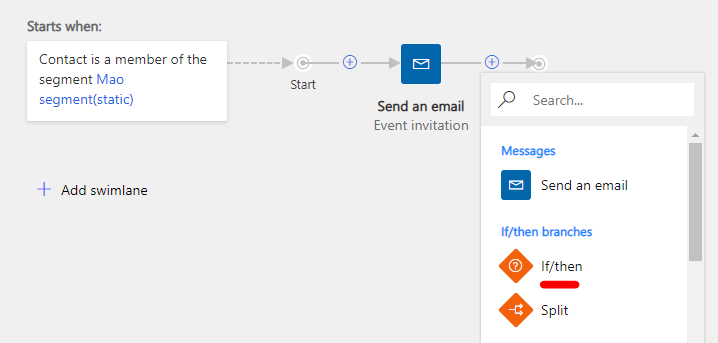
    pastedimage1601274392592v1.png

    2. Click the branch tile, set the source to your Email, set the condition to "has been opened".

    pastedimage1601275538370v2.png

    3. Click "+" button of Yes branch, add a phone call.
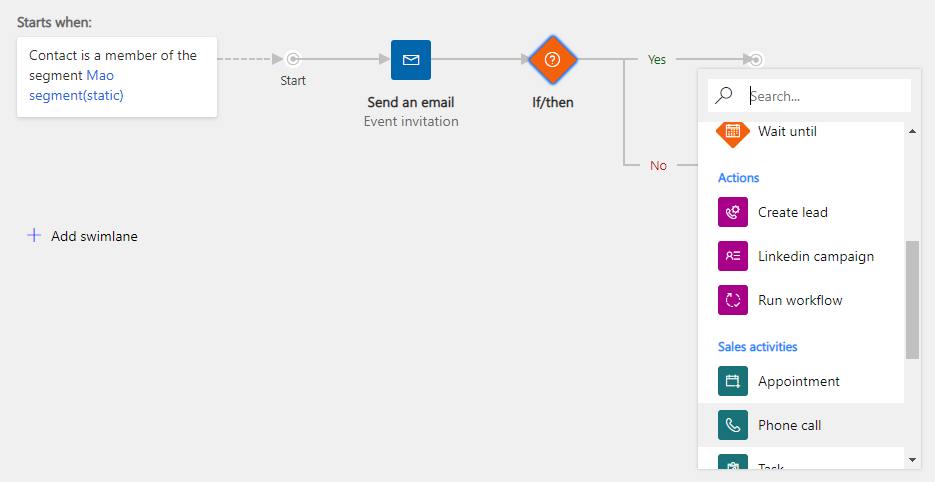
    pastedimage1601275657523v3.png

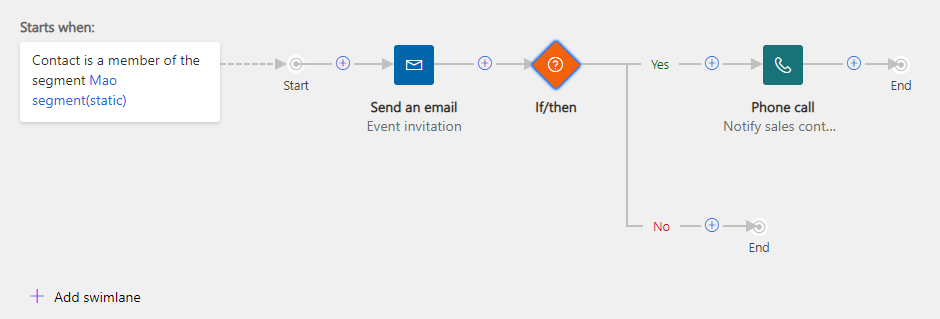
    Final result:

    pastedimage1601275768077v4.png

    You could refer to introduction about new canvas UI designer.

    https://docs.microsoft.com/en-us/dynamics365/marketing/customer-journey

    In addition, as you mentioned, UI of journey template is still same to the previous, because the new UI feature is still in early access,

    template designer might be also upgraded to the new UI with the general availability in October.

    Regards,

    Clofly

  • amargello Profile Picture
    5 on at

    Thanks Clofly. We did try those steps also but our journey is slightly different in that once the action/split is taken we'd like the emails in the journey to continue to send all of the remaining emails. This method doesn't appear to allow for that.  

  • Suggested answer
    Aga M Profile Picture
    on at

    Hi Amargello,

    Can you please share a screenshot/image showing required journey structure? (which was possible to create in the old designer)

    That way we will be able to assist you on how to create such a journey in the new journey designer.

    Thank you,

    Aga

Under review

Thank you for your reply! To ensure a great experience for everyone, your content is awaiting approval by our Community Managers. Please check back later.

Helpful resources

Quick Links

Responsible AI policies

As AI tools become more common, we’re introducing a Responsible AI Use…

Neeraj Kumar – Community Spotlight

We are honored to recognize Neeraj Kumar as our Community Spotlight honoree for…

Leaderboard > Customer experience | Sales, Customer Insights, CRM

#1
Tom_Gioielli Profile Picture

Tom_Gioielli 170 Super User 2025 Season 2

#2
#ManoVerse Profile Picture

#ManoVerse 61

#3
Gerardo Rentería García Profile Picture

Gerardo Rentería Ga... 52 Most Valuable Professional

Last 30 days Overall leaderboard

Product updates

Dynamics 365 release plans