web
You’re offline. This is a read only version of the page.
close
Skip to main content

Notifications

Announcements

No record found.

Community site session details

Community site session details

Session Id :
Microsoft Dynamics CRM (Archived)

Dynamics CRM App for Outlook v9 menu icons missing

(0) ShareShare
ReportReport
Posted on by 235

We just upgraded our production instance from 8.2 to 9.0 and we now have the upgraded App for Outlook as well. Some users, myself included, are not seeing any menu icons in the app. 
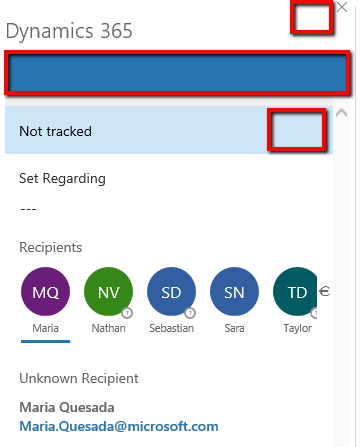
2018_2D00_08_2D00_06_5F00_1204.png

I've uninstalled and reinstalled the app, I've cleared the browser cache in IE11 and Edge, I do not know what else to try.

*This post is locked for comments

I have the same question (0)
  • Ben Thompson Profile Picture
    6,350 on at

    The icons are actually a downloaded font and this is likely to be a permissions issue within ie11.

    [View:https://stackoverflow.com/questions/26894319/icon-fonts-not-loading-in-ie11] has a list of the reasons of which the most likely one is

    Font downloads are disabled in IE, under Internet Options / Security / Custom Level / Font Downloads enable /disable. They might be disabled by your network admin, in which case you would not be able to see nor change this setting.

  • ekmpdx Profile Picture
    235 on at

    I checked my IE11 and I have Font Download enabled in both Internet and Trusted Sites.

  • Suggested answer
    Ben Thompson Profile Picture
    6,350 on at

    In which case you need to raise a call with Microsoft as this is a known issue with a documented answer but I can't remember what the other steps are...

  • JulienReny Profile Picture
    5 on at

    Hi!

    Were you able to fix this issue? I have the same problem with my client.

    Thanks

  • ekmpdx Profile Picture
    235 on at

    Icon issue didn't get resolved until I completely reinstalled my office. But then I still didn't have a pin for a long time. And to be honest, I'm not sure when and why it finally showed up, but it did. It all works fine now. Wish I could be of more help.

Under review

Thank you for your reply! To ensure a great experience for everyone, your content is awaiting approval by our Community Managers. Please check back later.

Helpful resources

Quick Links

Responsible AI policies

As AI tools become more common, we’re introducing a Responsible AI Use…

Neeraj Kumar – Community Spotlight

We are honored to recognize Neeraj Kumar as our Community Spotlight honoree for…

Leaderboard > 🔒一 Microsoft Dynamics CRM (Archived)

#1
SA-08121319-0 Profile Picture

SA-08121319-0 4

#1
Calum MacFarlane Profile Picture

Calum MacFarlane 4

#3
Alex Fun Wei Jie Profile Picture

Alex Fun Wei Jie 2

Last 30 days Overall leaderboard

Featured topics

Product updates

Dynamics 365 release plans



