web
You’re offline. This is a read only version of the page.
close
Skip to main content

Announcements

No record found.

News and Announcements icon
Community site session details

Community site session details

Session Id :
Microsoft Dynamics AX (Archived)

form dataSource record is not updated on call

(0) ShareShare
ReportReport
Posted on by

Hello:
I've dynamically added a button to my VendInvoiceJour form to call another form B for additional data. This form B relates to the VendInvoiceJour RecId.

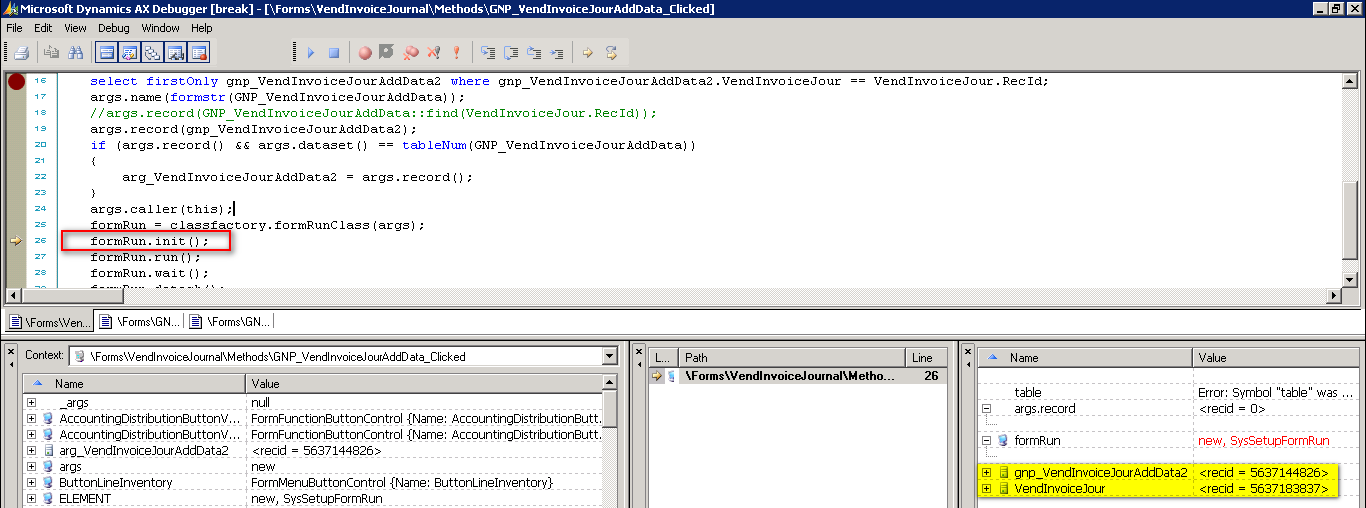
In the click method of the dynamic button I have put the following code, but when calling it does not bring me in correct registration but another one. This despite making Select with the RecId of VendInvoiceJour and passing the result of the query to form B:
Your help please.

void GNP_VendInvoiceJourAddData_Clicked(Args _args)
{
    Form formAddData;
    Args args;
    Object     formRun;
    GNP_VendInvoiceJourAddData gnp_VendInvoiceJourAddData2;
    GNP_VendInvoiceJourAddData arg_VendInvoiceJourAddData2;
    ;
    args = new Args();
    select firstOnly gnp_VendInvoiceJourAddData2 where gnp_VendInvoiceJourAddData2.VendInvoiceJour == VendInvoiceJour.RecId;
    args.name(formstr(GNP_VendInvoiceJourAddData));
    //args.record(GNP_VendInvoiceJourAddData::find(VendInvoiceJour.RecId));
    args.record(gnp_VendInvoiceJourAddData2);    
    if (args.record() && args.dataset() == tableNum(GNP_VendInvoiceJourAddData))
    {
        arg_VendInvoiceJourAddData2 = args.record();
    }
    args.caller(this);
    formRun = classfactory.formRunClass(args);
    formRun.init();
    formRun.run();
    formRun.wait();
    formRun.detach();    
}
2017_2D00_09_2D00_19_5F00_143214.png

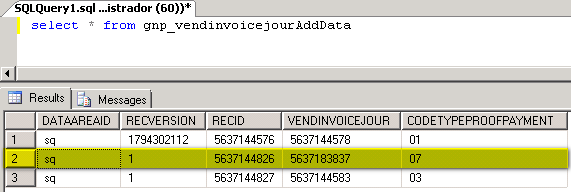
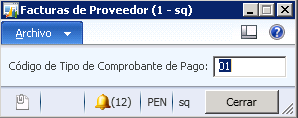
You should return the  CodeTypeProofPayment = "07" but instead bring "01".
2017_2D00_09_2D00_19_5F00_143510.png

2017_2D00_09_2D00_19_5F00_143410.png

*This post is locked for comments

I have the same question (0)
  • Suggested answer
    Vilmos Kintera Profile Picture
    46,149 on at

    Do you have the datasource set on the button? If yes, remove it, you might be receiving a linkActive call from the child form for the caller datasource.

    Also you might have implemented the link for the record incorrectly, can you show us your formdatasource init() and executeQuery() methods, where you should have created either a query range, or do the linking to the caller buffer?

  • Community Member Profile Picture
    on at

    Form B only has these two methods:

    public void init()

    {

       super();

    }

    public void main(Args args)

    {

    GNP_VendInvoiceJourAddData           localEmplTable;

    ;

    if(args.record().TableId == tablenum(GNP_VendInvoiceJourAddData))

    localEmplTable = args.record();

    }

  • Community Member Profile Picture
    on at

    Thanks Vilmos,

    There is no datasource set in the button as it is dynamically created with a method that is called by the init of the VendInvoiceJour form:

    void init()

    {

    ...

       super();

       //GNP_LocalizationPE

       gnp_LPEGeneralClass = new GNP_LPEGeneralClass();

       //gnp_LPEGeneralClass.AddButtonLocalization(this);

       element.GNP_LPEAddButtonLocalization();

       //GNP_LocalizationPE

    ...

    }

    private void GNP_LPEAddButtonLocalization()

    {

       FormButtonControl   formButtonControl;

       ;

       formButtonControl = new FormButtonControl();

       formButtonControl = this.design().addControl(FormControlType::Button, "GNP_VendInvoiceJourAddData");

       formButtonControl.text("Datos Adicionales");

       this.controlMethodOverload(true);

    }

  • Suggested answer
    Vilmos Kintera Profile Picture
    46,149 on at

    Have a look at this:

    community.dynamics.com/.../ax-2012-add-dynalink-in-x

    You might want to add the link for your caller record.

  • Community Member Profile Picture
    on at

    Hello Vilmos,

    In link it is recommended to use Dynalink but when I try it gives me this message:

    "does not contain this query method".

  • Suggested answer
    Vilmos Kintera Profile Picture
    46,149 on at

    Because your code is incorrect. You have to add dynalink on your form datasource within the child formDS's init method. Store the element.args().record in a local variable, and link based on that buffer.

Under review

Thank you for your reply! To ensure a great experience for everyone, your content is awaiting approval by our Community Managers. Please check back later.

Helpful resources

Quick Links

Introducing the 2026 Season 1 community Super Users

Congratulations to our 2026 Super Stars!

Meet the Microsoft Dynamics 365 Contact Center Champions

We are thrilled to have these Champions in our Community!

Congratulations to the March Top 10 Community Leaders

These are the community rock stars!

Leaderboard > 🔒一 Microsoft Dynamics AX (Archived)

#1
CP04-islander Profile Picture

CP04-islander 26

#2
imran ul haq Profile Picture

imran ul haq 8

#3
André Arnaud de Calavon Profile Picture

André Arnaud de Cal... 4 Super User 2026 Season 1

Last 30 days Overall leaderboard

Featured topics

Product updates

Dynamics 365 release plans