web
You’re offline. This is a read only version of the page.
close
Skip to main content

Announcements

No record found.

News and Announcements icon
Community site session details

Community site session details

Session Id :
Customer experience | Sales, Customer Insights,...
Suggested Answer

Sharepoint library link to D365 Event

(0) ShareShare
ReportReport
Posted on by 15

Hi all,

I try to connect an existing Sharepoint library to an event in Dynamics 365 Marketing.

I need to add for exemple a button or maybe be other but when i am on the event, i must see a link to a folder in sharepoint site.

That is possible ?

Thanks for all your help

I have the same question (0)
  • Suggested answer
    cloflyMao Profile Picture
    25,210 on at

    Hi Bishope,

    Yes, it is still possible to enable SharePoint in event portal.

    Please refer to following steps to complete integration:

    I assume that you have enabled SharePoint in Dynamics 365, so I start from Portal part.

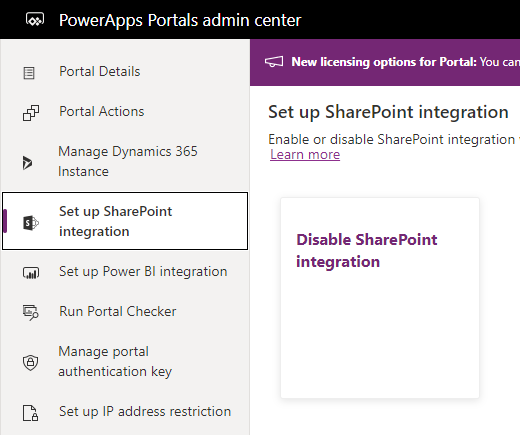
    1. Enable SharePoint integration in portal management center:

    https://admin.powerplatform.microsoft.com/resources/portals

    (I have enable it)
    pastedimage1599203905885v1.png

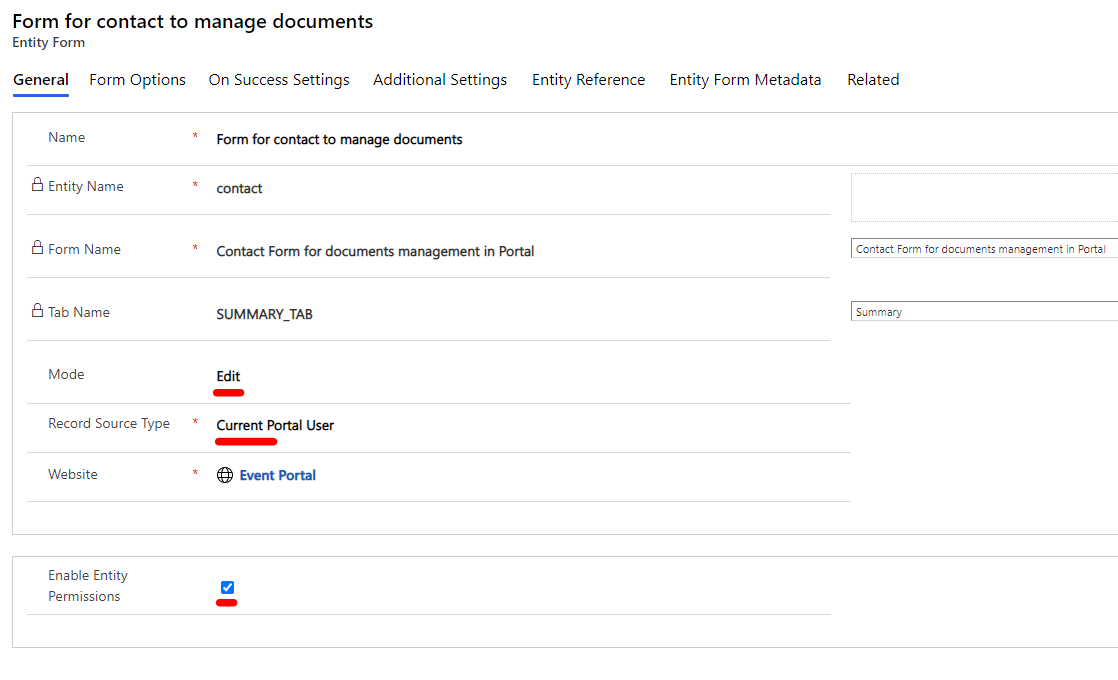
    2. Create an entity form record, add the contact form that you have added document subgrid to it.

    (Check article below for how to add document subgrid to form to make the form be able to display SharePoint files.)

    https://docs.microsoft.com/en-us/powerapps/maker/portals/manage-sharepoint-documents#sample-configuration-to-enable-document-management-on-the-case-entity-form
    pastedimage1599203984018v2.png

    3. Add two entity permission:

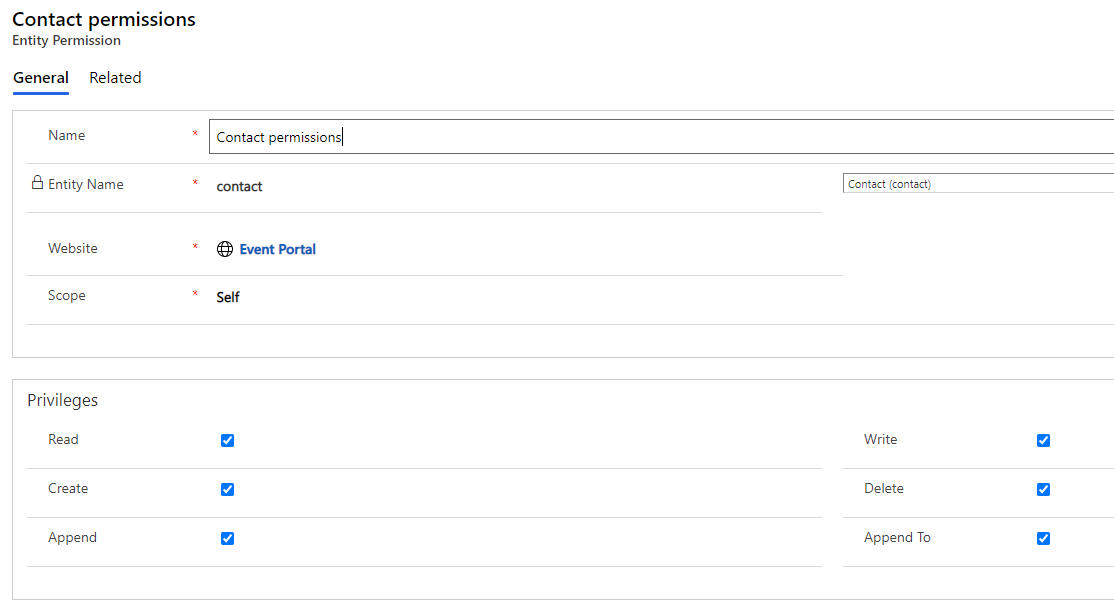
    The first one is for Contact, its scope is Self, enable all privileges to it.
    pastedimage1599204273719v3.png

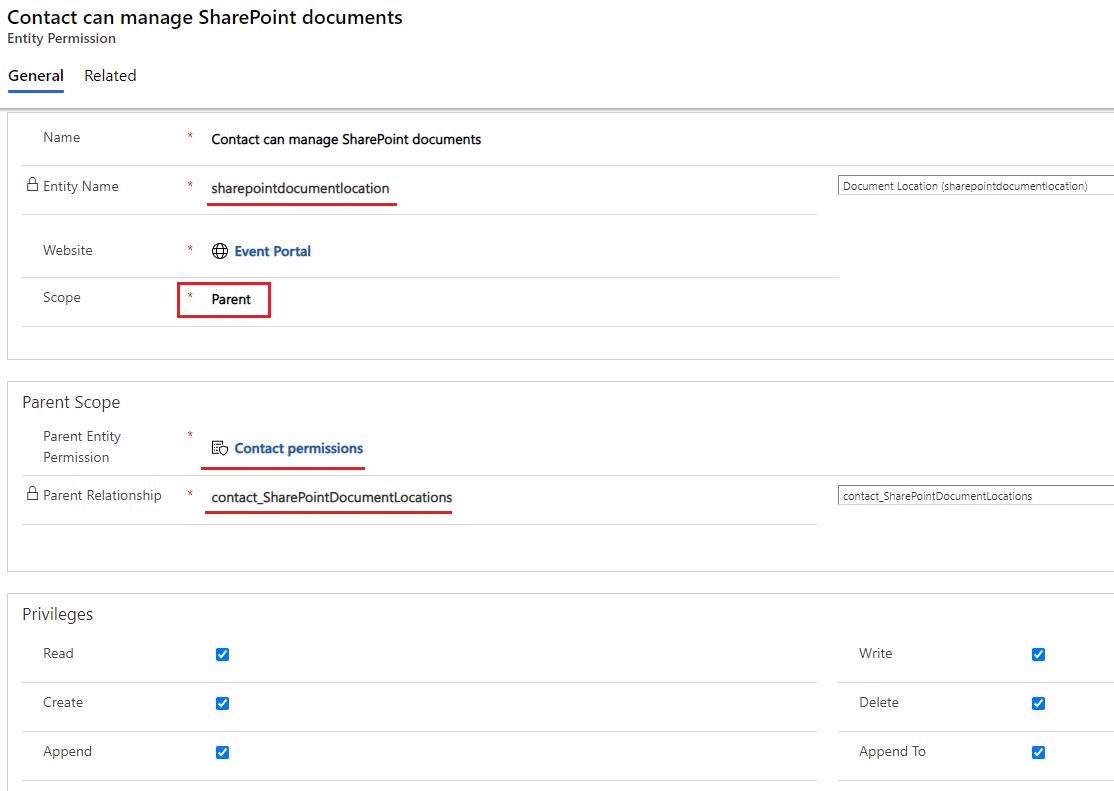
    The second is for SharePoint files, but the entity need to be sharepointdocumentlocation, set its parent entity permission to the first one and select the relationship to contact.
    6354.JPG

    4. Assign above two entity permissions to Authenticated Users web role,
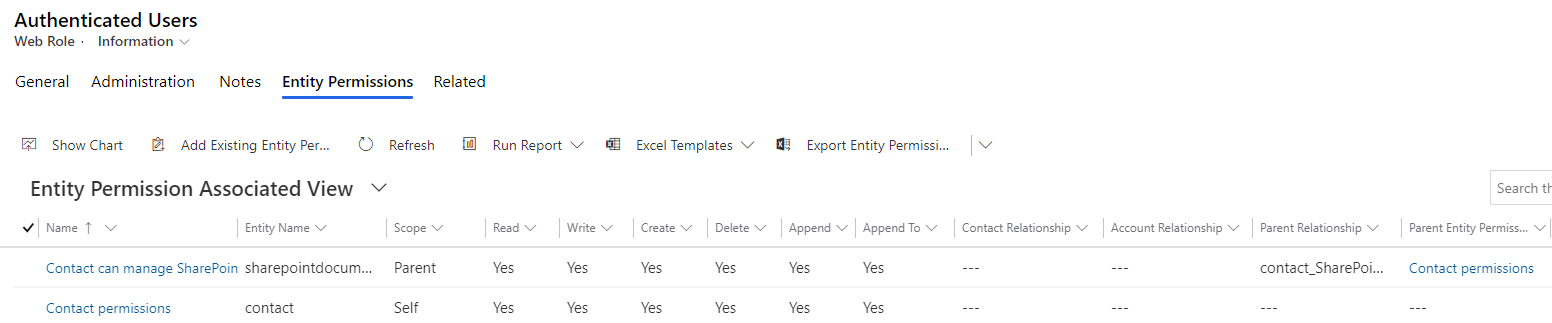
    pastedimage1599204684023v4.png

    then assign the role to your contact who want to manage SharePoint files.
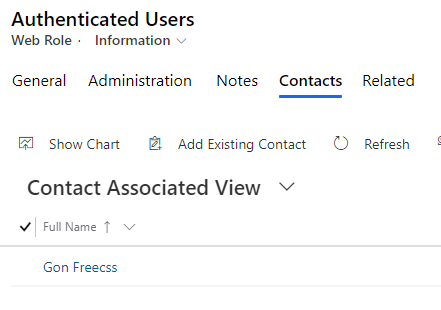
    pastedimage1599204767002v5.png

    5. Almost done, and this step is important.

    Create an Rewrite type page template record, set the rewrite url field to ~/Pages/Page.aspx
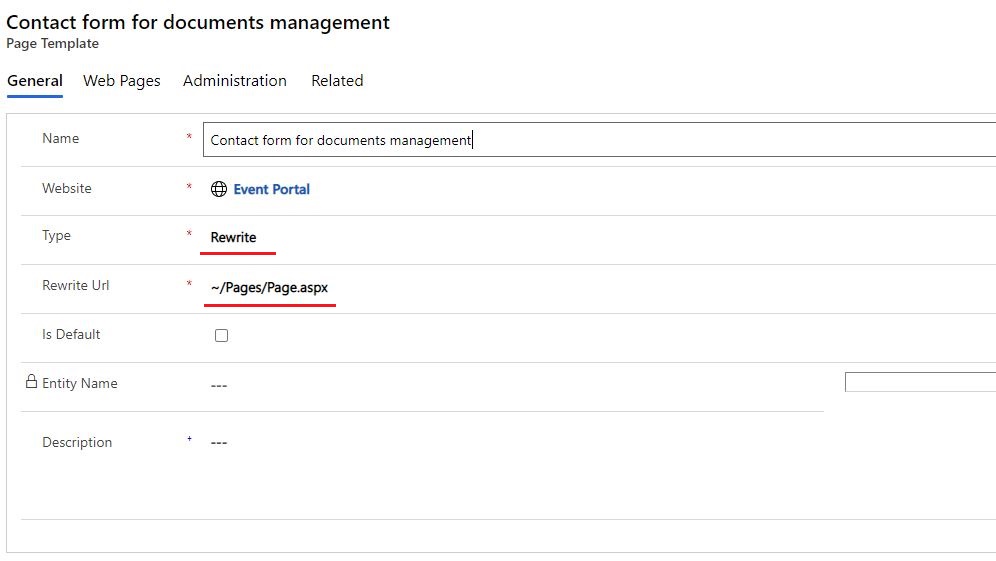
    2500.JPG

    6. Create a new web page record, set its page template to the previous record, add the entity form to it.
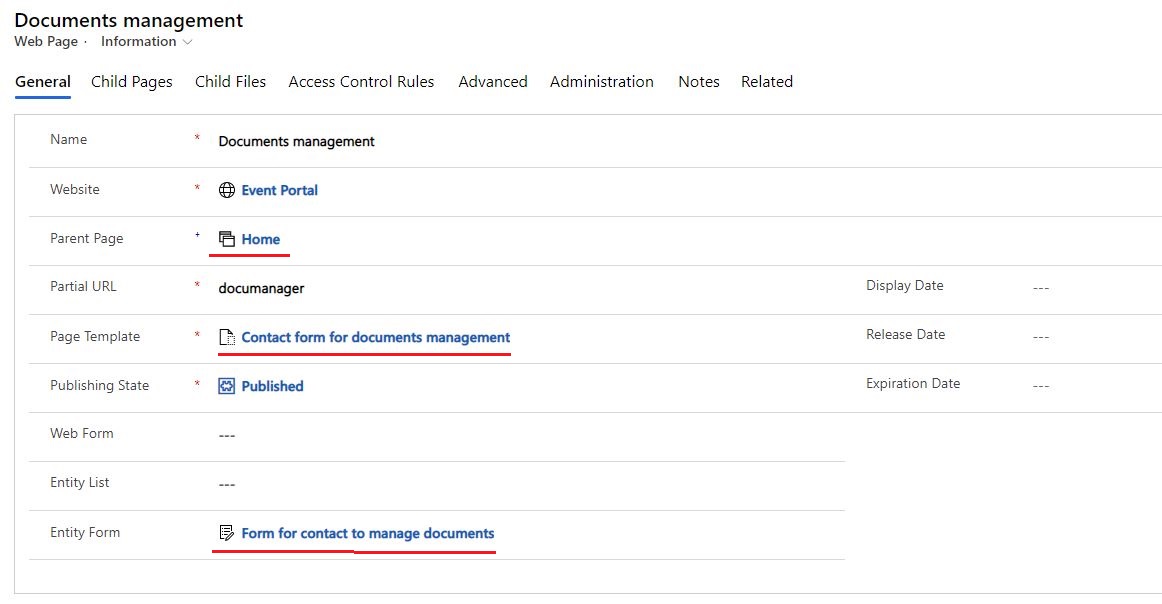
    02500.JPG

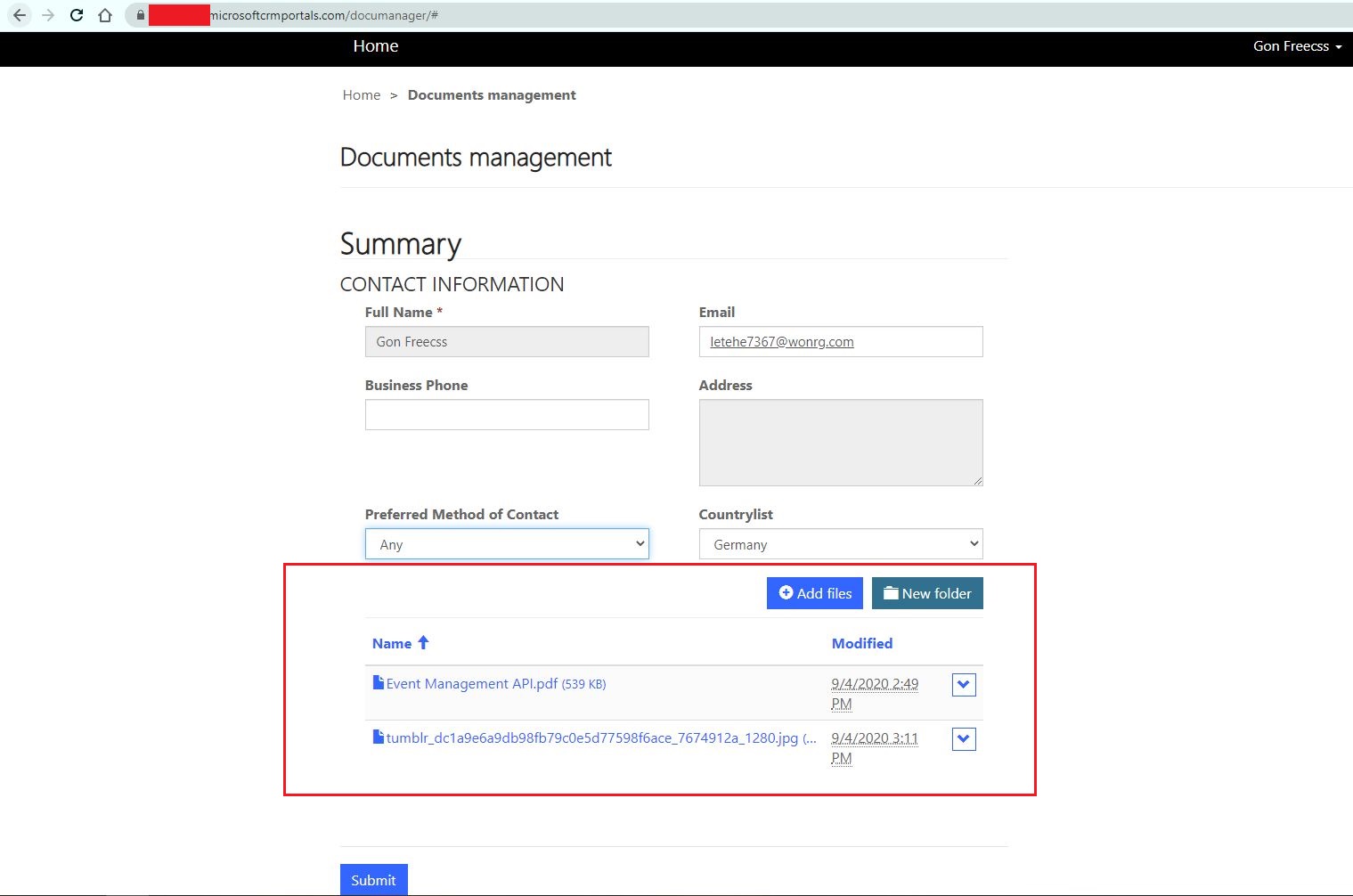
    7. Result

    Open the page, now contact is able to manage its sharepoint files.
    8838.JPG

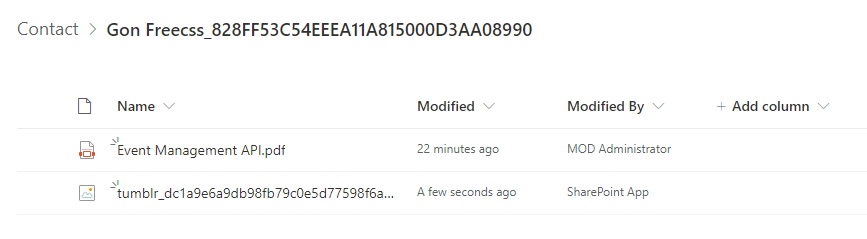
    These files are also available in SharePoint site.
    pastedimage1599205266625v6.png

    You can add an extra button to header section of web page which contains link to the documents management page.

    The event website is built with Angular, so you need to have some knowledge about it to customize the web page. 

    In short, we should download event website files and customize it locally, then deploy modifications to portal by executing an automation script.

    https://docs.microsoft.com/en-us/dynamics365/marketing/developer/portal-hosted

    Regards,

    Clofly

  • Bishope Profile Picture
    15 on at

    Hi Clofly,

    Very Sorry for the late response, i am very confused to go with all this steps.

    First Powerplatform admin center change and i can't activate SharePoint.

    And after that i need to know if we can show me in a demo tenant i created ?

    Thanks

  • cloflyMao Profile Picture
    25,210 on at

    Hi Bishope,

    -> First Powerplatform admin center change and i can't activate SharePoint.

    Couldn't you open the following links?

    https://admin.powerplatform.microsoft.com/ 

    https://admin.powerplatform.microsoft.com/resources/portals

    -> if we can show me in a demo tenant i created ?

    Do you mean that your marketing application is trial?

    Regards,

    Clofly

  • Bishope Profile Picture
    15 on at

    Hi Clofly.

    Yes d365 marketing it’s a trial licence which I use to test.

    Yes i can to the url.

    Thanks for help.

  • cloflyMao Profile Picture
    25,210 on at

    Hi Bishope,

    Unfortunately, marketing trials couldn't be integrated with a Dynamics 365 Portal. Instead, MS provide a special mechanism that lets you try out landing pages, forms, the event website.

    You can find the limitation of trial in following links: 

    https://docs.microsoft.com/en-us/dynamics365/marketing/trial-signup#differences-between-marketing-trials-and-production-instances

    https://docs.microsoft.com/en-us/dynamics365/marketing/trial-preview-limits

    Due to portal is not available for the trial application, therefore, we couldn't test SharePoint in demo tenant.

    However, once you have a production instance, then you could follow above steps to complete integration.

    Regards,

    Clofly

  • Bishope Profile Picture
    15 on at

    Ok I understand I try to access production tenant to test.

    Is there any impact if I activate and test SharePoint integration with a production environment?

    Thanks.

  • cloflyMao Profile Picture
    25,210 on at

    Hi Bishope,

    There isn't impact, you can activate it and test.

    Regards,

    Clofly

  • Bishope Profile Picture
    15 on at

    Thanks for your response. 
    i will let you know. 

  • cloflyMao Profile Picture
    25,210 on at

    Hi Bishope,

    Ok, if you still had any doubt or encountered any problem during configuration, feel free to ask question.

    Regards,

    Clofly

    If you had found any answer helped, please kindly mark as verified to close the thread, it would be really appreciated.

Under review

Thank you for your reply! To ensure a great experience for everyone, your content is awaiting approval by our Community Managers. Please check back later.

Helpful resources

Quick Links

Introducing the 2026 Season 1 community Super Users

Congratulations to our 2026 Super Stars!

Congratulations to our 2025 Community Spotlights

Thanks to all of our 2025 Community Spotlight stars!

Leaderboard > Customer experience | Sales, Customer Insights, CRM

#1
ManoVerse Profile Picture

ManoVerse 214 Super User 2026 Season 1

#2
CU11031447-0 Profile Picture

CU11031447-0 100

#3
NeerajPawar Profile Picture

NeerajPawar 71

Last 30 days Overall leaderboard

Product updates

Dynamics 365 release plans
