web
You’re offline. This is a read only version of the page.
close
Skip to main content

Notifications

Announcements

No record found.

Community site session details

Community site session details

Session Id :
Microsoft Dynamics AX (Archived)

How to edit field financial dimension in the Inventory Journal Transfer ?

(0) ShareShare
ReportReport
Posted on by 3,805

Hi Guys,

I want to edit financial dimension "To Dimension" field from Inventory Journal Transfer like Picture 1. 
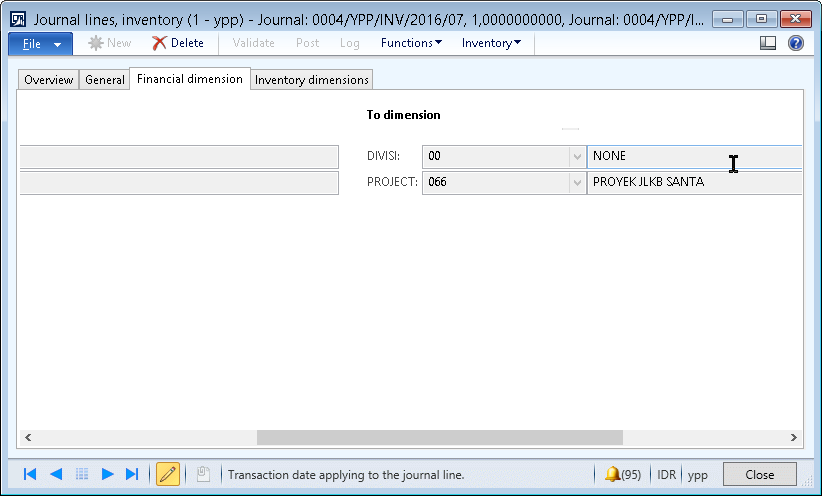
24_2D00_07_2D00_2016-21_2D00_58_2D00_57.png

Picture 1

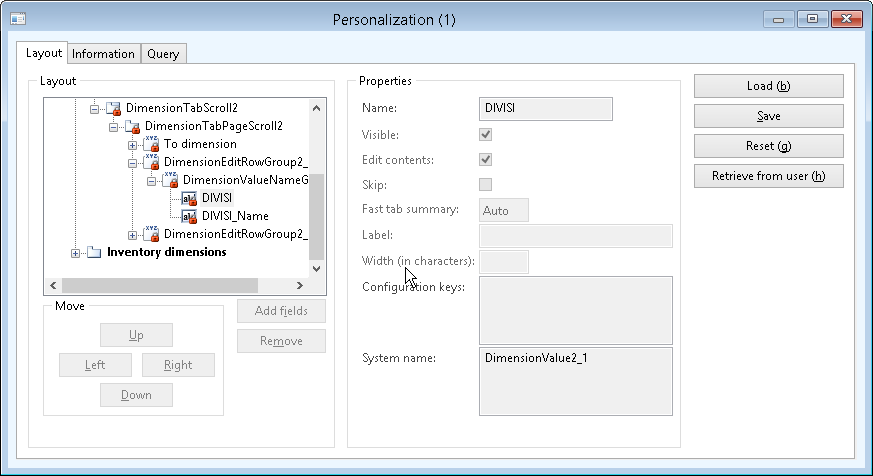
But when I want to change the properties, the personalized from the form show sign like a padlock in the field (Look Picture 2 )
24_2D00_07_2D00_2016-22_2D00_12_2D00_35.png

Picture 2


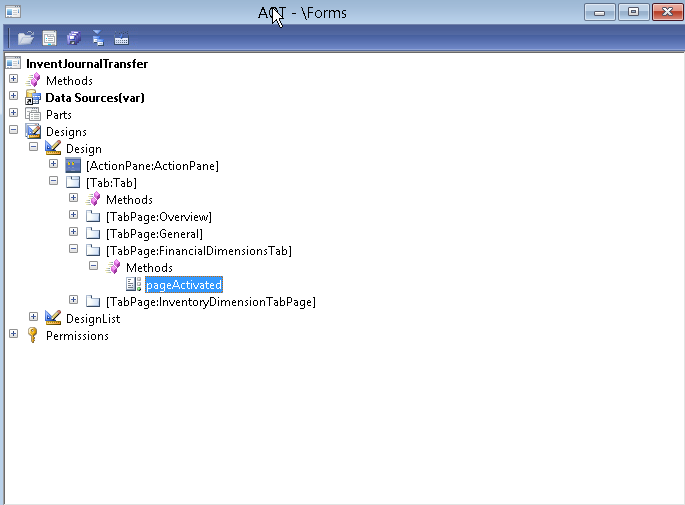
I dont quite know the meaning of the padlock sign like in the Picture 2 . I still open the form instead to look the condition of the form. But the form not showing any field except a class that control the financial dimension (Look Picture 3 ). The original name of the form is InventJournalTable, I make the copy of it and named it as InventJournalTransfer.
24_2D00_07_2D00_2016-22_2D00_20_2D00_29.png

Picture 3

I've tried opening the class pageActivated but I dont know which part that I should edit so the financial dimension field can be adited. Sorry Im kind of new comer in AX2012.
Hope anyone can show the right method so the field can be edited.
Thanks.


Sincerely,

~Enggar~

*This post is locked for comments

I have the same question (0)
  • André Arnaud de Calavon Profile Picture
    300,915 Super User 2025 Season 2 on at

    Hi Enggar,

    What is your business requirement here? The to dimensions are linked to the from dimensions and are just displaying the data. You can only select the dimensions in the from dimensions.

  • fajar Profile Picture
    3,805 on at

    Hi André

    I need the To Dimension can be adit, I mean I need the To Dimension can be select manually not according to the From Dimension.

    If its just to displaying data, so its that mean that the both fields cant be edit manually?

    Or is there any other way to make the both field (From and To Dimension) can be edit?

    Because from what I know, when the field is only used for displaying data it cant be edit.

    Thanks and Regards,

    ~Enggar~

  • Ludwig Reinhard Profile Picture
    Microsoft Employee on at

    Hello Enggar,

    As Andre, I am not clear what you actually want to achieve?

    Would you mind describing this in more detail?

    Many thanks and best regards,

    Ludwig

  • André Arnaud de Calavon Profile Picture
    300,915 Super User 2025 Season 2 on at

    Hi Enggar,

    Please have a look at the documentation: technet.microsoft.com/.../aa587291.aspx

    From dimension: Select the financial dimension from which the selected journal line is being transferred.

    To dimension: Displays the financial dimension to which the selected journal line is being transferred.

    Further: please mention your business requirement to explain why you need to have it editable.

  • fajar Profile Picture
    3,805 on at

    Hi Guys,

    Sorry for the inconvenience

    I'll try to give an explanation about the problem I faced. Hope my explanation clear enaugh.

    First of all, my client using 2 for their financial dimension

    Divisi and Project.

    In the dimension link setup, only Project that active.

    Then when they are going to make a new journal transfer, the only findim can be filled are From Divisi, From Project and To Project. The To Divisi is None and cant be edit.

    I need To Divisi can be filled or edit in case the user want to transfer the item to another Project in the certain Divisi

    Is there a way to make financial dimension To Divisi editable?

    Thanks and Regards,

    ~Enggar~

  • Suggested answer
    Ludwig Reinhard Profile Picture
    Microsoft Employee on at

    Hello Enggar,

    I would not recommend making modifications to the financial dimension framework. What might help though is the following.

    - Transfers within sites do not generate vouchers. For that reason, financial dimension values should not matter for you.

    - Transfer between sites create financial vouchers. I assume that you refer to those kind of transactions. Yet, in this case you have the option to link an inventory site to a financial dimension for example your division. By making use of this standard feature the from and to financial dimensions can differ and Standard AX makes sure that the voucher generated is ok. Wouldn't that be a feasible workaround for you?

    Ludwig

  • Suggested answer
    André Arnaud de Calavon Profile Picture
    300,915 Super User 2025 Season 2 on at

    Hi Enggar,

    For movements between projects you can also use an inventory profit/loss or movement journal and add the transaction into two lines. Then per line you can edit the dimensions. Note that on the positive line you need to enter the correct cost price depending on your inventory costing model.

Under review

Thank you for your reply! To ensure a great experience for everyone, your content is awaiting approval by our Community Managers. Please check back later.

Helpful resources

Quick Links

Responsible AI policies

As AI tools become more common, we’re introducing a Responsible AI Use…

Neeraj Kumar – Community Spotlight

We are honored to recognize Neeraj Kumar as our Community Spotlight honoree for…

Leaderboard > 🔒一 Microsoft Dynamics AX (Archived)

#1
Martin Dráb Profile Picture

Martin Dráb 4 Most Valuable Professional

#1
Priya_K Profile Picture

Priya_K 4

#3
MyDynamicsNAV Profile Picture

MyDynamicsNAV 2

Last 30 days Overall leaderboard

Featured topics

Product updates

Dynamics 365 release plans
