web
You’re offline. This is a read only version of the page.
close
Skip to main content

Announcements

No record found.

News and Announcements icon
Community site session details

Community site session details

Session Id :
Microsoft Dynamics AX (Archived)

Cannot create a record in Ledger posting setup (ProjPosting). Account type: , 0. The record already exists.

(0) ShareShare
ReportReport
Posted on by

Hi All,

We are trying to insert the record in ProjPosting table from job , getting the below error while executing the job, 

Requirement is to read the excel file and insert the records in ProjPosting table.

"Cannot create a record in Ledger posting setup (ProjPosting). Account type: , 0.

The record already exists."

We have Sync the ProjPosting table and followed the link https://stoneridgesoftware.com/microsoft-dynamics-ax-error-the-record-already-exists/

but still getting the same error.

Please advise us how we can resolve this issue.

Regards,

Akbar

*This post is locked for comments

I have the same question (0)
  • Blue Wang Profile Picture
    Microsoft Employee on at

    Hi Akbarpasha,

    Do you have multiple legal entities?

    Is the number sequence of each legal entity the only format?

    It's better to share your screenshots, which is more intuitive.

  • Akbarpasha Profile Picture
    on at

    Hi Blue Wang,

    we have only one Legal entity ,

    below is the code which we have return for inserting data:

    static void ProjPostingImport(Args _args)

    {

    SysExcelApplication application;

    SysExcelWorkbooks workbooks;

    SysExcelWorkbook workbook;

    SysExcelWorksheets worksheets;

    SysExcelWorksheet worksheet;

    SysExcelCells cells;

    COMVariantType type;

    int row = 2;

    Name name;

    FileName filename;

    ProjPosting                             projPosting;

    DimensionAttributeValueCombination      dimensionAttributeValueCombination;

    ProjFundingSource                       projFundingSource;

    ;

    application = SysExcelApplication::construct();

    workbooks = application.workbooks();

    //specify the file path that you want to read

    filename = "D:\\temp\\Proj posting testing";

    try

    {

       workbooks.open(filename);

    }

    catch (Exception::Error)

    {

       throw error("File cannot be opened.");

    }

    workbook = workbooks.item(1);

    worksheets = workbook.worksheets();

    worksheet = worksheets.itemFromNum(1);

    cells = worksheet.cells();

    do

    {

       row++;

       projPosting.ProjCode            = TableGroupAll::Table;

       projPosting.CategoryCode        = TableGroupAll::All;

       projPosting.ProjRelation        = cells.item(row, 1).value().bStr();


      /* select dimensionAttributeValueCombination

           where dimensionAttributeValueCombination.DisplayValue == cells.item(row, 2).value().bStr()

           && dimensionAttributeValueCombination.LedgerDimensionType == LedgerDimensionType::DefaultAccount;*/

       //projPosting.LedgerDimension     = dimensionAttributeValueCombination.RecId;

       select projFundingSource

           where projFundingSource.FundingSourceId == cells.item(row, 3).value().bStr();

       ProjPosting.ProjFundingSource   = projFundingSource.RecId;

       projPosting.ProjAccountType     = new DictEnum(enumNum(ProjAccountType)).name2Value(cells.item(row,4).value().bStr());

       projPosting.Insert();

       type = cells.item(row+1, 1).value().variantType();

    }

    while (type != COMVariantType::VT_EMPTY);

    application.quit();

    info('Lines inserted..');

    }

    error :
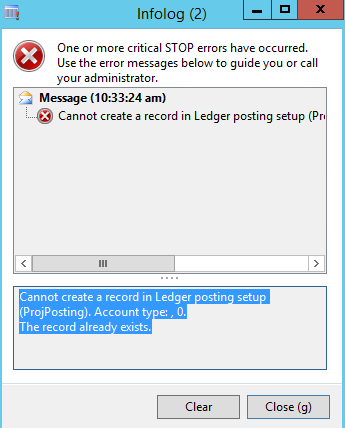
    8535.error.png

    Regards,

    Akbar

  • Akbarpasha Profile Picture
    on at

    Hi Blue wang,

    the below line is in question :

    projPosting.ProjAccountType     = new DictEnum(enumNum(ProjAccountType)).name2Value(cells.item(row,4).value().bStr());

    we are paasing the value from excel which is "Enum" in table , we have converted to enum, but it is taking by default "0" , we have just tried with comenting that line and its inserting the record in ProjPosting table.

    Please advise us how we can convert string(from excel ) value to enum .

    Regards,

    Akbar

  • Blue Wang Profile Picture
    Microsoft Employee on at

    Hi Akbarpasha,

    Have you read this thread?

    https://community.dynamics.com/ax/f/33/t/310673

  • Suggested answer
    Ludwig Reinhard Profile Picture
    Microsoft Employee on at

    Hi Akbar,

    Why do you plan to fill the posting table with the help of a job? This should be a one time setup that is not made on a regular basis. Creating a job seems a large effort for this. Can't you use the standard DIXF instead?

    Best regards

    Ludwig

  • Akbarpasha Profile Picture
    on at

    Hi Ludwig Reinhard,

    Please let us know which entity we can use for ProjPosting table.

    Regards,

    Akbar

  • Verified answer
    Ludwig Reinhard Profile Picture
    Microsoft Employee on at

    Hello Akbar,

    How many lines do you have to enter in this project posting table?

    If you have less than 50/60 lines, I would do thing manually.

    That should be the fastest and easiest way.

    Best regards,

    Ludwig

  • Akbarpasha Profile Picture
    on at

    Hi Ludwig,

    We also thought the same but as per the functional team, records are in thousands.

    Is there any other way where we can insert the records in ProjPosting table.

    Please advise us.

    Regards,

    Akbar

  • Verified answer
    Ludwig Reinhard Profile Picture
    Microsoft Employee on at

    Hello Akbar,

    I checked the DIXF but have not found a default entity that allows you creating records in this table.

    As a result, you would have to create this entity youself.

    An alternative is something that was inherited from previous AX versions.

    That is, in the system administration tool under common you can find a menu data export/import.

    Do you know this tool and have you used it before?

    With the help of this tool you can export the ProjPosting table from one company and import it into another by switching company accounts for the import.

    It is still a kind of 'half' manual process but if you have thousands of lines to setup this tool should also do the job.

    Best regards,

    Ludwig

  • Akbarpasha Profile Picture
    on at

    Thank you Ludwig for your inputs, we have rechecked excel file, there were wrong data in the file for base enums, it is not getting validated in the job, we have corrected the data for enums and updated the job.

    we are able to insert the records in the table using the file.

    Thank you very much for your inputs.

    Regards,

    Akbar

Under review

Thank you for your reply! To ensure a great experience for everyone, your content is awaiting approval by our Community Managers. Please check back later.

Helpful resources

Quick Links

Introducing the 2026 Season 1 community Super Users

Congratulations to our 2026 Super Stars!

Meet the Microsoft Dynamics 365 Contact Center Champions

We are thrilled to have these Champions in our Community!

Congratulations to the March Top 10 Community Leaders

These are the community rock stars!

Leaderboard > 🔒一 Microsoft Dynamics AX (Archived)

#1
CP04-islander Profile Picture

CP04-islander 39

#2
Michel ROY Profile Picture

Michel ROY 14

#3
imran ul haq Profile Picture

imran ul haq 8

Last 30 days Overall leaderboard

Featured topics

Product updates

Dynamics 365 release plans
