web
You’re offline. This is a read only version of the page.
close
Skip to main content

Notifications

Announcements

Community site session details

Community site session details

Session Id :
Customer experience | Sales, Customer Insights,...
Answered

Unsubscriptions

(0) ShareShare
ReportReport
Posted on by 20

Hello,

when sending an email I cannot find data on how many customers unsubscribed- neither in email insights nor in customer journey insights. Numbers show zero unsubscriptions, but when I export interaction report on which links were clicked, I can find quite a few customers that clicked the unsubscribe-me link. Where can I find a total number of unsubscribers in Mail/customer-journes insights?

Thanks,

Ine

I have the same question (0)
  • Verified answer
    Nya Profile Picture
    29,060 on at

    Hi Ine,

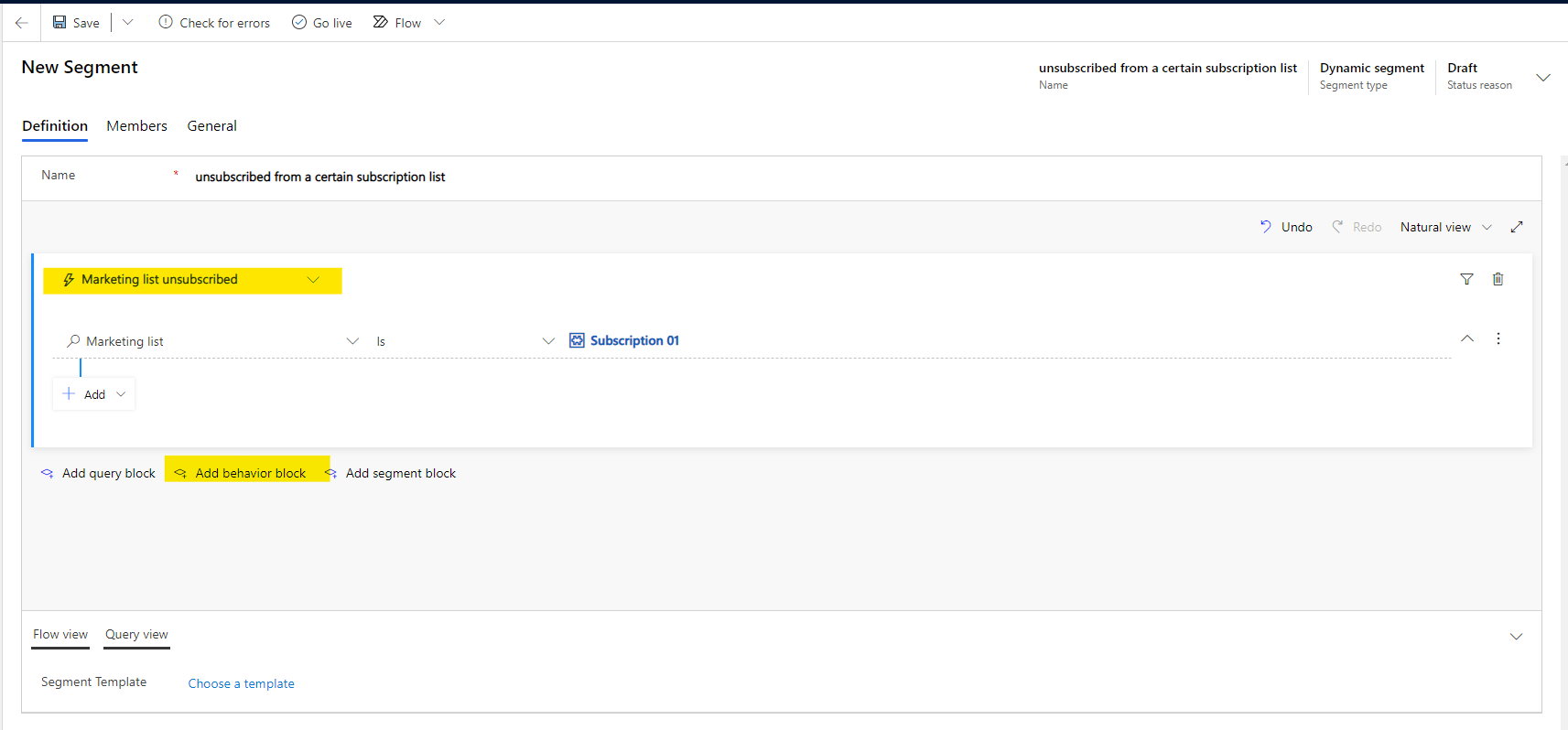
    It can be achieved by creating a dynamic segment with a behavior block.

    Here is an example, which can filter out the contacts who unsubscribed from a subscription list (Subscription 01).
     pastedimage1620180418361v1.png

    After going live it, you can see the total number of unsubscribers and details of them in members tab.


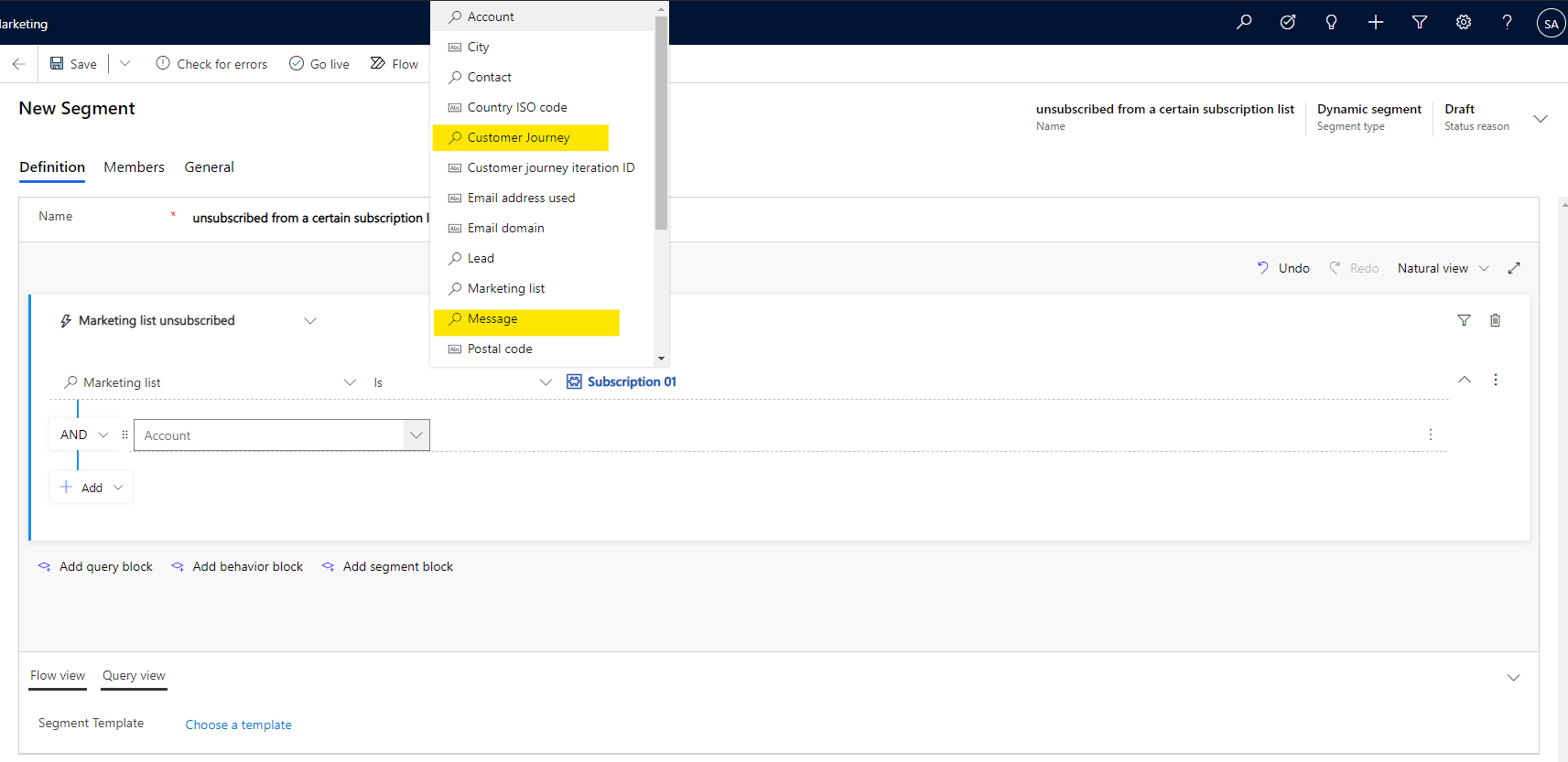
    Of course you can also add restrictions on Customer Journey or Email to the conditions to filter out people who have unsubscribed through a specific Customer Journey or Email.
     pastedimage1620180423380v2.png

    If this helped you, I'd appreciate it if you'd mark this as a Verified Answer, which may in turn help others as well.

    Best Regards,

    Nya

  • Ine Profile Picture
    20 on at

    Thanks a miilion, nya, that really helped me out. Currently we are working with a small amount of segmets which we're using over and over again for different mailings. But does this mean to be able to see unsubscribers by newsletter will have to create a special segment per newsletter?

    Best,

    Ine

  • Verified answer
    Nya Profile Picture
    29,060 on at

    Hi Ine,

    If you just want to filter contacts that have unsubscribed from a subscription list, then you only need one segment.

    If you need to specify newsletters, then you need to create a separate segment for each newsletter.


    If this helped you, I'd appreciate it if you'd mark this as a Verified Answer, which may in turn help others as well.

    Best Regards,

    Nya

  • Verified answer
    Nya Profile Picture
    29,060 on at

    Hi,

    I saw your last question but it seems to have been deleted from the post.

    It can be done in the situation you described.

    The dynamic segment is able to capture previously unsubscribed contacts and also refreshes at a certain frequency to capture subsequent unsubscribed contacts.

    To know more about dynamic behavioral segment, please refer to: Create segments based on interactions (Dynamics 365 Marketing) | Microsoft Docs


    If this helped you, I'd appreciate it if you'd mark this as a Verified Answer, which may in turn help others as well.

    Best Regards,

    Nya

Under review

Thank you for your reply! To ensure a great experience for everyone, your content is awaiting approval by our Community Managers. Please check back later.

Helpful resources

Quick Links

Responsible AI policies

As AI tools become more common, we’re introducing a Responsible AI Use…

Congratulations to our 2025 Community Spotlights

Thanks to all of our 2025 Community Spotlight stars!

Leaderboard > Customer experience | Sales, Customer Insights, CRM

#1
Tom_Gioielli Profile Picture

Tom_Gioielli 108 Super User 2025 Season 2

#2
TAHER_El_Mehdi Profile Picture

TAHER_El_Mehdi 30

#3
Satyam Prakash Profile Picture

Satyam Prakash 24

Last 30 days Overall leaderboard

Product updates

Dynamics 365 release plans
