web
You’re offline. This is a read only version of the page.
close
Skip to main content

Announcements

No record found.

News and Announcements icon
Community site session details

Community site session details

Session Id :
Customer experience | Sales, Customer Insights,...
Answered

Adding event in others marketing functionalities

(0) ShareShare
ReportReport
Posted on by 133

Hi,

I'm trying to attache my event to a marketing email/a customer journey but I can not find my events which are already in service.

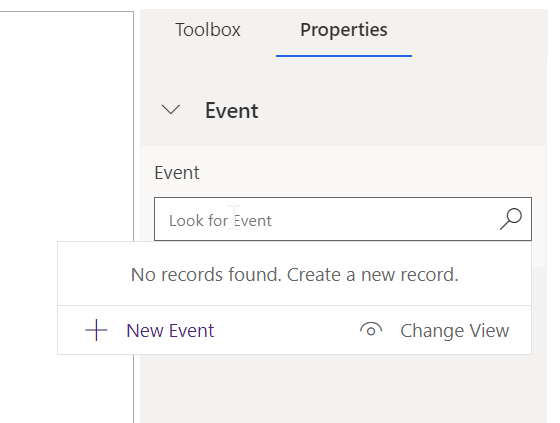
For example, when adding a QR code in my event invitation email, there's no event in the lookup field "Event" :
pastedimage1600959356424v1.png

Did i miss something when setting up my event?

Thank you in advance.

I have the same question (0)
  • cloflyMao Profile Picture
    25,210 on at

    Hi Partner,

    Please check whether publish status of your event is in Live instead of Draft.

    Regards,

    Clofly

  • Suggested answer
    Aga M Profile Picture
    Microsoft Employee on at

    Hi xhj45,

    Thank you for the question.

    In order to use an event link in the email, the event needs to be in Live status.

    To publish / go live with your event -> click the [Go Live] button in the top command bar.

    Best Regards,
    Aga

  • xhj45 Profile Picture
    133 on at

    Hi Clofly,

    Thank you for your answer.

    Yes the event is in Live, but with no event portal. Is it the reason why events were not shown in the lookup field?

    Have a nice day.

  • xhj45 Profile Picture
    133 on at

    Hi Aga,

    Thanks for your answer.

    As my reply for Clofly, my events are in live. So I suppose we need to set up the portal in order to have the full functionality for example sending marketing email with the QR code of event?

    Have a nice day.

  • Verified answer
    cloflyMao Profile Picture
    25,210 on at

    Hi xhj45,

    Thanks for providing more details, what you mentioned would be the reason.

    You may choose "use own server" option to set up marketing application, therefore, the Event URL was not generated automatically.

    Only events that are in Live publish status and whose Event URL field contain data will display in that lookup view.

    Please check whether the field of your event contains data, if not, set it to URL of your self-hosting page.

    Regards,

    Clofly

  • xhj45 Profile Picture
    133 on at

    Hi Clofly,

    After adding the URL into my event, i did have my event shown in the lookup field.

    Thank you for your help!

    xhj45

Under review

Thank you for your reply! To ensure a great experience for everyone, your content is awaiting approval by our Community Managers. Please check back later.

Helpful resources

Quick Links

Introducing the 2026 Season 1 community Super Users

Congratulations to our 2026 Super Stars!

Congratulations to our 2025 Community Spotlights

Thanks to all of our 2025 Community Spotlight stars!

Leaderboard > Customer experience | Sales, Customer Insights, CRM

#1
ManoVerse Profile Picture

ManoVerse 197 Super User 2026 Season 1

#2
CU11031447-0 Profile Picture

CU11031447-0 100

#3
NeerajPawar Profile Picture

NeerajPawar 70

Last 30 days Overall leaderboard

Product updates

Dynamics 365 release plans
