web
You’re offline. This is a read only version of the page.
close
Skip to main content

Announcements

No record found.

News and Announcements icon
Community site session details

Community site session details

Session Id :
Customer experience | Sales, Customer Insights,...
Suggested Answer

Unable to install Dynamics 365 App for Outlook

(0) ShareShare
ReportReport
Posted on by 547

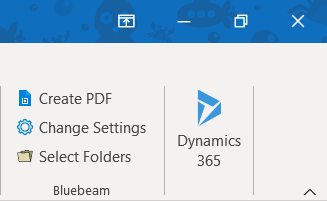
We recently upgraded to Dynamics 365 on prem and had our users uninstall the old 2016 plug-in.  WE then configured the users so that they could use the new Dynamics 365 App for Outlook.  I have 2 anomalies out of 80+ users.  One user I am unable to configure and he never gets the prompt.  I also have one user who is configured and receives the following icon in his Outlook.  This icon is grayed out and doesn't match the other users.  There is no program for dynamics installed or listed in the add-ins or Control Panel > Programs and Features.

Doesn't work and show not see this                                        Does work and should see this

pastedimage1610383082859v1.jpeg  vs  pastedimage1610383126096v2.png

Any insight on how this could happen or how to get rid of it?   Note: I don't need to to know how to configure the apps.  

I have the same question (0)
  • Suggested answer
    MikeC282 Profile Picture
    2,175 on at

    Hi my friend for the user that's got the icon greyed out. Are they selecting an email from a shared inbox as opposed to their own inbox? The app only works for emails within their own inbox.

  • jdalske Profile Picture
    547 on at

    Hi @mikec282 it’s always greyed out. However, the icon I am referring to is the Show Dynamics 365. I don’t know how I didn’t see it earlier but it looks like now he has the app to the left of that. This is a new screenshot as of today. We didn’t notice the real app is to the left. What is the Show Dynamics 365 item in the ribbon?

  • Yoshika Suzuki Profile Picture
    Microsoft Employee on at

    Log in to Dynamics 365 and click App for outlook.

    Is the status of the target user "Added to Outlook"?

    pastedimage1610433320866v1.png

  • jdalske Profile Picture
    547 on at

    Yes I have confirmed this.  He is completely configured and there appears to be traces of the app but it is not responding as it should.

  • jdalske Profile Picture
    547 on at

    Here is an update.  I can select a message and the icon is still greyed out.  When I open an email the icon is ready, I click and nothing happens it will sit on this "getting things set up screen" for hours.  I hope this picture helps.  

    always-greyed-out.png

    I also wanted to check event viewer but the user had to leave with their laptop.

    Appreciate all the suggestions.

  • Suggested answer
    necsa Profile Picture
    3,455 on at

    Hi Jdalske,

    Please take as a reference the following link:

    https://help.mgcld.com/hc/en-us/articles/115005018674-Microsoft-Dynamics-365-CRM-for-Outlook-Add-In-Not-Working

Under review

Thank you for your reply! To ensure a great experience for everyone, your content is awaiting approval by our Community Managers. Please check back later.

Helpful resources

Quick Links

Introducing the 2026 Season 1 community Super Users

Congratulations to our 2026 Super Stars!

Meet the Microsoft Dynamics 365 Contact Center Champions

We are thrilled to have these Champions in our Community!

Congratulations to the March Top 10 Community Leaders

These are the community rock stars!

Leaderboard > Customer experience | Sales, Customer Insights, CRM

#1
ManoVerse Profile Picture

ManoVerse 196 Super User 2026 Season 1

#2
11manish Profile Picture

11manish 129

#3
CU11031447-0 Profile Picture

CU11031447-0 100

Last 30 days Overall leaderboard

Product updates

Dynamics 365 release plans