web
You’re offline. This is a read only version of the page.
close
Skip to main content

Notifications

Announcements

No record found.

Community site session details

Community site session details

Session Id :
Microsoft Dynamics 365 | Integration, Dataverse...
Unanswered

Advanced Chart Editor/View designer in xrmltoolbox

(0) ShareShare
ReportReport
Posted on by 1,235

Hi,

Does anyone encountered error when try to create new chart in Dynamics 365 after using the advanced chart editor/view designer to modify existing chart/view?
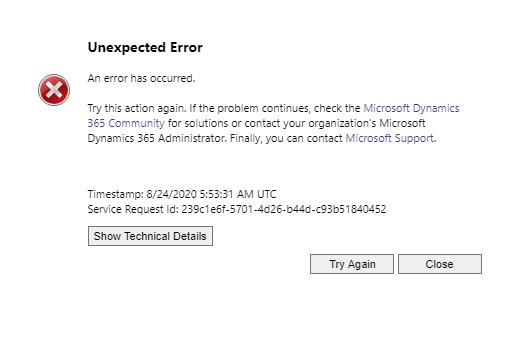
Annotation-2020_2D00_08_2D00_24-135358.jpg

I noticed when click on New Chart, the above error will happen on the entity if any modification was done using the above tools.

Thanks.

Regards,
Teh

I have the same question (0)
  • LuHao Profile Picture
    40,892 on at

    Hi partner,

    It is a general error and does not contain any useful information.

    Could you click Show Technical Details button and provide the details?

    Also, Can you tell us what you have modified via advanced chart editor/view designer?

  • Venedict Profile Picture
    1,235 on at

    Hi Lu Hao,

    Here it is.

    afi.jpg

    Normally we would add the aggregate or distinct into the xml. As for view, sometime we will adding link entity which the advanced find unable to add.

    Thanks.

    Regards,
    Teh

  • LuHao Profile Picture
    40,892 on at

    Hi partner,

    Can you first check whether the link entity can be successfully queried in the "view design" tool of xrmltoolbox?

  • Venedict Profile Picture
    1,235 on at

    Hi Lu Hao,

    There is error when run the view in the Advanced Find. The view was used in a chart, there is no error occurred when the chart is loaded. However, when try to create new chart the error happen.

    Regards,
    Teh

Under review

Thank you for your reply! To ensure a great experience for everyone, your content is awaiting approval by our Community Managers. Please check back later.

Helpful resources

Quick Links

Responsible AI policies

As AI tools become more common, we’re introducing a Responsible AI Use…

Neeraj Kumar – Community Spotlight

We are honored to recognize Neeraj Kumar as our Community Spotlight honoree for…

Leaderboard > Microsoft Dynamics 365 | Integration, Dataverse, and general topics

#1
Martin Dráb Profile Picture

Martin Dráb 62 Most Valuable Professional

#2
#ManoVerse Profile Picture

#ManoVerse 57

#3
Pallavi Phade Profile Picture

Pallavi Phade 49

Last 30 days Overall leaderboard

Product updates

Dynamics 365 release plans



