web
You’re offline. This is a read only version of the page.
close
Skip to main content

Announcements

No record found.

News and Announcements icon
Community site session details

Community site session details

Session Id :
Finance | Project Operations, Human Resources, ...
Answered

Incorrect Quantity on Short Picking Ax 2012 R3

(0) ShareShare
ReportReport
Posted on by 60

I have set the the item reallocation at manual in short picking exception. 

Scenario: A sales order is released to warehouse and work is generated for 15 Quantity to be picked from A01L11A. The warehouse worker starts to pick the item but when he physically arrives at the location A01L11A, suggested on work order, the location does not have the complete 15 quantity required. So he uses short pick from mobile device and picks the 5 qty. Since item reallocation is set to manual so reallocation list is opened on mobile device after 5 qty is picked. The locations on which the items are available are correct but the quantities are not correct as it can be seen in the image below. Rather than showing the correct quantities it is showing 9,999,999,999,999,999. What could be the reasons for this abnormality? Please suggest a possible solution
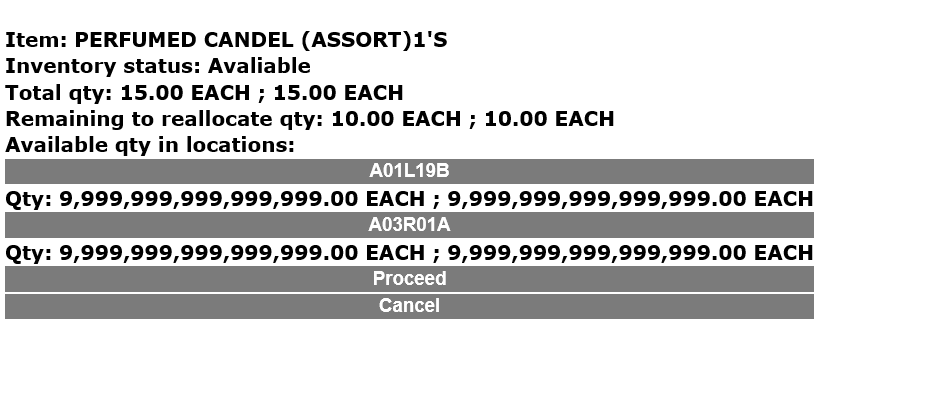
image_5F00_2020_5F00_04_5F00_25T19_5F00_10_5F00_14_5F00_967Z.png

I have the same question (0)
  • André Arnaud de Calavon Profile Picture
    303,679 Super User 2026 Season 1 on at

    Hi Afnan,

    Can you explain what the screenshot is? Is it a report, mobile process, ...?

    How are we able to reproduce it in a standard environment?

  • Afnan Ahmad Profile Picture
    60 on at

    Hi Andre,

    I have explained the scenario in the post now.

  • Verified answer
    André Arnaud de Calavon Profile Picture
    303,679 Super User 2026 Season 1 on at

    Hi Afnan,

    Apologies. I lost track of this question. Now someone did ask the same question on this forum: community.dynamics.com/.../ax-2012-wms---short-picking

    It might be a bug. Have you searched for possible known issues on LCS issue search?

  • Verified answer
    Community Member Profile Picture
    on at

    Hi Afnan,

    Qty on Locations is based on item model group configurations.Take a look at the code below and answer is here.

    class whsInventOnHand
    {
        #WHSReservationHierarchy
    
        #define.ConPosPhysical(1)
        #define.ConPosOrdered(2)
    }
    
    private static InventHandlingQty getWorkPhysicalQtyByInventDim(
            ItemId      _itemId,
            InventDim   _inventDim,
            boolean     _useRealMax,
            boolean     _returnCWQty)
    {
        real ret;
    
        if (_useRealMax && InventTable::find(_itemId).modelGroup().NegativePhysical)
        {
            ret = realMax();
        }
        else if (_returnCWQty)
        {
            ret = whsInventOnhand::getCWPhysicalAvailQty(_itemId, _inventDim, true, true);
        }
        else
        {
            ret = whsInventOnHand::getPhysicalAvailQty(_itemId, _inventDim, true, true);
        }
    
        return ret;
    }

    The mobile device is displaying this number if the Item model group allows the item to go physical negative.

  • Verified answer
    Community Member Profile Picture
    on at

    Hi Afnan,

    Qty on Locations is based on item model group configurations.Take a look at the code below and answer is here.

    class whsInventOnHand
    {
        #WHSReservationHierarchy
    
        #define.ConPosPhysical(1)
        #define.ConPosOrdered(2)
    }
    
    private static InventHandlingQty getWorkPhysicalQtyByInventDim(
            ItemId      _itemId,
            InventDim   _inventDim,
            boolean     _useRealMax,
            boolean     _returnCWQty)
    {
        real ret;
    
        if (_useRealMax && InventTable::find(_itemId).modelGroup().NegativePhysical)
        {
            ret = realMax();
        }
        else if (_returnCWQty)
        {
            ret = whsInventOnhand::getCWPhysicalAvailQty(_itemId, _inventDim, true, true);
        }
        else
        {
            ret = whsInventOnHand::getPhysicalAvailQty(_itemId, _inventDim, true, true);
        }
    
        return ret;
    }

    The mobile device is displaying this number if the Item model group allows the item to go physical negative.

  • Afnan Ahmad Profile Picture
    60 on at

    Hi Andre,

    I have verified this on different servers and this is an issue while short picking, if Physical Negative is allowed at Item Model Group the quantity will be as shown in the screen shot in the post.

    Faran, Thank you for your effort

Under review

Thank you for your reply! To ensure a great experience for everyone, your content is awaiting approval by our Community Managers. Please check back later.

Helpful resources

Quick Links

Introducing the 2026 Season 1 community Super Users

Congratulations to our 2026 Super Stars!

Congratulations to our 2025 Community Spotlights

Thanks to all of our 2025 Community Spotlight stars!

Leaderboard > Finance | Project Operations, Human Resources, AX, GP, SL

#1
Giorgio Bonacorsi Profile Picture

Giorgio Bonacorsi 617

#2
André Arnaud de Calavon Profile Picture

André Arnaud de Cal... 461 Super User 2026 Season 1

#3
Syed Haris Shah Profile Picture

Syed Haris Shah 298 Super User 2026 Season 1

Last 30 days Overall leaderboard

Product updates

Dynamics 365 release plans
